



Skip to content
View in the app

A better way to browse. Learn more.

MSFN

A full-screen app on your home screen with push notifications, badges and more.

To install this app on iOS and iPadOS
  1. Tap the Share icon in Safari
  2. Scroll the menu and tap Add to Home Screen.
  3. Tap Add in the top-right corner.
To install this app on Android
  1. Tap the 3-dot menu (⋮) in the top-right corner of the browser.
  2. Tap Add to Home screen or Install app.
  3. Confirm by tapping Install.

leonx81

Member
  • Joined

  • Last visited

  • Country

    United States
  1. iTune 5.0 just got out, I confirm that 5.0 works fine with the current syntax!!
  2. Hi, when I run it, I've encountered such a problem: run-time error'380': Invalid property value. Please help me out here, thanks in advance.
  3. leonx81 replied to Brando569's topic in XPlode
    Notepad++ is a great program, I replace Notepad with it already.
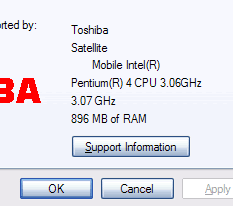
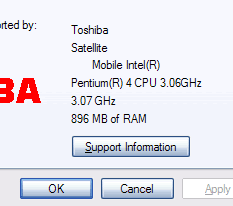
  4. Thanks for your help, guys. I finally figured out my ATI RADEON 9000 takes 128MB away..
  5. nobody can explains it for me?
  6. I think it was 488MB before I installed the new RAM module.. don't know where the 128MB goes?
  7. Hi, I've just added a 512MB Kingston SODIMM memory to my new laptop which it has 512MB memory already; so the total of memory is 1GB. But I only see 896MB in the Sysem Properties.(see pic) Will some1 explain to me, please? Sorry for the stupid question. Thanks in advance.
Account

Navigation

Configure browser push notifications

Chrome (Android)
  1. Tap the lock icon next to the address bar.
  2. Tap Permissions → Notifications.
  3. Adjust your preference.
Chrome (Desktop)
  1. Click the padlock icon in the address bar.
  2. Select Site settings.
  3. Find Notifications and adjust your preference.