Everything posted by Shan_blender
-
Welcome to you guy !
-
Yo Whatup boi! Welcome baby and have fun here..Ya know what the deal is xD Sorry Welcome my friend !
-
Sorry for being not able to fulfill your wishes , but NO , I won't trust you on your word and self-declared experience. When I'll see some data I may. Of course, as long it is your personal opinion on the matter, I will hold it in the greatest consideration. , but still at the moment it sounds to me more like a: kind of innuendo. jaclaz You know, I don't care if you don't "trust"me. I don't think i'm important in your life. But, I'm a pc user since I was 5. So please, do not tell me those cr**@
-
Java is not the same thing as JavaScript! +1 met je
-
Care to share some data? Are there more recent tests? http://nontroppo.org/timer/kestrel_tests/ http://celtickane.com/webdesign/jsspeedarchive.php Or are you talking of "pure" javascript speed? http://ejohn.org/blog/javascript-performance-rundown/ http://w-shadow.com/blog/2008/09/03/google...-js-speed-test/ It seems like latest 10 Alpha is much faster in them too: http://www.download.com/8301-2007_4-10113913-12.html However, I guess that the small differences in tests cannot really be appreciated in "real life" use, and choosing one over the other should be made over a "personal feeling" rather than on benchmark data.... jaclaz No , I mean in every things. Take the exemple of loading a Flash Component! To see the flash controls, you must click on the Animation! This is crapy. FIREFOX POWA, PLUS...I have some experience in Browser..Opera is 50% slow than IE and FIrefox..trust me. And to finish, see the title of your Download.com document ! Just the title xD
-
Oh God, Opera is now 9.6. It's a fantastic browser , however very slow comparing to Firefox and Google Chrome ! Has some nasty things like the IE ("bug") 'Click to active this control' BTW, I prefer Firefox
-
Hello Dude , Welcome
-
left click on my task bar doesn't do anything. Really ?
-
OK, the problem he told us is that he uses Virtual Drivers. Not Real drivers...
-
Ah ha, tweak the browser to not close tab quickly. I mean, if he closes a Windows...it will but after maybe 20 sec. XD Ah...people XD Or even better. Just talk with him :| Ah HA...much harder
-
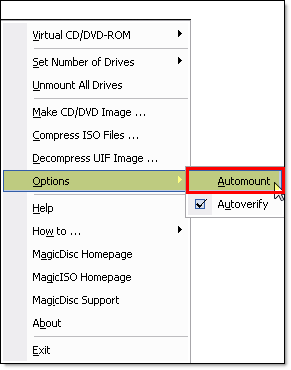
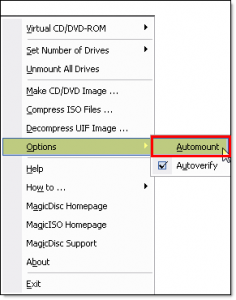
Let us know the program you use, because mine is very simple , Just a left clic to the task bar, > Disable Autorun. PS use a true software as... MagicDisc. Very free
-
Yep, like me hé hé Welcome | Bienvenue | Bienvenido |Thats it
-
Hello JJH, welcome here dude
-
Ah ok, sorry bout' that, yes you can
-
No no no no, on some pcs it works. Dunno why on mine it dosen't
-
Hello there, how are u today ? I'm not bad but got a problem. When I run Photoshop and or Delphi (2009) The Aero theme is available only with the application itself but when I creat a new document in Photoshop or Delphi, the Windows dosen't get the aero aymore :S please help me Yours Shan Have a nice day ALL
-
First of all; you can at any time remove the SP1 from your CBuild Windows, but only in Windows . Second, ou can't and won't remove the SP1 from a custom B. Because the Sp1 is in the B as a "normal" Windows
-
OKay, here's the fully working link thx again for your interest Merci http://www.3doors.110mb.com/win.html What I love with this Setup, is that the custom XP I made got the Royal blue theme. So the theme is the same as the installer i like that. Shan
-
Hello all, I wanna show U my brandnew Setup Billboard image Every think's working...woawwwww Here's the link of the large image. THX a lot for ur tuts http://www.3doors.110mb.com/images/fond2.png
-
Hello dude, Welcome here
-
Thank u Nerwin
-
Basically, You can't install IE7 With Nlite directly, but you can add an Add-On, with Nlite. Just go to http://www.winaddons.com/ and search for IE7. Be sure to install te last service Pack to run the IE installer. Be careful with IT! Add the Add-on as any other add-on and Continue with nlite ;D OK, Brb
-
Hello Yall, My name's Shan and I'm really excited to participate into this forum I'm 16, from France and glad to See u here Let's get started...