-
I would not use those power supplies that come with those cheap cases. I've seen several go up in smoke(lit.), and even fry several other componets on the motherboard. Since your using a PIII system though, you should be allright. If you ever upgrade to a P4 or an AMD XP... consider buying a new power supply.
-
Make sure ACPI is enable in your BIOS...
-
I acomplished a silent install by using AutoIt... not exactly silent, but it worked
-
The cdshell scripts mentioned in this thread are very good. I hope this thread can be of some type of use to someone else. BUMP...
-
BitTornado This should work with ALL versions.
-
EVEREST Professional v1.1
-
Hmm, thank you for that info. Unfortunatly the Linux machine that i was trying to acomplish this on DOES NOT allow you to edit any IRQ or system resource settings... I guess this is a lost cause... Thanks for all your help.
-
Yes, i understand you do have to run with the NOBOOT. I am unsure if you can run any executables from within cdshell. I was hoping somoene else here as used the new version enough to know.
-
DAEMON Tools 3.x Note: Remember to check script variables for options!
-
Ad-aware 6-Pro Note: This is the PRO version of ad-aware, so you must edit the apropriate variable in the script to add in the "password" or reg code.
-
-
Yes, you have a big issue. You are missing quotes IE: SET KEY=HKLM\SOFTWARE\Microsoft\Windows\CurrentVersion\RunOnceEx REG ADD %KEY% /V TITLE /D "Installing Applications" /f REG ADD %KEY%\015 /VE /D "SpyBot 1.3" /f REG ADD %KEY%\015 /V 1 /D "%systemdrive%\Install\spybot\SpyBot(v.1.3).exe /SILENT" /f
-
YOU EDIT THAT BOOTSECTOR THAT YOU SAVED IN THE HEX EDITOR. NOT THE ZIP FILE.
-
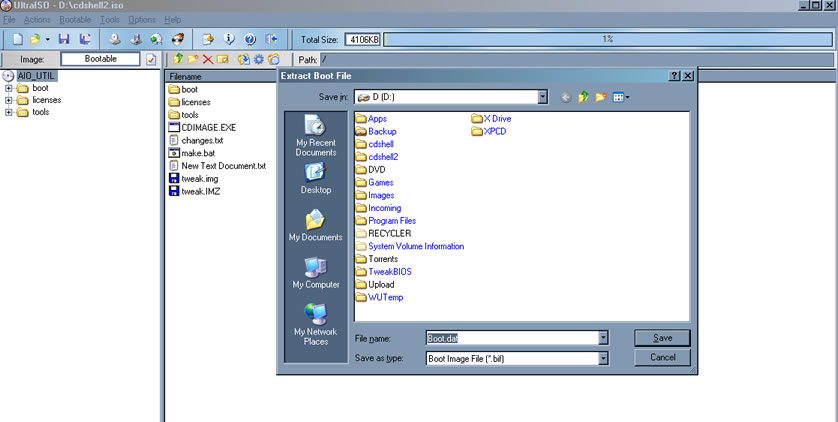
Your still not extracting the BOOTSECTOR... The bootsector is NOT a file in the cd fielsystem, rather info stored at the beginning of the CD, that allows it to be booted from. Try UltraISO and open up the ISO, it should say "Bootable" or something similiar, that means you can save the bootsector. So, from here click "bootable -> save bootfile" give it a name! From there, open the bootsector you saved in a hex editor, then make the changes to it as ncessary. Here's a screenshot of an ISO i opened up that contains a bootsector.
-
You need to extract that zip file first. Then save the bootsector from the ISO, then edit the bootsector using the hex editor.