




-
ok this is what i get in file hashes of my wmp installer CRC32: A87E8A6A MD5: 4A3DE150EF717826A3843278509CE7B9 SHA-1: 126607377E36057C0E80CB4C2A2458B6BB6E8678
-
Download and install Hash Tab 2.0.9. Then right click on WMP11 installer->Properties->File Hashes thanks buddy
-
what is md5 & where should i get it in the installer
-
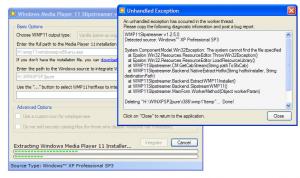
thanks for quick reply ok am explaining the whole thing that i did location of WMP11Slipstreamer.exe H:\WMP Spl\WMP11Slipstreamer.exe path to media player 11 H:\wmp11-windowsxp-x86-enu.exe path to windows source H:\WINXPSP2pure after this when i press intergate it shows WMP11Slipstreamer v1.2.5.0 Detected source: Windows™ XP Professional SP3 System.ComponentModel.Win32Exception: The system cannot find the file specified at Epsilon.Win32.Resources.ResourceEditor.ThrowWin32Exception() at Epsilon.Win32.Resources.ResourceEditor.LoadResourceLibrary() at WMP11Slipstreamer.CM.GetCabStream(String pathToSfxCab) at WMP11Slipstreamer.Backend.NativeExtractHotfix(String hotfixInstaller, String destinationPath) at WMP11Slipstreamer.Backend.ExtractWMP11Installer() at WMP11Slipstreamer.Backend.SlipstreamWMP11() at WMP11Slipstreamer.MainForm.WorkerMethod(Object workerParam) Deleting "H:\WINXPSP2pure\i386\wmp11temp"... Done! The source being modified has not been damaged. All changes have been successfully reverted. am attaching the image to the error please have look to that. Please tell me what mistake am doing
-
hey can anyone help am getting this error WMP11Slipstreamer v1.2.5.0 Detected source: Windows™ XP Professional SP3 System.ComponentModel.Win32Exception: The system cannot find the file specified at Epsilon.Win32.Resources.ResourceEditor.ThrowWin32Exception() at Epsilon.Win32.Resources.ResourceEditor.LoadResourceLibrary() at WMP11Slipstreamer.CM.GetCabStream(String pathToSfxCab) at WMP11Slipstreamer.Backend.NativeExtractHotfix(String hotfixInstaller, String destinationPath) at WMP11Slipstreamer.Backend.ExtractWMP11Installer() at WMP11Slipstreamer.Backend.SlipstreamWMP11() at WMP11Slipstreamer.MainForm.WorkerMethod(Object workerParam) Deleting "H:\WINXPSP2pure\i386\wmp11temp"... Done! The source being modified has not been damaged. All changes have been successfully reverted.
-
This is my first WPI installation DVD & am not able to interigate my nvidia drivers inc. my chipset drivers(ethernet, smbus, etc). The drivers are in cd & i tried most of tricks given in the forum ie, install drivers from cd. And can anybody explain about the compressed & uncompressed driver & if i can install by that process.
