Skip to content
View in the app

A better way to browse. Learn more.

MSFN

A full-screen app on your home screen with push notifications, badges and more.

To install this app on iOS and iPadOS
  1. Tap the Share icon in Safari
  2. Scroll the menu and tap Add to Home Screen.
  3. Tap Add in the top-right corner.
To install this app on Android
  1. Tap the 3-dot menu (⋮) in the top-right corner of the browser.
  2. Tap Add to Home screen or Install app.
  3. Confirm by tapping Install.

checom

Member
  • Joined

  • Last visited

  • Country

    Mexico
  1. Does support nlite with win xp x64 ?
  2. checom replied to checom's topic in nLite
    Yup i remove wmp form the nlite, and intall l-lite codec pack but they wont play wma format. and also i slipstream wm runtime format and its still wont play wma !
  3. checom replied to checom's topic in nLite
    well i remove wmp and install k-lite but i didnt play wma !
  4. checom replied to checom's topic in nLite
    its compatible with nlite addon ?
  5. checom posted a topic in nLite
    Hi i got this situation i used nlite tu customize my Win xp instalation, i dont want wmp. i wan to play wma files. its there any way ?
  6. checom replied to MrCobra's topic in Windows XP
    So what the iso winsp3 that MS is releasing ? Iso win sp3
  7. checom posted a topic in nLite
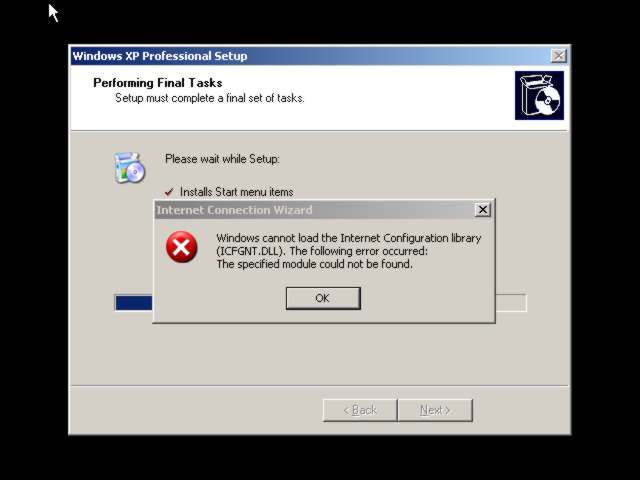
    I install win sp3 in vmware, and this problem display
  8. The new media player. Songbird is a desktop media player mashed-up with the Web. Songbird is committed to playing the music you want, from the sites you want, on the devices you want, challenging the conventions of discovery, purchase, consumption and organization of music on the Internet. http://www.songbirdnest.com/
  9. checom posted a topic in nLite
    i got this bug, i dont know if is good or bad !
  10. checom replied to checom's topic in nLite
    yup doesn work, i just click and doens apear nothing. and yup a download a addon and apple package and meither work. doesn turn on itunes.
  11. checom posted a topic in nLite
    i remove wmp and 6.4 to make itunes my defaul player but it does work. doesn open the aplication. its theres some way to make itunes the default player without wmp ? do i need some dlls to put in some folder ?
  12. checom posted a topic in Introduce Yourself!
    hey guys, hello

Account

Navigation

Configure browser push notifications

Chrome (Android)
  1. Tap the lock icon next to the address bar.
  2. Tap Permissions → Notifications.
  3. Adjust your preference.
Chrome (Desktop)
  1. Click the padlock icon in the address bar.
  2. Select Site settings.
  3. Find Notifications and adjust your preference.