Everything posted by billjrm
-
800x600 when windows is installing.(because graphic driver is not installed yet) 1024x768 after windows installation is complete. 1024x768 - editting config
-
Original thought is "different theme for different resolution". Themes | +--- Glossy (dir) | +--- default (dir) | +--- 600 (dir) | +--- 768 (dir) . . I consider that there will be many duplicate files, so I reduce to "different wpi.htm for different resoulation". Now I feel that "different wpi.htm for different resoulation" is not a good idea and "different theme for different resolution" is my wish. It's OK to do this, but structure of this wpi.htm will not be same as the current provided wpi.htm. I think the general form of this wpi.htm will be complicated, so "wpi.htm per resoulation" is easyer to accomplish.
-
use different wpi.htm for different resolution e.g. use wpi_600.htm for 800x600 use wpi_768.htm for 1024x768 use wpi.htm if wpi_xxx.htm not exist
-
Great I like it.
-
hard to make the choice...... maybe use this mod. http://www.msfn.org/board/index.php?showto...63entry444663
-
thanks all
-
same as cipher982's answer, so I delete myself.
-
Great .....thanks to CIPHER Checkbox of "default item" is disabled during initialization and re-enabled after initialization is completed when grayed condition is met. Everybody will be happy For simplification, option of grayed condition is not included, so I do a little modification about your check.js. In the box.js, grayed condition only change item's text color and don't disable checkbox. I thought this is final. (codes I uploaded are modified from v4.3.7b) 4.3.7b.2.rar
-
Assume I recommend you to install dNet Framework, so I set dflt[pn]=['yes'] and greyed condition do not disable checkbox. dNet Framework will always be checked every time I enter WPI, if dNet Framework is installed and I forget clear its checkbox, it will install again. I don't like this. Change box.js(v4.3.7b) as follows if you want to change color only. change line 130-131 and 137-138 from if(DoGray) txt += ('disabled '); else txt += ('onclick="checkDeps(' + i + ');checkCategory(' + i + ')"'); to txt += ('onclick="checkDeps(' + i + ');checkCategory(' + i + ');"'); line 155 from if(!DoGray) txt += ('onClick="toggleChecked('+i+');checkDeps(' + i + ');checkCategory(' + i + ');" '); to txt += ('onClick="toggleChecked('+i+');checkDeps(' + i + ');checkCategory(' + i + ');" '); to define your own greyed color, modify this ( in wpi.ccs ) .gtxt { font-family: arial; font-weight: bold; color : #A0522D; <---- this one font-size : 8pt; margin-left: 5px; margin-right: 10px; margin-top: 10px; margin-bottom: 50px; }
-
I have seen your file...but I do not understand what is your point about greyed condition.
-
Can you give me some example.
-
I added a option "enable checked" (look at config. wizard), only hightlight text if you checked this option. "checkbox enabled" is not a good ideal I thought. ( thinking what happen if dflt="yes" ) If you want to reinstall a software, just remove it first and then exec WPI. Please rename anything I named if you felt it is not appropriate because my English is bad. The codes I upload are modified from v4.3.7b 4.3.7b.rar
-
OK. let me think about it
-
Can you post your box.js
-
I have no such problem. gcond[pn]=['FileExists("%programfiles%\K-Lite Codec Pack\\unins000.exe")'] use \\ before K-Lite. typing error ???
-
I think it is better let Greyed Condition same as Condition. It may be gcond[pn]=['FileExists("file1")&&FileExist("file2")'] or somthing else
-
@kelsenellenelvian you must use FileExists function. is gcond[pn]=["FileExists('%Windir%\\0.log')"] not gcond[pn]=['%Windir%\\0.log'] @glent I am glad that you like this
-
Codes I modified about variable gcond[] refer to the variable cond[]. Please test cond[] of unmodified version if gcond[] occurred error. Same situation should occur to variable cond[] of unmodified version if gcond[] occurred error.(I thought and not sure) I do not really know what you mean. Can you give me some example of config.js about this error. It's OK if gcond[pn]=[''] or gcond[pn] not present in my test.
-
Hello! I modify code further, I think this is better I add a new gtxt style to wpi.ccs .gtxt { font-family: arial; font-weight: bold; color : #A0522D; font-size : 8pt; margin-left: 5px; margin-right: 10px; margin-top: 10px; margin-bottom: 50px; } and change boxes.js (only list code about item label) v4.3.6 function fillBoxes() { ............... ............... // -- label -- txt += ('<label class="txt" '); if (uid[i]==null || uid[i]=="") txt += (' for="chkbox' + i + '" '); else { txt += ('for="' + uid[i] + '" '); txt += ('onClick="toggleChecked('+i+');checkDeps(' + i + ');checkCategory(' + i + ');" '); } txt += ('onMouseOver="qdh(prog[' + i + '],desc[' + i + '],Style[0]);" '); txt += ('onMouseOut="htm();" '); txt += ('/>' + prog[i] + ((uid[i]&&debugOn)?(' ['+uid[i]+']'):'') + '</label>\n<br>\n'); // -- ................ ................ } my code function fillBoxes() { ............... ............... // -- label -- if(DoGray) txt += ('<label class="gtxt" '); else txt += ('<label class="txt" '); if (uid[i]==null || uid[i]=="") txt += (' for="chkbox' + i + '" '); else { txt += ('for="' + uid[i] + '" '); if(!DoGray) txt += ('onClick="toggleChecked('+i+');checkDeps(' + i + ');checkCategory(' + i + ');" '); } txt += ('onMouseOver="qdh(prog[' + i + '],desc[' + i + '],Style[0]);" '); txt += ('onMouseOut="htm();" '); txt += ('/>' + prog[i] + ((uid[i]&&debugOn)?(' ['+uid[i]+']'):'') + '</label>\n<br>\n'); // -- ................ ................ } Again, the codes I upload are modified from v4.3.6 4.3.6.new.rar
-
I modified WPI v4.3.6 according above and work I upload files I modified. I use "Bill mark" to the code I added or modified. 4.3.6.rar
-
My WPI added some other feature which will be confused with this..... Sorry I missed this file program.js ========== ........... ........... var cond=[]; // Javascript conditional statement to check if this will be installed. var gcond=[]; //======================================= var cons=[]; // (deprecated) installation constraint ........... ........... function program(idx) { ...................... ...................... this.cond = cond[idx]; this.gcond= gcond[idx]; //================================= this.dflt = (dflt[idx]==null)?['no']:[dflt[idx][0]]; this.configs=(configs[idx]==null)?['']:[configs[idx][0]]; } //write program objects back to array-variables function WriteBackPrograms(programs) { ...................... ...................... cond[i+1]=programs[i].cond; gcond[i+1]=programs[i].gcond; //============================ configs[i+1]=programs[i].configs; } prog[programs.length+1]=null; } ...................... ......................
-
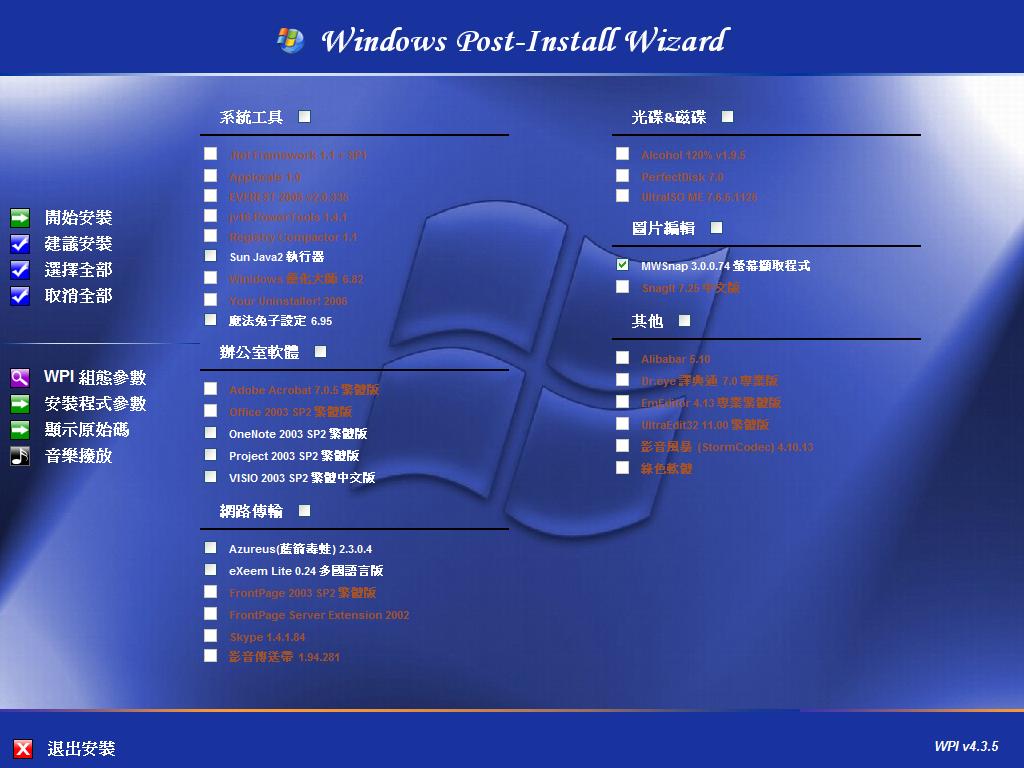
The parameter "Greyed Condition" is similar to the parameter "Condition". Condition ---> hide item Greyed Condition ---> disable item ( disable checkbox and change text color ) Assume .Net Framework 1.1 is installed on my system. I can choice a file installed by .Net Framework 1.1 %windir%\Microsoft.NET\Framework\sbs_diasymreader.dll So Greyed Condition gcond[pn]=['FileExists("%windir%\\Microsoft.NET\\Framework\\sbs_diasymreader.dll")'] I hard-coded text color in my program. It is better to define a new label class in wpi.css for this. Code I modified box.js ====== function fillBoxes() { .......... .......... var winheight = screen.height; var i, cols, colwidth, a, b; var DoGray; //========================= added debug("Working on Windows " + getOSver(),1); if (sorting && CatsDefined()) SortPrograms(); .......... .......... if ((cons[i]!=null)) // constraint checking { a = cons[i][0]; b = cons[i][1]; if (replpath(a)!=replpath(b)) // constraint ... continue; } // ------------ added ------------------- // DoGray=0; if(!debugOn && gcond[i] && gcond[i][0]) { var d = unescape(replpath(gcond[i][0]).replace(/\\/g, "\\\\")); try { DoGray = eval(d) ? 1 : 0; } catch(e) { alert("Error in condition statement for " + prog[i] + ":\n\n" + gcond[i] + "\n\nTreating as a false condition."); continue; } } // ----------- added ------------------- // .......... .......... //insert checkbox and label // -- checkbox -- if (debugOn) txt += ('<font class="txt">' + i + '</font>\n'); txt += ('<input type="checkbox" id="chkbox' + i + '" '); if (uid[i]==null || uid[i]==""){ txt += ('name="chkbox' + i + '" '); if(DoGray) txt += ('disabled '); //=============================== Modified else txt += ('onclick="checkDeps(' + i + ');checkCategory(' + i + ')"'); //==== } else { txt += ('name="' + uid[i] + '" '); if(DoGray) txt += ('disabled '); //================================== else txt += ('onclick="checkDeps(' + i + ');checkCategory(' + i + ')"'); //====== } txt += ('/>\n'); // -- label -- txt += ('<label class="txt" '); if (uid[i]==null || uid[i]=="") txt += (' for="chkbox' + i + '" '); else { txt += ('for="' + uid[i] + '" '); if (!DoGray) txt += ('onClick="toggleChecked('+i+');checkDeps(' + i + ');checkCategory(' + i + ');" '); //======================================= } txt += ('onMouseOver="qdh(prog[' + i + '],desc[' + i + '],Style[0]);" '); txt += ('onMouseOut="htm();" '); txt += ('/>'); txt += ('<font color="'+ (DoGray ? 'sienna' : 'white')+'">'); //============= txt += (prog[i] + ((uid[i]&&debugOn)?(' ['+uid[i]+']'+'['+ordr[i]+']'):'')); //===== txt += ('</font>'); //======================================= txt += ('</label>\n<br>\n'); //================================= // -- .......... .......... } configwizard.js =============== function SaveConfig() { .......... .......... tf.WriteLine("// cond[pn]=['Javascript Conditional Statement to hide item']"); tf.WriteLine("//gcond[pn]=['Javascript Conditional Statement to gray item']"); //== added .......... .......... WriteConfigValue(tf, "cond", form.cond.value); WriteConfigValue(tf, "gcond", form.gcond.value); //======================= added .......... .......... } function ReadConfig() { .......... .......... switch (opt) { ........... ........... case "cond": form.cond.value=val; break; case "gcond": //======================================= added form.gcond.value=val; //================================ break; //========================================== ........... ........... } .......... .......... } configwizardtemplate.htm ========================= .......... .......... <tr> <td nowrap>Condition</td> <td colspan="8"> <input name="regb" type="text" class="CfgTextBox" id="cond" size="75"> </td> </tr> <!------------------------ added ----------------------------- <tr> <td nowrap>Grayed Condition</td> <td colspan="8"> <input name="gcond" type="text" class="CfgTextBox" id="gcond" size="75"> </td> </tr> -------------------------- added ----------------------------> .......... ..........
-
I Add a new Parameter called "Grayed condition" to determinate whether the application is installed. Item's checkbox will be disabled and the text color changed when "Grayed condition" meet. I also use AutoIt to write a simple program. CloseAudio.au3 ------------------ if WinExists ("Media Player") then WinClose("Media Player") ------------------ And add a line on the bottom of function CreateFile to close "Media Player player" window when installation is finished. ------------------------- window.moveTo(0,0); SetScriptWaitTimeout(-1); audioshell.run(".\\CloseAudio.exe", 1, true); <--- I added if (!debugOn) window.close(); ------------------------- I don't really known about the Source of WPI, so this may not be a good solution. Wish these functions can add to the futher version. I comes from Taiwan. Sorry for my stupid English.