SnapShot
About SnapShot

SnapShot's Achievements
0
Reputation
-
I've got the same problem, after installing vlited Vista Ultimate and runing Windows Update I get into constant reboot-loop. Here is my last session ; vLite preset file ; ;#Environment: ; vLite v1.2 beta ; Framework 2.0.50727.1434 ; Microsoft Windows NT 6.0.6001 Service Pack 1 32-bit ; ;#Target: ; Windows Vista ULTIMATE 32-bit Service Pack 1 ; Version 6.0.6001.18000 English (United States) ; [Compatibility] Logitech Setpoint Aero Glass Internet Explorer [CustomHide] [Components] ;# Accessories # Accessibility Character Map Paint Snipping Tool Speech Support System Information Welcome Center Wordpad ;# Drivers # Display adapters-Ati Display adapters-Intel Display adapters-NVIDIA Display adapters-S3 Display adapters-SiS Diva Server Ethernet network adapters Modems Printers-Apollo Printers-Brother Printers-Canon Printers-Citizen Printers-Dell Printers-Diconix Printers-Epson Printers-Fuji Xerox Printers-Fujitsu Printers-Generic printer Printers-Gestetner Printers-HP Printers-IBM Printers-Infotec Printers-Konica Printers-Konica Minolta Printers-Kyocera Mita Printers-Lanier Printers-Lexmark Printers-Minolta Printers-Minolta-QMS Printers-NEC Printers-NRG Printers-Oce Printers-Oki Printers-Okidata Printers-Olivetti Printers-Panasonic Printers-QMS Printers-Ricoh Printers-Samsung Printers-Savin Printers-Seikosha Printers-Sharp Printers-Sony Printers-Star Printers-Tally Printers-Tektronix Printers-Wipro ePeripherals Printers-Xerox QLogic Fibre Channel Adapter Scanners Sound controllers Storage controllers-Adaptec Storage controllers-Elxstor Storage controllers-Hewlett-Packard Storage controllers-IBM ServeRAID Storage controllers-ICP vortex Storage controllers-ITE Storage controllers-LSI Logic Storage controllers-MegaRAID Storage controllers-nVidia Storage controllers-Promise Storage controllers-SiS Storage controllers-ULi Storage controllers-Via TV Tuners-ADS Technologies TV Tuners-ASUSTeK Computer Inc. TV Tuners-AVerMedia Technologies, Inc. TV Tuners-Compro Technology Inc. TV Tuners-Conexant Systems, Inc. TV Tuners-Creatix TV Tuners-Hauppauge TV Tuners-KNC ONE GmbH TV Tuners-KWorld TV Tuners-Lumanate, Inc. TV Tuners-Philips Semiconductors TV Tuners-Pinnacle Systems TV Tuners-TerraTec Electronic GmbH TV Tuners-VidzMedia Pte Ltd. TV Tuners-ViXS Systems Inc. ;# Games # Game Explorer Inbox Games Premium Inbox Games ;# Hardware Support # Dynamic Volume Manager Fax Support Floppy Disk Support Infrared Support Internet Small Computer System Interface (iSCSI) Printer Support Smartcards Windows Image Acquisition Windows Mobile Device Center Windows Portable Devices ;# Languages # Arabic Brazillian Bulgarian Croatian Czech Danish Dutch Estonian Finnish French German Greek Hebrew Hungarian Italian Japanese Korean Latvian Lithuanian Norwegian Polish Portuguese Romanian Russian Serbian Simplified Chinese Slovak Slovenian Spanish Swedish Table Driven Text Input Processor Thai Traditional Chinese Turkish Ukrainian ;# Multimedia # Media Center Movie and DVD Maker Music and Video samples Sample Pictures Screensavers SideShow Sound Recorder Windows Calendar Windows Photo Gallery ;# Network # Connect to a Network Projector File and printer sharing (Server) Internet Information Services (IIS) Quality of Service (QoS) RIP Listener Simple Network Management Protocol (SNMP) Simple TCPIP services Telnet Client Telnet Server TFTP Client Windows Collaboration Windows Mail ;# Services # Application Experience Computer Browser Diagnostics Distributed Link Tracking Client Distributed Transaction Coordinator (DTC) Error Reporting Function Discovery Interactive Services Detection IP Helper IPsec Policy Agent Microsoft DFS Replication Offline Files Protected Storage Quality Windows Audio Video Experience Remote Access Auto Connection Manager Remote Registry Secondary Logon TCP/IP NetBios Helper TPM Base Services Universal Plug and Play (UPNP) WebDAV (WebClient) Windows Remote Management ;# System # Beep BitLocker Drive Encryption Digital Locker Disk Defragmenter Disk Quota Guided Help Help IMAPIv2 Burning Support Jet Database Engine Malicious Software Removal Tool Manual Install (Setup.exe) MDAC Microsoft Agent Microsoft Client For NFS Microsoft Message Queue (MSMQ) Natural Language Parental Controls Performance Counters Reliability and Performance Monitor Remote Differential Compression Removable Storage Management Run a legacy CPL elevated Security Center Software Quality Management (SQM) Subsystem for UNIX-based Applications (SUA) Sync Center Tablet PC User Account Control (UAC) Windows Backup Windows Defender Windows Easy Transfer Windows Picture and Fax Viewer (Shimgvw) Windows SAT (Performance Index) Windows Ultimate Extras Zip Folder [Options] DEP (Data Execution Prevention) = Default User Account Control (UAC) = Enabled AntiSpyware Realtime Protection = Default Memory requirement = Default AutoPlay = Enabled Paging Executive = Enabled Power scheme = Balanced Power button = Default Sleep button = Default Hibernation = Off Control Panel - Classic View = Enabled Show hidden files and folders = Yes Show protected operating system files = No Show extensions for known file types = Yes IE Phishing Filter = Disabled IE Phishing Verification Ballon Tips = Disabled [Services] [Protection] [Drivers] [Unattended] [Hotfixes] [LanguagePacks]
-
Has anyone been able to install IE8 beta on Vlite install?
SnapShot replied to Bilar Crais's topic in vLite
Here is my config. I have completley removed the UAC, so I doubt the problem is in UAC. Maybe it has something with Sidebar and Gadgets (if Bilar Crais meant that by "gadgets and toolbars"). Last_Session.ini -
Has anyone been able to install IE8 beta on Vlite install?
SnapShot replied to Bilar Crais's topic in vLite
IE8 Beta 1 installed fine for me on heavily vLite-ed Vista Ultimate SP1. I have removed most of the components with vLite (the installation image was 637MB in size). -
It seems that it appeared again Too bad.... I was happy for short period. This problem is really anoying when you look at Event Log.
-
Yes I'm talking about LocalSessionManager Event Log report. The report that appears every 10 minutes. Well, you need to restart your system after you remove RDPNP refference. The driver is loaded at start up so you need to restart your system. I will check it again.
-
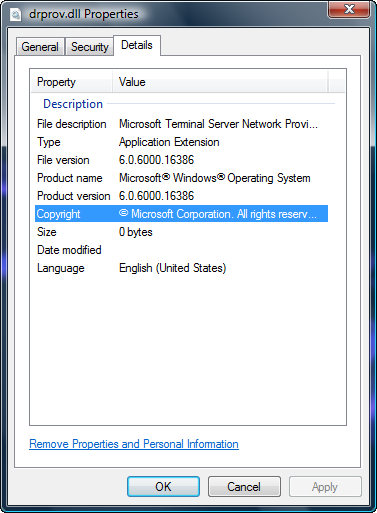
Here is the solution for the well known problem of Terminal Service error appearing in the Event Log. The problem is in the following registry: HKLM\SYSTEM\CurrentControlSet\Control\NetworkProvider\Order\ProviderOrder If you remove RDPNP (I suppose RD in RDPNP means Remote Desktop) from this registry key, then the error in Event Log doesn't appear. I didn't check this deeply but from the name of the key I assume the ProviderOrder key is used to cofigure the order of loading of some network components. The entries in ProviderOrder key are comma separated. For example my key value is: LanmanWorkstation,RDPNP. So if I leave only LanmanWorkstation the event doesn't appear in the log. If we look at RDPNP registry entry: HKEY_LOCAL_MACHINE\SYSTEM\ControlSet001\Services\RDPNP We will notice that RDPNP component actually loads %SystemRoot%\System32\drprov.dll. This drprov.dll looks like a remainant from Microsoft Terminal Services service. It's properties: I haven't checked this throughly, but I hope that nuhi will look at this, check any additional dependencies this remaining DLL has and fix this little bit anoying bug Hope this helps. Regards, SnapShot

-
It is not a big deal, we will wait for next release to remove them Thanks nuhi!
-
It seems that some registy entries are left after removing Windows Mail on Vista Enterprise x64. The registry entries are: HKEY_CLASSES_ROOT\Microsoft Internet Mail Message HKEY_CLASSES_ROOT\Microsoft Internet News Message There are several values in those keys which reference %ProgramFiles%\Windows Mail\WinMail.exe. Are this left for compatibility? Or they can be safely removed? BTW, those registry entries appear in CCleaner and it seems that it can't remove them. I always check to remove them, but they appear in the next scan. EDIT: CCleaner screenshot
-
I think that there isn't any DRM in Multimedia Class Scehduler. From all the info I have read, I can say that it's multimedia thread scheduler, it boosts the priority of registered multimedia threads depending of the type of the thread. By default on Vista there are several types of multimedia threads that application can register (other can be added later by user or automaticaly after some software isntalation). Here is the picture: As you can see Audio threads have CPU priortiy 6. Also there is a clock rate settings which I assume is used to boost the clock speed of the CPU if Cool'n'Quite, EIST or similar frequency scaling technology is in use. There is also Game class of threads, so this service is probably important for games. I'm sure new games will use it to register their threads and get higher priority. There is GPU Priority setting, which would be most important for games, but GPU Priority is NOT yet implemented in Vista. I hope it will get implemented in some SP, but I doubt it. MS will probalby wait for new Windows version to implement GPU Priority. Multimedia Class Scheduler also tries to offer fair CPU service for non-multimedia threads. It boosts the multimedia threads but at the same time cares for other threads so the system remains repsonsive. By default it reservs 20% of CPU time for non-multimedia threads. But it can be changed in: HKEY_LOCAL_MACHINE\SOFTWARE\Microsoft\Windows NT\CurrentVersion\Multimedia\SystemProfile\SystemResponsiveness Someone which is not using multimedia apps can think that it's better if this service is removed, but I think that this service shouldn't be removed becuase it won't do any harm if there are no multimedia threads registered AFAIK. And you never know which application will use it to boost its performance. Maybe some professional applications like: PhotoShop, 3ds max, AutoCAD will use it to boost their performance.
-
Yup, you are right. NPPTools.dll is part of the Network Monitor and it has been removed from Vista. It can be downloaded separately from: http://www.microsoft.com/downloads/details...;DisplayLang=en Sorry about the possible confusion. Problem solved you can close the topic.
-
You should never remove Multimedia Class Scheduler IMHO. It's one of the most important performance services in Vista: So it's used to manage the priorities od multimedia threads. Multimedia players register their threads to Multimedia Class Scheduler so it can properly schedule their execution for seamless playback of multimedia.
-
Just a notice, when trying to start nmap with WinPcap i got the error message that NPPTools.dll is missing. I searched and found that same problem occured in the past with nLite: http://www.msfn.org/board/index.php?showtopic=43431 http://www.msfn.org/board/index.php?s=&...st&p=500688 It's not a big problem, but which component does NPPTools.dll belong to??? I can't find any network related component which seems logical for NPPTools.dll. Or maybe this is a nonintentional removal (bug)???
-
I'm also confused with contradictory info on the web about Aero (Glass) and Standard (without Glass). But I think that nuhi is right, Standard doesn't have HW acceleration. Here is description of Standard UI from winsupersite.com