Everything posted by qfox
-
MY BAD! the problem is not caused by nlite.
-
Same problem here. any suggestion?
-
I found the reason, if you remove Task Scheduler , you will have problem with your IME.
-
When I used the IME, after typed "da" and some Chinese displayed in a prompt window, I hit the space key, the first Chinese char should be entered into a text editor. this worked fine in 0.8 and the version before. But in a 0.9 vlited Vista Business, when I hit space key, the IME window is closed. the behavior like I hit the ctrl+space. I tried to install same IME software in original vista business, 0.8 and 0.9 vlited vista business. only 0.9 had the problem. I dont know if you can test the IME software in Chinese. :-) you can download the IME here. http://www.freewb.org/freeime/setup6.exe Thanks a bunch.
-
Hi nuhi, Did you change something that relates to IME(Input Method Editor) or language in 0.9? The IME software I am using worked fine in 0.8beta, but acted weird in 0.9beta. Thanks, QFox
-
possible reason: I unzipped the file to "E:\vLite-0.8.beta", this one has above problem I install another vlite on c: and it works.
-
--------------------------- Error --------------------------- Error while accessing image. - The process cannot access the file because it is being used by another process. --------------------------- OK --------------------------- When vilte English Vista Ent under following options and try to apply and rebuild ; vLite preset file [information] Version = 0.8 beta on 2.0.50727.312 Microsoft Windows NT 6.0.6000.0 Target = Windows Vista ENTERPRISE 32bit [Components] ;# Drivers # Display adapters Ethernet network adapters Modems Printers Scanners Sound controllers ;# Games # Inbox Games Premium Inbox Games ;# Hardware Support # Smartcards ;# Languages # Japanese Korean ;# Multimedia # Movie and DVD Maker Screensavers SideShow Speech Support Tablet PC Wallpapers Windows Media Samples Windows Photo Gallery Windows Sidebar and Gadgets ;# Network # Windows Collaboration ;# Services # Error Reporting Microsoft DFS Replication Volume Shadow Copy Windows Remote Management Windows Search ;# System # Accessibility BitLocker Drive Encryption Microsoft Agent Natural Language ReadyBoost Security Center System Restore Welcome Center Windows Backup Windows Defender Windows Easy Transfer Windows SAT Zip Folder [Options] [Protection] [services]
-
this bug happens when you take the dvd maker out. another bug is is you remove windows mail, you can not save webpage in mht format. Thanks.
-
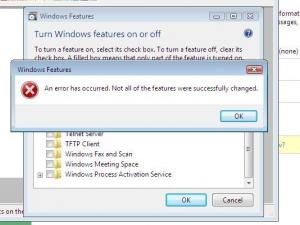
Thanks for the great job. Vista 32bit Ent, after removing movie and DVD maker, Tablet PC option, wallpager and media sample and installation, I got error on The "turn windows feature on and off" function