-
Thanks Sonic, but the nvatabus.sys is installed. Maybe just the reg tweak will suffice. I just wish Nvidea would write their drivers correctly.
-
No enhanced mode in the bios for sata. Bios is sata2. Raid is off. Still no joy mate. Must be a bug in the bios. Since late May there has been 3 bios upgrades for this board. I will ask Gigabyte about this problem & post if I get any reasonable responce. Goes to show, just how they rush these boards to market, with NO trials of their own. SH##t service. Never again will I EVER have a "gigabyte" board. This is the second heap of Sh##t I`ve had. NOT at ALL a happy puppy. Just as well I only spent AUD$176 for this load of Cr##p May try an Asus shortly & see how that goes. Can`t be any worse tha "Gigabyte"?.
-
Thanks Nitroshift. The board is a gigabyte GA-M55plus-S3G with an Nforce-430 chipset, socket AM2. I have never seen this before, on any board. The Bios Sata setup is set for ATA only & not raid, as I have only one sata drive, being the boot drive. The other four drives are ATA only, & none in raid.
-
My system drive (sata) shows up in "Safely remove hardware" on the taskbar. How can I stop this behaviour, as it is very easy to click the wrong hardware device. I always thought "safely remove hardware" was for USB devices only. Regards & thanks, Carquip
-
Gigabyte GA-M55plus-S3G board. How can I intergrate all the associated drivers from the Mobo CD with 1.01?. Also, Windows loads its native drivers at install. How can I disable that, as at present, the bios looks for these native drivers?. CHEERS PPL.
-
I had S/P1 installed, installed S/S2 & still no go. S/P2 wont overwrite some of S/P1`s critical files. I deleted the partitions from the drive & re-installed Windows with S/P2, & Bingo. Everything works as it should. S/P2 has a lot of bugs. Thanks ppl.
-
Task manager only shows one processor. Device manager says AMD 64 FX62 Dual core processor. I only have S/P1 installed. Does this processor require S/P2??.
-
Thanks "gamehead", but no such option in this bios. Any other suggestions??.
-
Gigabyte GA-M55plus-S3G, AMD FX62 dual 2.8gig, 2gig Corsair DDR2/800 Pro. How can I tell if the processor is in dual mode?. Burning a DVD with NERO at 4speed & processor usage is 100%.
-
Thanks "Biohazard", but this option is not available with SP1.
-
XP, SP1, Athlon 1.1g, 1gig ram. I try to open "Outlook Express" & it takes about 2 mins. Any IDEA folks???
-
Thank you "Memnoch", yes, that was an oversight on my part in the beginning, not to have a S/P installed. I should no better. But after installing the S/P`s, the drives were still not recognized by Windows. Then, a day or two later two of the drives were OK again with no input from me?????. Nothing recognized the 160gig untill the partition table was re-written. I didn`t alter any of the 3 drives in any way to cause this to happen. This old machine has been doing some weird things of late, hence the re-install, thinking that Windows was the problem. It now seems to me to be a motherboard problem more than anything else, as I have checked the memory several times with "Memcheck" and others. The Mobo is a "Gigabyte 7ZX which was replaced four times while under waranty. The Mobo currently installed has been in the machine now for about four years, but has had only 1 Com port for most of it`s life. The biggest heap of crap I have ever dealt with, even though it`s been stable till now. The earlier boards all failed because of bad bios chips, even though this board has 2. Seems like a controller prob like you thought in one of your earlier posts. What do you think??. regards mate.
-
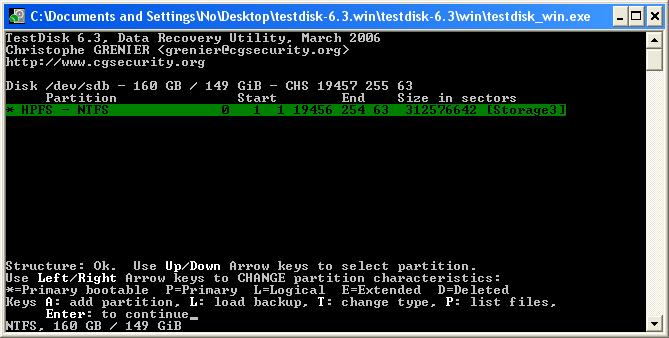
I ran "TestDisk" all the way through & had it re-write the patition table & now everything is back to normal. Don`t know what happened to the 300gig drives, but they are working now. Didn`t do anything to them. Weird!!!!. Maybe the IDE controller on my Mobo is acting up?. Time for a new Box I think. Thanks to all for your help.
-
I ran ntfsdos & it found my 2 300gig drives but not my 160gig. All of a sudden, windows now recognizes the 2 300s, but not the 160gig. I ran "TestDisk" & it found the 160gig.
-
"Memnoch", I was definately on the 80gig drive. Yes, I do have a 300gig WD still packed, sitting here. I run 2 rack drawers in this machine, which enables me to load any readable drive via the bios. I was given a copy of "gold" today, which should be the same as I have installed now, WinXP/Pro-OEM. I noticed another prob yesterday while on this forum, ( IE has a problem & must close). To Me, it points to memory, but "Memtest" or Micosofts test can`t find a problem. The CPU is cool & never been overheated to my knowledge. Tried runnig only 1 ram stick (512) at a time also. I have never asked for help reguarding computers in my life till now. 60 years old & HELP!!!!!!. " Being self taught doesn`t mean you know it all", even if you think you do. Learning STILL!!. Thanks PPL for your input. Much appreciated. Regards to all, Carquip.