-
My CPU is 10-20% used by nLite only
-
Y use Kaspersky Anti-Virus, but he is allways turn off
-
Intel P4 2.4 GHz 1 GB RAM Kingstom Dual Channel 80 Gb S-ATA HDD (with 35 Gb free) ATI Radeon 9550 SE 256 Mb 500 W Power suplly
-
Hy guys First of all, sorry for my bad english I use nLite from 1.0 version and work just fine. After a long period of time when y have been very busy y take nLite 1.3.5 to customize a version of WinXP Pro Corporate. When integrate addons nLite take LONG LONG ( i mean 1 file / minute) time to do that. (my PC work fine, no problems at all) My addons are: RyanVM 2.1.11 Winrar 3.70 Foxit Reader WGA Addon DirectX August Update IE 7 Addon WMP 11 Tweaked Windows Installer 3.1 ClearType_addon Please guys help me.
-
Edit hivesys.inf and add this at the top: HKLM,"SYSTEM\CurrentControlSet\Services\VgaSave\Device0","DefaultSettings.BitsPerPel",0x00010001,32 HKLM,"SYSTEM\CurrentControlSet\Services\VgaSave\Device0","DefaultSettings.XResolution",0x00010001,1024 HKLM,"SYSTEM\CurrentControlSet\Services\VgaSave\Device0","DefaultSettings.YResolution",0x00010001,768 HKLM,"SYSTEM\CurrentControlSet\Control\Video\{23A77BF7-ED96-40EC-AF06-9B1F4867732A}000","DefaultSettings.BitsPerPel",0x00010001,32 HKLM,"SYSTEM\CurrentControlSet\Control\Video\{23A77BF7-ED96-40EC-AF06-9B1F4867732A}000","DefaultSettings.XResolution",0x00010001,1024 HKLM,"SYSTEM\CurrentControlSet\Control\Video\{23A77BF7-ED96-40EC-AF06-9B1F4867732A}000","DefaultSettings.YResolution",0x00010001,768
-
-
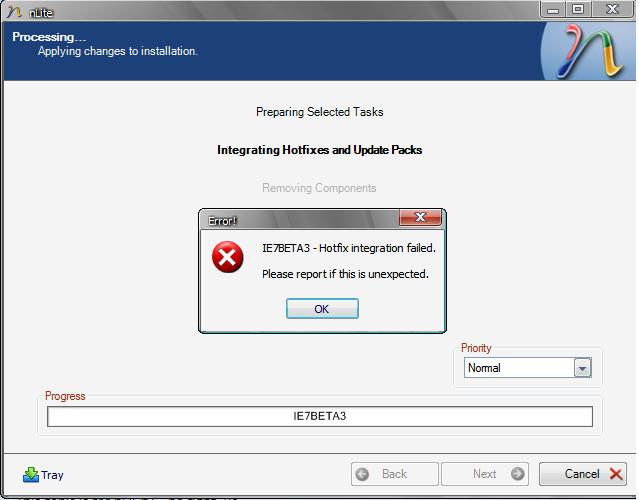
how about you supply some details of the problems or errors you are facing?! Here it's my error!
-
update: Internet Explorer 7 beta 3 integration support (XP only) False! Pleasea Fix!