sscoop
Content Type
Profiles
Forums
Events
Everything posted by sscoop
-
unattended windows and 2 active partitions
sscoop replied to sscoop's topic in Unattended Windows 7/Server 2008R2
exactly the same. currently what i do is remove one drive, install from usb and then plug the drive back. but i want to change this in order to be able to move users folder and application data on the hdd -
unattended windows and 2 active partitions
sscoop replied to sscoop's topic in Unattended Windows 7/Server 2008R2
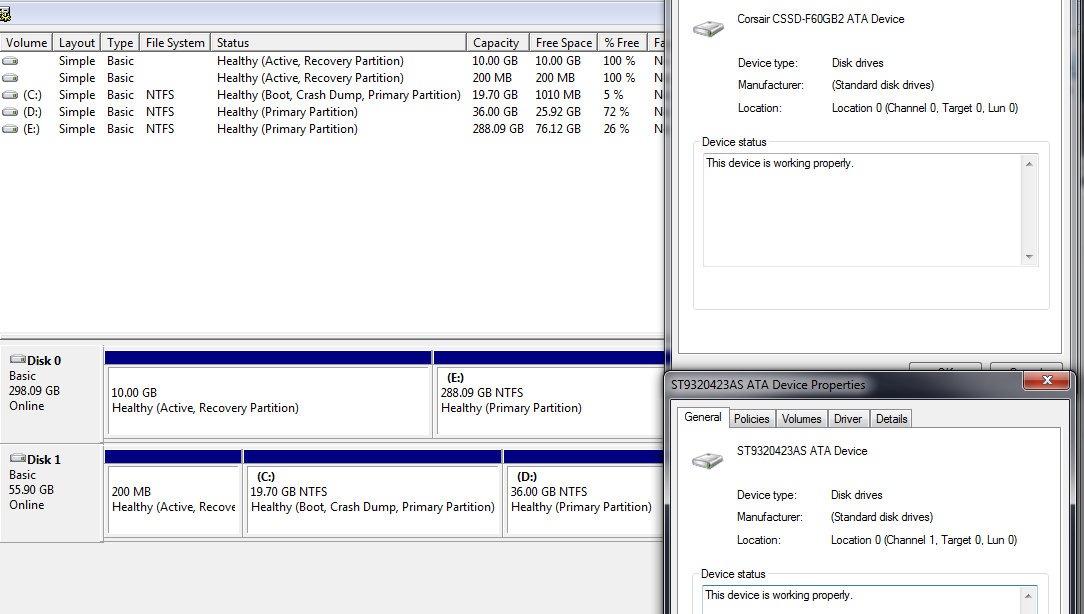
since a picture speaks a thousand words... the ssd is conected to sata0 but somehow always gets assign disk1. which is strange... anyone might explain this. and also this is only part of the problem as the more pressing issue is can i "make" windows put the boot partition on disk1 partition1?
-
i am struggling to make the following scenario to work and had no success... the hardware is 1. SSD drive with 3 partitions that getts assigned as Disk1: - 1st partition hidden and active boot partition - 2nd windows partition - 3rd applications and games partition 2. HDD with 2 partitions that getts assigned as Disk0: - 1st hidden and active windows kit partition - 2nd users folders and programdata the computer is configured to boot from the ssd and thus use the disk1-partition1 as the boot partition. now if i manualy boot from disk0-partition1 (i am using windows assignments for the disks, actually the first disk in my computer is the ssd, and i dont really know why it gets assigned as disk1), i have to start the instalation manually (by running "setup.exe /unattend:unattended.xml") but what also happends is that the boot partition becomes disk0-partition1 the one with the windows kit on. what i would like to know is if there is a method to force windows to use as boot partition the partition on my ssd that is disk1-partition1. thanks
-
hello i am wandering if there is a way to create a autounattend.xml file that only activates when i chose setup so that i can still access the repair tools from my bootable usb without automaticaly installing customised windows.
-
is there a way to show the security tab in windows vista if several files are selected, for all of them.
-
is there any way to create a windows vista user profile on top of an existing profile. ex. user name is myUser and has never been logged in thus not having any folder in C:\Users. i manualy create or use an existing folder named myUser which i copy to C:\User. i logg off an when i log on with myUser he gets the settings from that folder thus not creating another profile folder named myUser.computername. thanks
-
i would like to know if it is possible to remove/prevent install of windows packages like Microsoft-Windows-Foundation-Package from autounattended.xml, or some other method that does not imply "hacking" the source. the main purpose for this would be to remove Movie Maker or Windows Media Player. thanks
-
i am mostly interested in inf and ini that load at this stage.
-
Im trying to find out what file is responsable for the creation of the tree structure when a new user is created, and expecially who/what creates the My Documents folder. Title Edited - Please follow new posting rules from now on. --Zxian
-
ok thanks, ill try that out.
-
yes winxp si set up via winnt.sif that problem was corrected. i had a bogus entry in my hivesft file, but i get that same error now during the registering components part of the setup
-
During the Install Devices part of the unattended setup i get an Advanced INF Install error (Cant find C:\WINXP\INF\***.inf). Can anyone tell me what file is responsable for this.
-
does anyone know if its possible to setup windows in such a way, that on creation of a new user all the settings to be stored in documents and settings folder only his documents to be stored in a similar foldertree but in a different location. Example 1. I create the user John. 2. In Documents and Settings a John subfolder is created and there all settings are stored except My Documents. 3. on drive D in folder Documents a John subfolder is created with My Documents Folder in it. please tell me if this is possible. and how (if it is). Title Edited - Please follow new posting rules from now on. --Zxian
-
please read my post. i have done that and yes it worked but im trying to do the same thing by modifying the hive*.inf files. i have modified that specified strings and the setting didnt work. is it possible to achive this by modifying the hive*.inf files? what do i need to do?
-
i want to set the default my documents folder to "d:\My Documents". i have succeded by running a reg at T-13 but i cannot do that using hivedef.inf. i have changed the setting at U_SHELL_FOLDERS_PERSONAL and U_SHELL_FOLDERS_MYPICTURES but it doesent seem to work.
-
i tried all the offline unattended methods described in unattended.msfn.org to activate windows and none worked. i have a toshiba oem windows and when i install my unattended winSP2 it does not work but when i use the unattended cds provided by toshiba (WXP SP1 ghost images) it works perfectly.
-
how can i (if possible) set up my WLAN SSID and password in unatteded mode instalation of windows.
-
[Version] signature = "$Windows NT$" [DefaultInstall] Needs = codecs10.DefaultInstall, DRM10.DefaultInstall, WMDM10.DefaultInstall, WMFSDK10.DefaultInstall Include = codecs10.inf, DRM10.inf, WMDM10.inf, WMFSDK10.inf i have wrote this and i keep getting an error that says: the software i am installing has not passed windows logo verification and can not continue
-
thanks a lot
-
thanks very much for the info but could you give me a simple example so that i can work on that. i find that writing infs is pretty complicated
-
is there a way to create an inf file that is used as a "shortcut" or "batch" to install other inf files. i am interested because i want to group an aplication that has several inf files using iexpress and install it. thanks.
-
i have a unattended windows instalation and i have removed wmp using nlite (wmp support is not removed). i want to know if there are some internet explorer plugins for wmp because some windows media player steams/ files that used to work are not playng no more. dont want to install wmp. i can play any windows media offline. thanks.