-
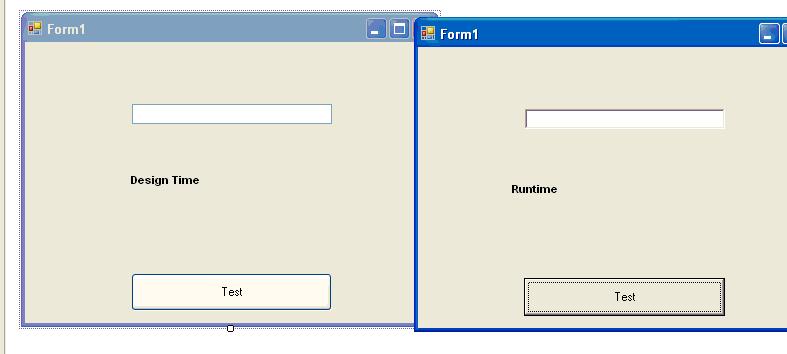
My First Post! Im new to .net and have been programming database apps in vb6 for plenty of years... I have a question though... I created a quick "button and textbox" app and I immediately noticed that the way it displays the buttons and textboxes on the screen in runtime is different then that in design time... Is there a setting i need to change? Btw i am running XP as well... thanks for reading PS... it seems that my ENABLE APPLIACTION FRAMEWORK option under APPLICATIONS is greyed out, and I have tried to change my display styles as well, no use so far
-
Me too please... cmegafox@hotmail.com Im pretty eager to test something new.
-
Hmm, no error logs get generated by Win 2000, but ill see what ping and tracert can do for me. Thanks for the suggestion thus far.
-
Hi. We have recently moved to a new ISP and as such needed to change a few settings on our NAT server. It has been working for nigh on 3 years non stop now, but as of the change, my NAT stops responding after about 3 hours use by my clients. More Info. We have 50 clients on the intranet with static assigned IP addresses in the 192.168.x.x range. New Cisco 1700 router installed with new ISP. I SUSPECT that they have NAT installed on the router aswell. ( Will this affect my problem ? )