Everything posted by Gumbyx84
-
Great job on this. I have been wanting to get a totally black windows setup for a while now. Will def keep my eye on this. One problem I seem to be having is with a few of the re-colored windows/panels, like the shutdown menu (w/ the Standby, Shut Down, and Restart buttons) and Add Hardware. It seems like the XPize auto-reloader is reloading over the Darkside-modded files. Should I be shutting off the XPize auto-reloader, or should they be playing nicely with each other (as I have heard)? Or should I just wait till the "standalone" version is released? If it helps any, I am running Windows XP Media Center. I will grab a pic of the problem tomorrow, as right now its past midnight and I have to work in the morn. Thanks ahead of time for the help.
-
Thanks ricktendo64! It worked perfectly. I don't remember running that mod, but it might have happened when i tried a XP-to-Vista Theme pack. Anyway thanks again!
-
Has no one ever run into this problem? Sorry but I find it hard to believe that no one may know how to help me out.|21|11/ 1/ 0/ 0/ 0/ 0/ 0/ 0|
-
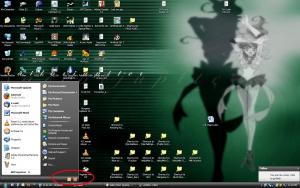
I have had this problem for a while now, but after trying to figure it out on my own and failing, I thought I would come by here. After I installed the new Luna Royale themes (got the links from here) on my XP:MCE PC, I noticed my start menu was acting funny. The text for "Log out" and "Turn off computer" seemed to be missing (see attached picture). I removed the theme and still had the problem. I then uninstalled XPize and the problem was still there. I have XPize and the same theme on my laptop (windows XP Pro) and have not had this problem. Anyone experienced this or know of a way to fix the problem. Its just a nuisance not to have it working right.
-
I know its an odd question to ask, but I am going to ask it since I really like this theme. Is there any way of getting a Lima/Green version of Luna Royale? If so, I would be an EXTERMLY happy XPize user. I like the standard Olive Green XP theme and usually stick with it because none of the other xp themes usually have a nice green version. So, Is there any way you would be able to pull that off?
-
LOL sorry didnt explain that. He (I assume) is insinuating that XPero is neglecting us and is refusing to aknowledge there is a problem with XPize, which there is not. XPize 4.2 has gone through 2 betas and many debug runs, so i assume that many bugs have been removed. But since I am here I may as well ask this: Do you have a 64-bit processor? Like I sai, I had problemws with XPize andI think it may have something to do with using the x86 version on .Net 2.0 on a 64-bit machine. If I am wrong, oh well and sorry.
-
I had a problem with my first install of XPize on my MCE machine. I was having issues with icon transparency on the desktop. I had to do a clean install of XP to fix the problem. One thing I noticed was that with my clean install, I do not have .Net 2.0 installed. I was going to install it until I noticed that wxp wanted me to download the x86 version of 2.0. I have a 64 bit AMD processor in my be my new PC, and waswondering if that may have interfiered with XPize. I do not program on the .Net platform, so I do know if this would affect anything. All I know is that when I installed it on my XP Pro laptop, I had no such problems with XPize. Just asking the community.
-
Wow. You are rude as hell. All i could say to try is double check the intergrety of your windows install, and your current version of .Net. I was having problems and it turned out another program scrwed windows up, and I had to do a clean install of XP.