



Skip to content
View in the app

A better way to browse. Learn more.

MSFN

A full-screen app on your home screen with push notifications, badges and more.

To install this app on iOS and iPadOS
  1. Tap the Share icon in Safari
  2. Scroll the menu and tap Add to Home Screen.
  3. Tap Add in the top-right corner.
To install this app on Android
  1. Tap the 3-dot menu (⋮) in the top-right corner of the browser.
  2. Tap Add to Home screen or Install app.
  3. Confirm by tapping Install.

zachdms

Member
  • Joined

  • Last visited

  • Country

    United States
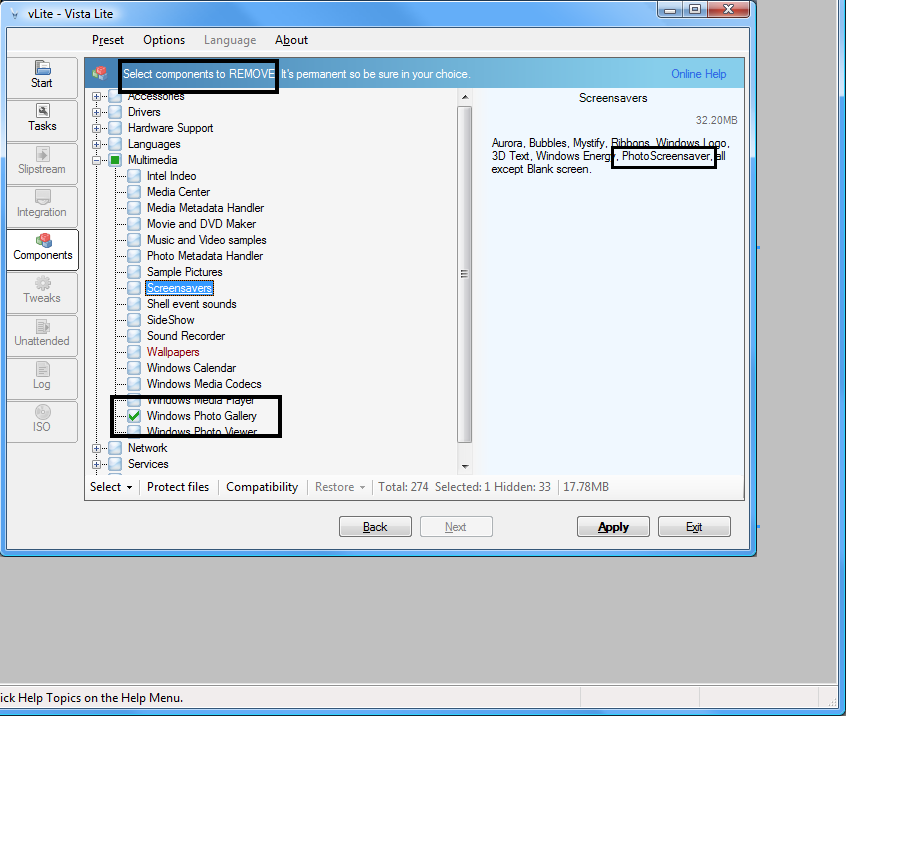
  1. I ran into some weird crashes and eventually realized that PhotoScreensaver uses photobase.dll (part of the Windows Photo Gallery component). You should probably add a "Needed for: Screensavers" under the "Windows Photo Gallery" entry so that other people don't try to use PhotoScreensaver and end up crashing.
  2. So I've got probably official information from Microsoft: Even in the Microsoft internal database, there is no idocumentation for IExpress. Strange. The only possibility is to find the coder who writes IExpress then. Petr <{POST_SNAPBACK}> Who told you that?What's the Question needing documentation?
Account

Navigation

Configure browser push notifications

Chrome (Android)
  1. Tap the lock icon next to the address bar.
  2. Tap Permissions → Notifications.
  3. Adjust your preference.
Chrome (Desktop)
  1. Click the padlock icon in the address bar.
  2. Select Site settings.
  3. Find Notifications and adjust your preference.