



Skip to content
View in the app

A better way to browse. Learn more.

MSFN

A full-screen app on your home screen with push notifications, badges and more.

To install this app on iOS and iPadOS
  1. Tap the Share icon in Safari
  2. Scroll the menu and tap Add to Home Screen.
  3. Tap Add in the top-right corner.
To install this app on Android
  1. Tap the 3-dot menu (⋮) in the top-right corner of the browser.
  2. Tap Add to Home screen or Install app.
  3. Confirm by tapping Install.

Roderik

Member
  • Joined

  • Last visited

  • Country

    Belgium
  1. Roderik replied to XPero's topic in XPize
    ok please disregard all my comments, i've reapplied the entire package and now it works. It also works on the unattended version through nlite. Seems like it just didn't apply completely the first time. Thx anyway for this great program
  2. Roderik replied to XPero's topic in XPize
    if uninstalling means running the exe and unselecting shell32.dll then it worked. The + is back.
  3. Roderik replied to XPero's topic in XPize
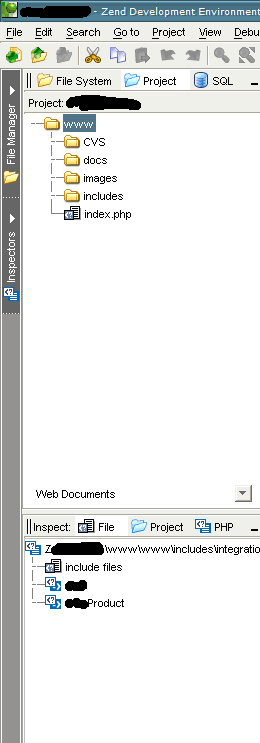
    Since installing this i've lost the + signs in the file tree in Zend Studio. It's a Java app if that helps
Account

Navigation

Configure browser push notifications

Chrome (Android)
  1. Tap the lock icon next to the address bar.
  2. Tap Permissions → Notifications.
  3. Adjust your preference.
Chrome (Desktop)
  1. Click the padlock icon in the address bar.
  2. Select Site settings.
  3. Find Notifications and adjust your preference.