-
very nice program great work i have one suggestion how about a progress bar that will show the overall progress of the process and perhaps the remaining time
-
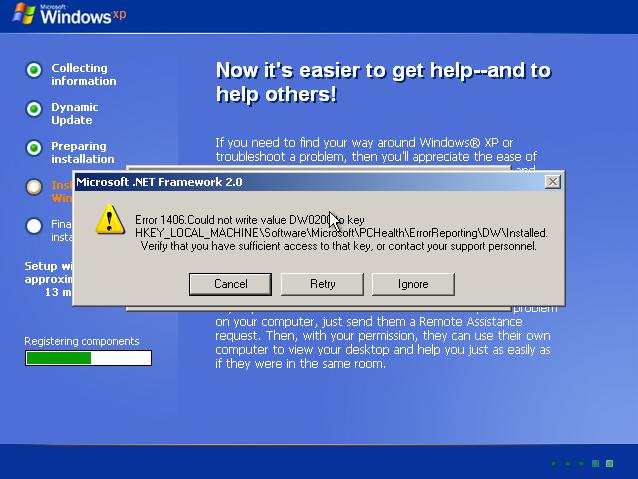
hello i have extracted the dotnetfx.exe then using the iexpress i have re-packaged the .net framework but there was a problem see screenshoot you will need to edit install.ini change CheckAdminRights=1 from to CheckAdminRights=0 [Setup] ProductName=Microsoft .NET Framework 2.0 ProductMsi=netfx.msi ProductRegKey=SOFTWARE\Microsoft\NET Framework Setup\NDP\v2.0.31113 ProductRegValue=OCM ProductSupportURL=http://support.microsoft.com DefaultDirInstallToken=URTInstallPath.3643236F_FC70_11D3_A536_0090278A1BB8 SupportWin9X=1 MinNTVersion=5.0 CheckAdminRights=0 ShowFeatureOptions=0 ShowDestinationFolder=0 LogFilePrefix=dd_netfx20 VerboseLog=1 RebootMode=1 UILanguage=1033 BitmapFile=netfx.bmp CustomTextPrefix=CustomText
-
/off topic WinInstall 8.1 has been released Download WinINSTALL 8.1 Download WinINSTALL 8.1 with MSDE
-
sorry i forgot to mention that the method i used to install .net framework was from RunOnceEx because with xpcreate i could not install it Event Type: Error Event Source: MsiInstaller Event Category: None Event ID: 11406 Date: 14/4/2004 Time: 3:21:25 pm User: N/A Computer: XXXX Description: Product: Microsoft .NET Framework 2.0 -- Error 1406.Could not write value DW0200 to key HKEY_LOCAL_MACHINE\Software\Microsoft\PCHealth\ErrorReporting\DW\Installed. System error . Verify that you have sufficient access to that key, or contact your support personnel. For more information, see Help and Support Center at http://go.microsoft.com/fwlink/events.asp. i have used only the hotfixes that are mentioned on the xpcreate site and like you said GreenMachine Beta software = you are on your own. so i will have to wait for the final version
-
If you don't mind was it an issue of the order of hotfix's or something else? yes it was an issue with the order of the hotfixes
-
why it wasn't on the offical site yet?
-
after 15 installations on vmware net framework 2.0 has been succesfully installed
-
you can use http://babelfish.altavista.com for translation
-
search button? http://www.msfn.org/board/index.php?showtopic=12657
-
-
nope its Opus Luna Download @ DA
-
-
there is no direct link for the net framework you must be a beta tester sorry XPCREATE.LOG
-
hi I am a beta tester in the Microsoft command shell Preview and in order to install it under windows xp you need to have .net framework 2.0 installed. I want to add it in my dvd using XPCreate. The name of the file is the same dotnetfx.exe and i assumed that in the X2M directory would work. Well here is what happened XPCreate finished the creation of the iso then i runned it on vmware and the result was .net framework was not installed any suggestions? thanks in advance
-
http://www.msfn.org/board/index.php?showto...367&hl=orktools