-
Windows Registry Editor Version 5.00 [HKEY_CLASSES_ROOT\exefile\shell\Uniextract] [HKEY_CLASSES_ROOT\exefile\shell\Uniextract\command] @="\"C:\\Soft\\Packer\\uniextract\\uniextract.exe\" \"%1\""
-
seagate support says not yet affected, whatever that means
-
Backup your your registry, Backup your system partition, then go to: HKEY_LOCAL_MACHINE\SOFTWARE\Microsoft\Windows\CurrentVersion change the value of ProgramFilesDir (x86) to D:\programfiles(x86) and the value of CommonFilesDir (x86) to D:\programfiles(x86)\CommonFiles or whatever path you like. If you already installed something in C:\programfiles(x86), then search the Registry for C:\programfiles(x86) and programfiles(x86) (some software uses C?\programfiles(x86)) and change the values according to your wishes. Complex Installation (f.e. antirus or firewall) could get messy using this procedure, so its best to uninstall these and then do a reinstall. there is no such thing as windows recognizing programs. it is nothing without you
-
xp.sp2 doesn't have these problems
-
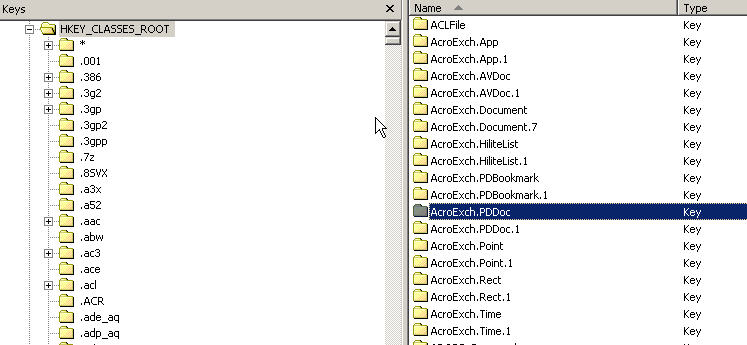
winxp registry is full of double entries like for example: Internet.HHCtrl + Internet.HHCtrl.1 i think new keys are created with every software-update, first Internet.HHCtrl.1 then Internet.HHCtrl.2 which is totally useless because both keys contain same data. with the creation of a new key the original is updated with a reference-Subkey to the added key [example: HKEY_CLASSES_ROOT\Internet.HHCtrl\CurVer: Internet.HHCtrl.1]. i think this is the main reason for the registry size growing, especially when reinstalling bloated software like acrobat, msoffice or vmware. does anyone know why this happens? and a second registry-related question: is there a software that analyzes key-sizes like there is for folder-sizes (treesize pro or FolderSizes)
-
meanwhile it should be enough to overwrite the old innounp.exe with this one
-
I changed the IP address of the the pci network card to 192.168.1.* and it works now. thanks for your quick help Ghostrider
-
i got a starnet digital router with integrated adsl modem, connected to my standard pci network card. normally i should be able to enter the configuration screen by browing to http://192.168.1.2, that dos not work. i tried with 2 different network cards, 2 windows versions,out of winpe,disabled firewall,nothing worked. what windows services etc. are needed to connect to a router in this configuration? any ideas? or should i reset the router?
-
thanks anonim1979 tested and worked [GUIRunOnce] command9= "cmd.exe /c RD /S /Q %SystemDrive%\DP"
-
same here RideGuy, the newest version of the driver pack uses the line command9= "RD /S /Q %SystemDrive%\DP" in winnt.sif instead of calling for BTS_DP_cleanup.cmd. i get the same error with the new method, something like cannot find RD. could that be a problem with the iso format? is the value for command9 the correct one?
-
under Device Manager - IDE ATA/ATAPI controllers - choose the matching IDE Channel -doubleclick - Details - Hardware Ids. or use a 3rd party system information software
-
Vendor ID - 10DEh Nvidia Corp Device ID - 008Eh nForce MCP2S Serial ATA Compatible Controller Hardware IDs PCI\VEN_10DE&DEV_008E&SUBSYS_100F1695&REV_A3 PCI\VEN_10DE&DEV_008E&SUBSYS_100F1695 PCI\VEN_10DE&DEV_008E&CC_010185 PCI\VEN_10DE&DEV_008E&CC_0101 Vendor ID - 10DEh Nvidia Corp Device ID - 0085h nForce MCP2S Parallel ATA Controller Hardware IDs PCI\VEN_10DE&DEV_0085&SUBSYS_100F1695&REV_A3 PCI\VEN_10DE&DEV_0085&SUBSYS_100F1695 PCI\VEN_10DE&DEV_0085&CC_01018A PCI\VEN_10DE&DEV_0085&CC_0101
-
i still get the BSOD STOP ERROR my configuration: method used: Nr.2 packs used: -DriverPacks_BASE_V503 -DriverPack_MassStorage_V503.7z CHIP: nforce2 ultra400 (epox ep-8rda6+) IDE: NV RAID,Sil3114 - both used for SATA HDD, Raid disabled SOUND: Soundblaster 2ZS thanks for any help on that