Ziapteryx
Content Type
Profiles
Forums
Events
Everything posted by Ziapteryx
-
The enhanced taskbar is great, but it breaks compatibility with other tools designed for the standard taskbar. I want to start a thread to gather any potential widgets that the community has found to work with the SAB taskbar. Unlikely, but I figure I might give it a shot. For example, I would love to have a weather widget that doesn't require Bing or eats up more than 1GB RAM every time it's running.
-
Are you on stable channel? What version of SAB are you on? Mine is working fine.

-
The menu bar being deprecated is absolutely possible, but that means that I am at a loss right now on how to access those settings when I want the minimal look of the Win 7 command bar.
-
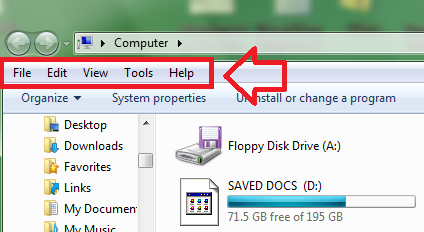
For reference, here is the menu bar in question. You can toggle to hide/unhide it with "Alt" back in StartIsBack on Windows 10. Right now for Windows 11 I could not find a way to access it when using the Windows 7 ribbon.
-
I can no longer press "Alt" to toggle the menu bar when I set explorer to use the Windows 7 ribbon anymore. Anyone run into similar behaviour?
-
With Windows 11 moving towards having full dark mode support and automatic mode switchers becoming more prevalent (PowerToy's Light Switch and Auto Dark Mode), I wish that SAB allows configurations to run two separate visual styles corresponding to each mode as well. Many available SIB/SAB styles are specifically designed for either Light or Dark mode, so they look horrid when user switch mode while having a singular style.