Everything posted by wow-boogieman-cork
-
This changes the taskbar color, I am asking for a color picker for the accent color. The accent color in windows is what is used for that little line under icons to indicate if a program is open. Currently if you use a darker windows accent color, its very hard to see that programs are open unless you use a custom taskbar color that contrasts a lot.
-
Can the developer please consider adding a custom accent color override in this section? After one of the updates it now uses the system accent color, which makes it very hard to see if you use a darker accent color. Top is a picture from 3.7.8, bottom is from latest. As you can see its quite hard to tell the browser is open in the second one.

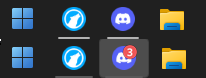
-
Id like to bump this, even a color override for the bottom part of taskbar icons would go a long way. I'm using an older version because its so hard to see on the newer ones.
-
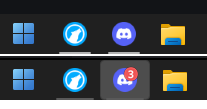
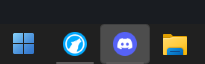
Hello, I have automatic updates off so I didn't notice this sooner. But if I upgrade past version 3.7.8 it is very difficult for me to be able to tell if a program is open or not. Is there any fix to this? I have included a photo, top is 3.7.8, bottom is 3.8.13: latest version 3.9 3/ This is 3.9, same issue.