Skip to content
View in the app

A better way to browse. Learn more.

MSFN

A full-screen app on your home screen with push notifications, badges and more.

To install this app on iOS and iPadOS
  1. Tap the Share icon in Safari
  2. Scroll the menu and tap Add to Home Screen.
  3. Tap Add in the top-right corner.
To install this app on Android
  1. Tap the 3-dot menu (⋮) in the top-right corner of the browser.
  2. Tap Add to Home screen or Install app.
  3. Confirm by tapping Install.

Vavun

Member
  • Joined

  • Last visited

  • Country

    Belarus
  1. Vavun replied to Tihiy's topic in StartIsBack+
    Hi. Thank you for your work, it looks interesting Old styled highlight for custom toolbars menu now catches the eye with Plumpness => Aura enabled
  2. My bad. Toolbars menu and toolbars disappeared after update and I thought it was because of SAB I didn't realize that in order for the panel menu to appear back, I need to unpin the taskbar first Sorry
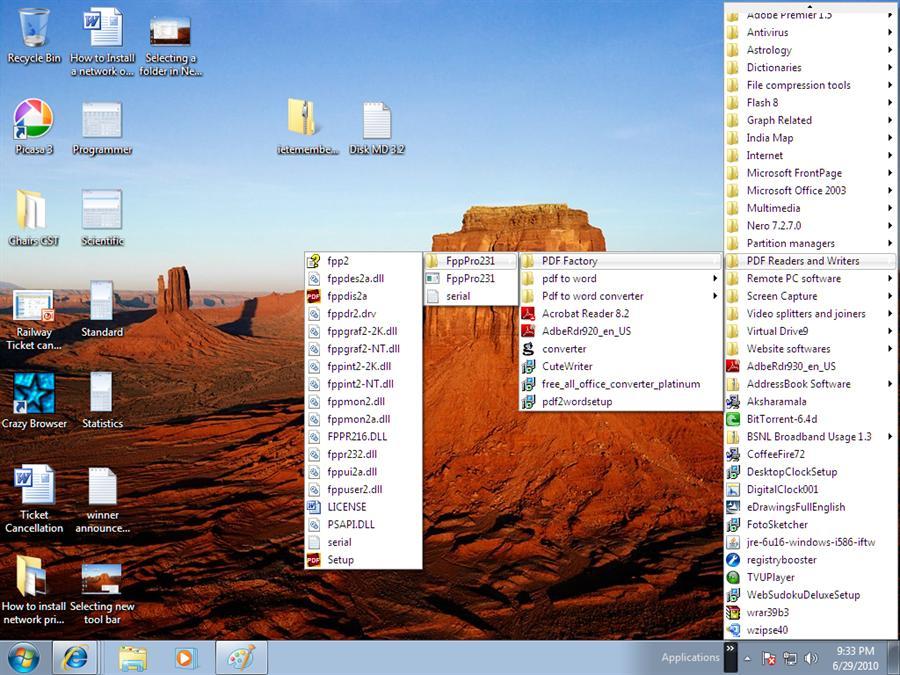
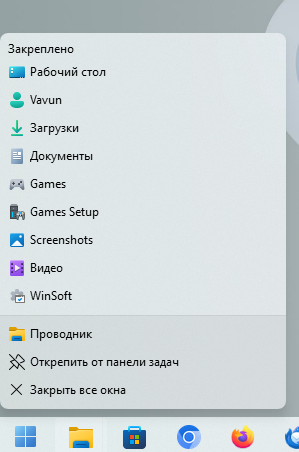
  3. Hello I have a question to the developer: are there any plans to add custom toolbars like there were in previous windows versions? I really miss this feature after upgrading to 24h2 Example image from the internet Something styled to look like the Explorer drop-down menu with its pinned folders, but with a custom location would look great. Thanks for your reply
  4. https://safebrowsing.google.com/safebrowsing/report_error/
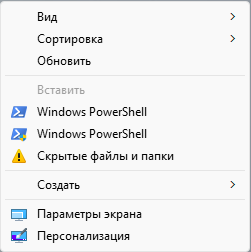
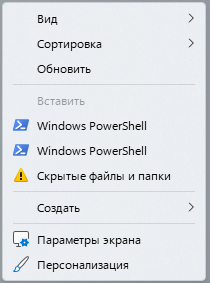
  5. Hi Since ancient times I have been using this tweak to open PowerShell in the current directory. ( Shift +Right mouse click to see second "AsAdmin" line ) Windows Registry Editor Version 5.00 [HKEY_CURRENT_USER\Software\Classes\Directory\Background\shell\Run_PowerShell] "Icon"="powershell.exe,-0" "NoWorkingDirectory"="" "MUIVerb"="@powershell.exe,-109" [HKEY_CURRENT_USER\Software\Classes\Directory\Background\shell\Run_PowerShell\command] @="C:\\Windows\\system32\\WindowsPowerShell\\v1.0\\powershell.exe -NoProfile -NoExit -Command \"Set-Location '%V'\"" [HKEY_CURRENT_USER\Software\Classes\Directory\Background\shell\Run_PowerShell_AsAdmin] "Icon"="powershell.exe,-0" "NoWorkingDirectory"="" "HasLUAShield"="" "Extended"="" "MUIVerb"="@powershell.exe,-109" [HKEY_CURRENT_USER\Software\Classes\Directory\Background\shell\Run_PowerShell_AsAdmin\command] @="C:\\Windows\\system32\\WindowsPowerShell\\v1.0\\powershell.exe -NoProfile -Command \"Start-Process powershell.exe -verb runAs -ArgumentList '-NoProfile','-NoExit', '-Command', 'cd %V'\"" Looks like StartAllBack broke default "HasLUAShield" key behaviour in combination with "Icon" key This is SAB disabled And this is enabled When disabled, the second PoSh has a small shield, as expected

Account

Navigation

Configure browser push notifications

Chrome (Android)
  1. Tap the lock icon next to the address bar.
  2. Tap Permissions → Notifications.
  3. Adjust your preference.
Chrome (Desktop)
  1. Click the padlock icon in the address bar.
  2. Select Site settings.
  3. Find Notifications and adjust your preference.