




-
Hey. i don't know if it is related the StartAllBack or not, but from the last version 3.9.21, the preview option on the explorer started to change automatically to maximum size here and there, but i don't know what triggers it. It happened to me on the Windows 7 Explorer, i don't know what about the other explorer versions.
-
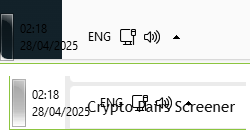
About the "Segments" feature. I saw that you added an option for only seeing the middle segment what i really was interested in. The problem with it is that you can't see the clock and the rest of thing in a lot of situation. and even if you set it to black is still sometime hard to see and sometimes mixed up with other words that under it. So if it is possible then please find a workaround to that problem.

-
The Restart and update and shutdown and update functions does not work. they just shutdown or restart normally.
-
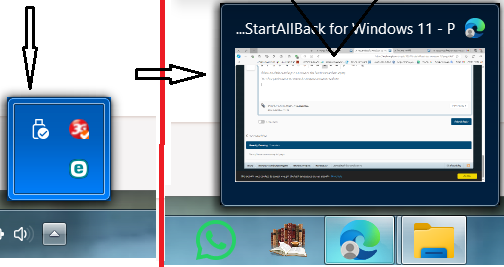
If that is a bug or not i have no idea, but it is a minor one. The color you choose for the taskbar do not apply to those two windows: Each of them has an independent color
-
Yes, it was patched!
-
I'm on Version 3.7.9. The weather icon is reverse in right-to-left operating systems.
