



Skip to content
View in the app

A better way to browse. Learn more.

MSFN

A full-screen app on your home screen with push notifications, badges and more.

To install this app on iOS and iPadOS
  1. Tap the Share icon in Safari
  2. Scroll the menu and tap Add to Home Screen.
  3. Tap Add in the top-right corner.
To install this app on Android
  1. Tap the 3-dot menu (⋮) in the top-right corner of the browser.
  2. Tap Add to Home screen or Install app.
  3. Confirm by tapping Install.

tuskacz

Member
  • Joined

  • Last visited

  • Country

    Ireland
  1. Lol. Anyway, I don't suppose it's heavily protected from disassembling either (if at all) so I'm going to unpack it and check it myself. Someone should take over futher development of it as the program is good and has potential, but lacks advanced tweaking options.
  2. @Tihiy Waiting for your reply
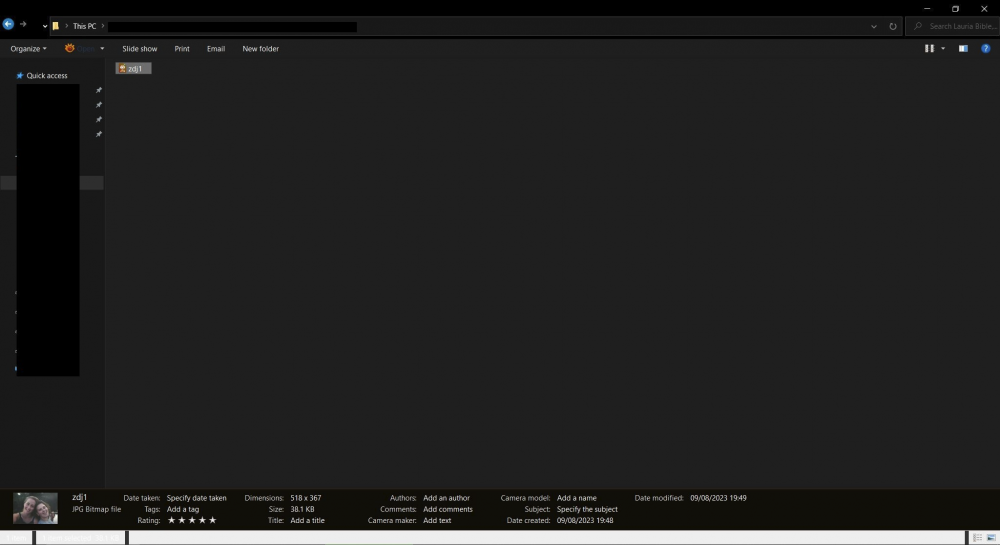
  3. How to change botton preview pane bar from black to custom one? It's too dark and doesn't match my Windows 10 dark theme. Is the source code available so that anyone can change windows colors of this app?
Account

Navigation

Configure browser push notifications

Chrome (Android)
  1. Tap the lock icon next to the address bar.
  2. Tap Permissions → Notifications.
  3. Adjust your preference.
Chrome (Desktop)
  1. Click the padlock icon in the address bar.
  2. Select Site settings.
  3. Find Notifications and adjust your preference.