Skip to content
View in the app

A better way to browse. Learn more.

MSFN

A full-screen app on your home screen with push notifications, badges and more.

To install this app on iOS and iPadOS
  1. Tap the Share icon in Safari
  2. Scroll the menu and tap Add to Home Screen.
  3. Tap Add in the top-right corner.
To install this app on Android
  1. Tap the 3-dot menu (⋮) in the top-right corner of the browser.
  2. Tap Add to Home screen or Install app.
  3. Confirm by tapping Install.

triplepresidento

Member
  • Joined

  • Last visited

  • Country

    Brazil

Everything posted by triplepresidento

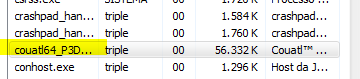
  1. Tysm @vxiiduu!! I installed the 0.0.0.3 version and... it works! These ground vehicles and finger depend on Coautl64_P3D.exe and that dll Sorry for delay to answer you, and congratulations for your work
  2. Include support for this library. Is a Add-On called GSX (Ground Services X) for Prepar3D v4 Flight Sim. FsDreamTeam (developer) says that this library is available in Windows 8.1.
  3. Mmm. You have tried programs like Driver Booster or 3DP Chip?
  4. Is possible to bring color emojis to Windows 7? If you install the Segoe UI Emoji font of Windows 10 or 11, the emojis in apps like Discord will be black and white. Kind regards, Triple

Account

Navigation

Search

Search

Configure browser push notifications

Chrome (Android)
  1. Tap the lock icon next to the address bar.
  2. Tap Permissions → Notifications.
  3. Adjust your preference.
Chrome (Desktop)
  1. Click the padlock icon in the address bar.
  2. Select Site settings.
  3. Find Notifications and adjust your preference.