




Everything posted by KrazyLurt
-
Is there a way to manually load SAB and not have it loaded at start-up? I've would like to load it when I switch to windows dark mode because I use a custom color for the taskbar in SAB and that color mess with the white theme windows taskbar.
-
I posted a picture of two screenshots merged together, they aren't the same so you have probably done something on your end.
-
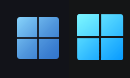
No, theres is quite a bit difference, hence why I asked. See the attached picture. Kleine Eule 73, yeah diviantart of course is the go-to but I haven't found one exact or near exact one.
-
Quick question; Is there any way to implement the exact Windows 11 orb into startallback? The one representing windows 11 doesnt quite look the same. Or if someone have a link to an exact svg start orb. That would be awesome!
-
Awesome! "- Fix taskbar redrawing issues on Beta/Dev builds" works great!
-
Issue with the un-supported, Windows 11 beta build 22H2 , 22616.1: I hope there is a fix for the taskbar, especially the systemtray/clock that becomes blank after applying a different windows theme. A rough fix is hover the mouse over the affected area or restaring explorer.