




-
Tihiy If I set "EnableLUA"=dword:00000000, then drag-and-drop between tabs works when choosing the ribbon-view, but does not work when choosing the default explorer view. Please, fix drag-and-drop for default explorer view when UAC is disabled (if possible).
-
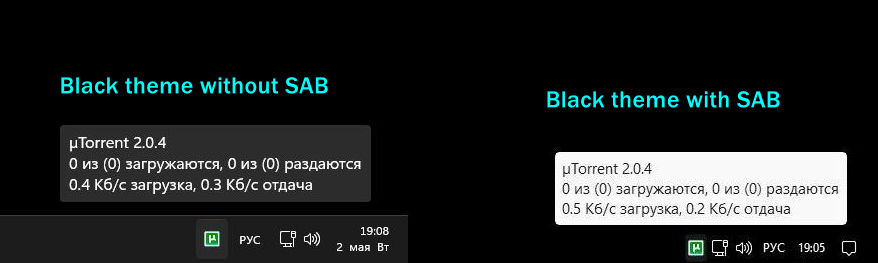
That's right, but without SAB, the text is white on a black background (with dark theme for system only).
-
Tihiy Could you fix the color of the tray tooltips so that it is like in the original Windows?
-
Fixed !!! SAB -- 3.5.3.4540 Win -- 25227.1010 Many thanks !
-
Tihiy What about that bug:
-
Explorer does not remember the size and position of its window if the "ribbon interface" is selected. - StartAllBack 3.5.2.4532 - Win 22621.675
-
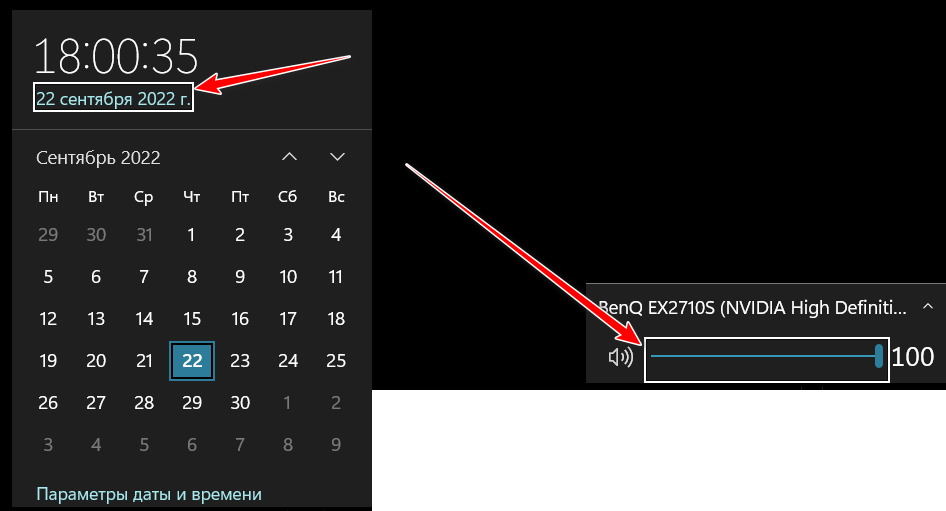
I completely agree with you. These margins look nasty.
-
Could you remove these borders? They look bad.
-
The same behavior is seen on 22000.651 when set to solid black as the desktop background. Both the icons and the text in the tray become invisible due to the fact that they are black (black icons on a black background).
-
Tihiy Привет! На 22000.651 (а может даже и раньше) не получается настроить панель задач, чтоб она была черного цвета и при этом в трее были читаемые часы и другие значки. В винде на рабочем столе я выбрал простой сплошной черный фон, но если в startallback настраиваю панель прозрачной, то она все равно остается серой --> ups... the panel becomes transparent, but icons and text become invisible in the tray Можно ли это как-то исправить или теперь с этим ничего нельзя будет сделать? (в более ранних билдах 11 панель задач нормально настраивалась, чтоб была, как в 10)