Everything posted by JoeBar
-
Rebooting takes 30s, i wouldn't let Windows running for weeks personnally ...
-
Mine is as dark as the rest of Start Menu.

-
The author really don't want to develop this, i asked him 3 or 4 times, same answers...
-
That means all hacks that worked for 3.7.11 (7+ Taskbar Tweaker...) will work with the next version ?
-
He really don't want to develop this requested feature, and instead add features that 1/2 users requested, maybe it's too much work for him ...
-
Also do you think an option to cycle taskbar combined items when clicking on them is realisable ? It's so useful... And if i have luck, implement mid click on the taskbar ? Thanks.
-
I asked this function and some others from the dead "7th taskbar tweaker" and he answered it was not in the plans.
-
Wait, Verstappen is chinese ?
-
It has always been like that, all programs you call from PATH have to be spelled until end. Those that are shortcuted in Start Menu does have the partial match box. Try it.
-
This was an option of "7+ Taskbar Tweaker" but unfortunately Starllback is no more compatible since version 3.8 and Taihiy don't want to reimplement its functions, so u can stick to 3.7.11 if you want to continue using 7+TT functions. Same for Windhawk from what i tested... I would love to have this implemented and some others 7+TT's funcs as "Middle-click on Taskbar" or "Cycle combined items".
-
I used version 3.7.x with "7+ Taskbar Tweaker" successfully, but i upgraded to 3.8.x to begin using Windhawk, but Startallback make most mods impossible to run. Is there any way it can work ? Cause there are some features needed...
-
I would add 3rd click on Taskbar to bring Task Manager and "click on a combinate element" to switch windows is so useful
-
I didn't knew we got alpha versions merged with release ones. So any of new versions will integrate TASKBAR2 ?
-
What is normal ? It's the 1st version of SAB that is not supported.
-
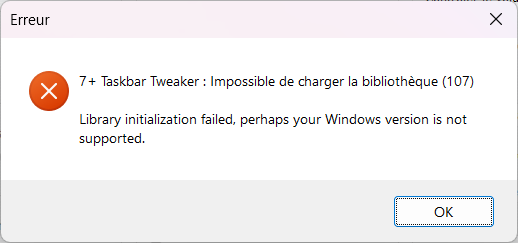
Hi, since the last update (i was in 3.7) "7+ Taskbar Tweaker" doens't work.
-
Same for me, it happens randomly and it's on a desktop.
-
As answered by Tihiy, you will never have this option in SAB. You would prefer check ExplorerPatcher that have this feature, and more. And it's Free and OpenSource, just check it.
-
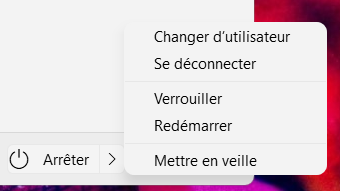
Mine is correct. It must be your theme, your start menu doesn't seem standard.
-
Same, since the lastest update of SAB, my explorer.exe randomly crashes ...
-
+1, i'm surprised that it's not been already made
-