



Skip to content
View in the app

A better way to browse. Learn more.

MSFN

A full-screen app on your home screen with push notifications, badges and more.

To install this app on iOS and iPadOS
  1. Tap the Share icon in Safari
  2. Scroll the menu and tap Add to Home Screen.
  3. Tap Add in the top-right corner.
To install this app on Android
  1. Tap the 3-dot menu (⋮) in the top-right corner of the browser.
  2. Tap Add to Home screen or Install app.
  3. Confirm by tapping Install.

vr2008

Member
  1. On windows 10 version 1703 there are some problems in control panel pages that have links in sidebar.
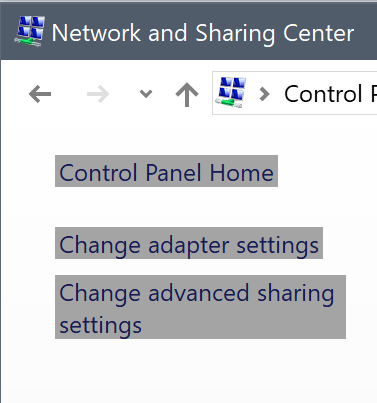
  2. Exactly same for me.
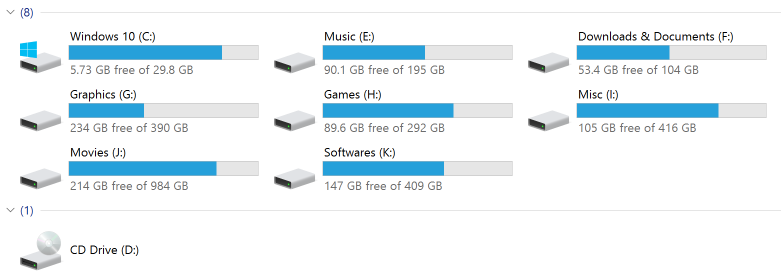
  3. For me it happens even without connecting any removable drive. Just after a little browsing in folders, details pane suddenly disappears along with group titles.
  4. I'm using this program more than a year since version 1.1.7 on windows 10 enterprise x64 and since the first day I have an annoying problem. And that is the details pane suddenly disappears until I restart explorer.exe from task manager. Even the most recent version (1.1.8.2) didn't fix the issue and it happens again. also after disappearing details pane, the hard drive grouping titles disappear too and just the numbers remain.
Account

Navigation

Configure browser push notifications

Chrome (Android)
  1. Tap the lock icon next to the address bar.
  2. Tap Permissions → Notifications.
  3. Adjust your preference.
Chrome (Desktop)
  1. Click the padlock icon in the address bar.
  2. Select Site settings.
  3. Find Notifications and adjust your preference.