Skip to content
View in the app

A better way to browse. Learn more.

MSFN

A full-screen app on your home screen with push notifications, badges and more.

To install this app on iOS and iPadOS
  1. Tap the Share icon in Safari
  2. Scroll the menu and tap Add to Home Screen.
  3. Tap Add in the top-right corner.
To install this app on Android
  1. Tap the 3-dot menu (⋮) in the top-right corner of the browser.
  2. Tap Add to Home screen or Install app.
  3. Confirm by tapping Install.

Rhahzadh

Member
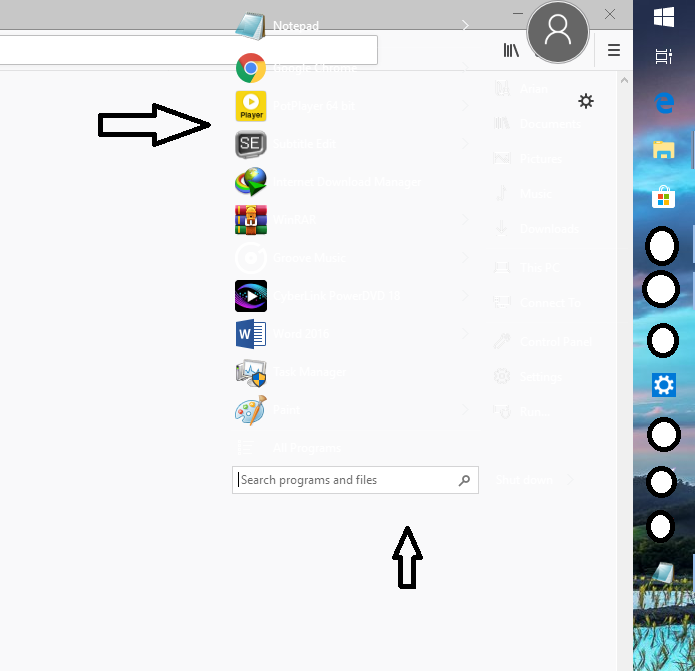
  1. hi, i have problem with SIB. when i open start menu on any program like browser or file manager, i can not see text on transparent SIB like picture. can you add check box like "support show desktop when i open start menu". in this methout when i click start button it minimized all programs and folders and shows start menu and desktop.
  2. i installed This theme on my windows 8.1 Enterprise 64 bit but i have problem with shell 32 : http://neiio.deviantart.com/art/nome-8-1-479789366how can i fix this problem ? my settings :
  3. To Remove Start Screen : Right Click on Start Button And Choose Properties and UNCHECK " Display Start screen shortcut " . How Pin something : Go to " All Programs " and Right Click On your Choice and Select " Pin to Start Menu "

Account

Navigation

Configure browser push notifications

Chrome (Android)
  1. Tap the lock icon next to the address bar.
  2. Tap Permissions → Notifications.
  3. Adjust your preference.
Chrome (Desktop)
  1. Click the padlock icon in the address bar.
  2. Select Site settings.
  3. Find Notifications and adjust your preference.