




Everything posted by mzik
-
After installing Nlite xp+ sp3 , shuting down the pc stops with teling me that I can now shut down before it just shut down by it self LAST SESSION_U.INI
-
-
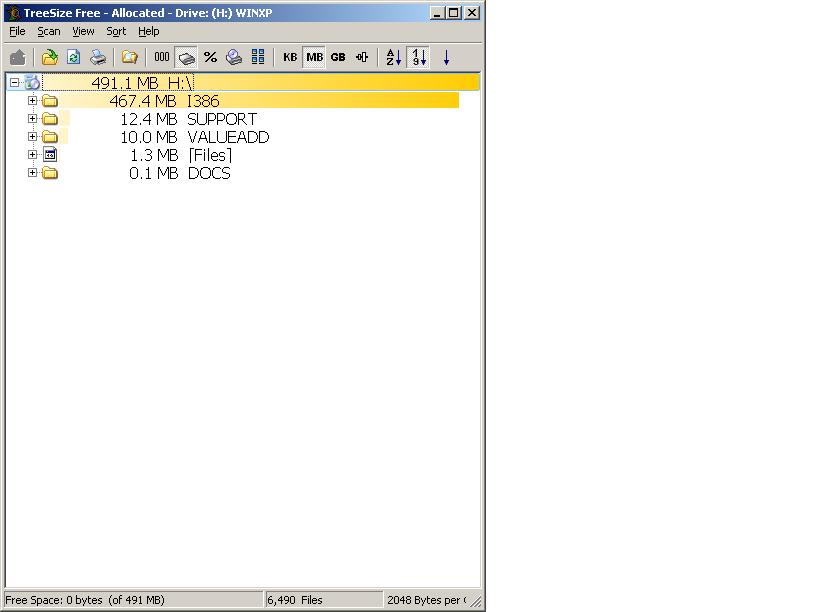
Lets sum it again: I try to copy the I386 folder from the CD to a folder on a hard disk I do it from "CMD-xcopy h:\I386 (cd) i:\i386 (usb hardisk) /s" Te original folder on the CD is 500mb but the folder on the disk is 800mb The folder on the disk was emptybefore copying All that before using Nlite
-
???"added the sp3"???1 - make a folder 2 - copy [files] to it 3 - copy I386 folder to it 4 - run nLite 5 - in nLite, point to the folder 6 - in nLite, point to the SP3.EXE (to Integrate) 7 - DONE!!! Surely, you aren't copying the SP3.EXE Service Pack File to the "folder"... NO NO NO!!! You will be unnecessarily adding roughly 300mb to the CD! nLite INTEGRATES it into the I386 (replaces the older files with the newer SP3)!!! (There's your extra megabytes IF you are...) Go here and do a little reading...
-
That's the "original" RTM (5.1.2600.0). It didn't have the .Net folder and [files] is undoubtedly the other Root files. Yes/no/maybe? Shouldn't copy over anything but what you need (same size). Try making a folder (anywhere) and copy only the I386 folder (the whole folder) and the [files] to it then try again. "Folder" should be less than 400mb. These are all that are necessary. Idonot see any problems either, but the file arrives to the folder as 800mb.This is the original xp before sp's and toit iadded the sp3 It works fine, it goes only on DVD and it shoudnt
-
-
hi i did as suggested and it worked, only now the pc doesnt end the shutdown- it stops with a msg that it can now be shutdown,before it finished by it self I looked at the faq, there is not same screen on my control panel as described. how to return the shut down? thnksHi When I use a standard xp instalation it stops somewhere and allows to do a corectional installation,(restore) instead of new installation that keeps the original apps and just fixes the XP The nlite disk that I made doesnt stop to allow me to choose "Restore" Is there a way to make it just restore an older(nlite) installation?Sorry, but its the same- everything goes ok, but the disk dont bootHi I tried afew times to make a xp boot disk with cdimage, with and without gui, but the disk dont boot Other disks boot OK The source is Nlite +sp3 that is booting and installing OKHi How to recognize the update and add the ms update files?I have xpsp2 connected to the net via rtl3189 o/b card and Alcatel speedtouch modem/router ADSL line. Sometimes after comming out of standby I cant connect to the web without re booting Tried to disable/enable nic and reconnecting thr router but didnt help- had to reboot Any idea?After upgrading to sp2 via cd,when trying to system restore( system tools-system restore) nothing happens. There is a flash on the screen and goes back to the desk top The service is on automatic and the scheduler is onI made batch file to be run with the Schsduler for chkdsk.exe once a month, only it ask for an answer "Y/N" How to insert the answer "y" in the batch fie? Thnksdoes anybody know about a freeware virtul machine? I dont use it much so I dont like to buy it thnksIs there a printer frienly guide for the unattended cd guide?I just finished to burn the iso file created by Nlite, but after starting from the CD I cant find how to steup ftom it Pls helpwhen starting Nlight there isa list of the functions to be done it dosnt even ask about the location of the XPsp1 that I want to merge with instalation disk-so I get a thiner iso file but its basic xp (pro, corporate)
Important Information
Account
Navigation
Configure browser push notifications
Chrome (Android)
- Tap the lock icon next to the address bar.
- Tap Permissions → Notifications.
- Adjust your preference.
Chrome (Desktop)
- Click the padlock icon in the address bar.
- Select Site settings.
- Find Notifications and adjust your preference.
Safari (iOS 16.4+)
- Ensure the site is installed via Add to Home Screen.
- Open Settings App → Notifications.
- Find your app name and adjust your preference.
Safari (macOS)
- Go to Safari → Preferences.
- Click the Websites tab.
- Select Notifications in the sidebar.
- Find this website and adjust your preference.
Edge (Android)
- Tap the lock icon next to the address bar.
- Tap Permissions.
- Find Notifications and adjust your preference.
Edge (Desktop)
- Click the padlock icon in the address bar.
- Click Permissions for this site.
- Find Notifications and adjust your preference.
Firefox (Android)
- Go to Settings → Site permissions.
- Tap Notifications.
- Find this site in the list and adjust your preference.
Firefox (Desktop)
- Open Firefox Settings.
- Search for Notifications.
- Find this site in the list and adjust your preference.