Skip to content
View in the app

A better way to browse. Learn more.

MSFN

A full-screen app on your home screen with push notifications, badges and more.

To install this app on iOS and iPadOS
  1. Tap the Share icon in Safari
  2. Scroll the menu and tap Add to Home Screen.
  3. Tap Add in the top-right corner.
To install this app on Android
  1. Tap the 3-dot menu (⋮) in the top-right corner of the browser.
  2. Tap Add to Home screen or Install app.
  3. Confirm by tapping Install.

PLuz

Member
  • Joined

  • Last visited

  • Country

    Portugal
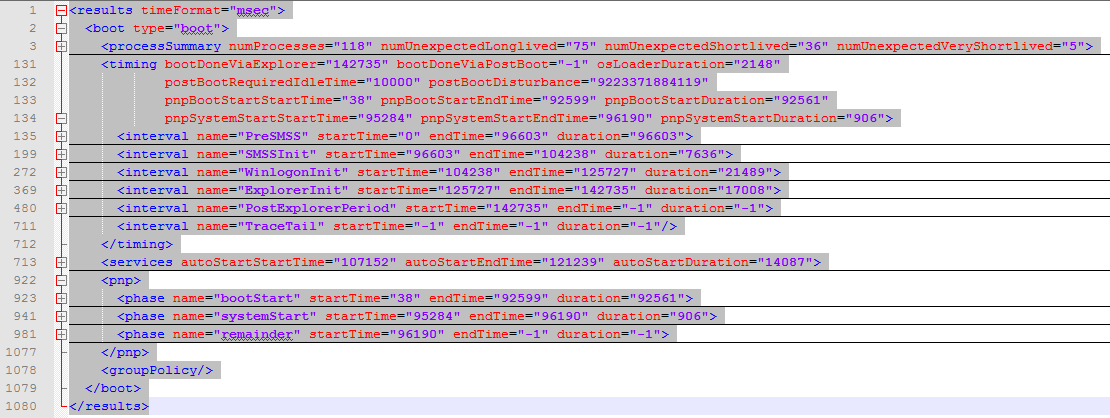
  1. Recently I've been having problems with the boot of Windows 8.1. Here's some information of the boot trace: As you can see the PreSMSS phase takes way too long - over 96 seconds - and the ExplorerInit phase 17 seconds which I think isn't normal since my system used to take 30 seconds or less to completely boot. Also the duration of the PostExplorerPeriod and TraceTail phases are set to -1. Is this some kind of bug? Can somebody please help me? PS: I attached the .xml file with all the information of the boot trace. summary_boot.xml
Account

Navigation

Search

Search

Configure browser push notifications

Chrome (Android)
  1. Tap the lock icon next to the address bar.
  2. Tap Permissions → Notifications.
  3. Adjust your preference.
Chrome (Desktop)
  1. Click the padlock icon in the address bar.
  2. Select Site settings.
  3. Find Notifications and adjust your preference.