Everything posted by isler
-
plus 1.0.5 win8.1 when i use ms ppt 2013 with a projector, the start button is always stay in the peojector
-
double monitors the "show desktop" button is in the lower right corner of the master monitor if i click the button, everything is ok in the master monitor but in the secondary monitor, the taskbar disappear, the start button is still stay there not everytime, but this didn't happen before rc5
-
when click show desktop, the start button of the secondary monitor doesn't disappear. since rc5

-
That's intended. If you use secondary monitors solely for Metro, you likely want to to have easy access to it. ok, but maybe it's better to give an option and...
-
maybe a new bug in RC4 if "all screen corners are active on secondary monitors" is checked when i click the start botton of the secondary monitor, the start screen is shown, not the start menu
-
Aha. It opens Start screen on the last used monitor. Middle-click on Start button or pressing Ctrl-Win or invoking Start screen via charms will open it on the intended monitor, but i'll try to make shortcut open it on the active monitor too. You can also set 'Enable all corners on secondary monitors'. Then start button on non-primary monitor will open Start screen only. if set 'Enable all corners on secondary monitors', when i click the start button in LCD2, the start screen is shown in LCD2, and the "startisback+ menu" can't be loaded...
-
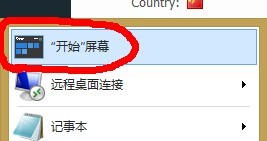
it's the shortcut of start screen in the startisback+ menu.
-
report a bug i use two LCDs, and LCD1 is the master LCD. when i update the system to windows 8.1, every LCD has its own start button. (in windows 8, only the master LCD has a start button) before i install startisback+, if i click the original start botton in LCD2, the start screen will be shown only in LCD2, no change in LCD1. the reverse is the same but after i install startisback+, if i click the "start screen" button(i don't know the english name, it's the shortcut to open the start screen in the startisback+ menu) in LCD1/2, the start screen will be shown always in the master LCD maybe the main method is when you click the shortcut of one software in the startisback+ menu in LCD2, the software can be shown in LCD2, not the master LCD