



Skip to content
View in the app

A better way to browse. Learn more.

MSFN

A full-screen app on your home screen with push notifications, badges and more.

To install this app on iOS and iPadOS
  1. Tap the Share icon in Safari
  2. Scroll the menu and tap Add to Home Screen.
  3. Tap Add in the top-right corner.
To install this app on Android
  1. Tap the 3-dot menu (⋮) in the top-right corner of the browser.
  2. Tap Add to Home screen or Install app.
  3. Confirm by tapping Install.

Brotosaurus

Member
  • Joined

  • Last visited

  • Country

    Brazil
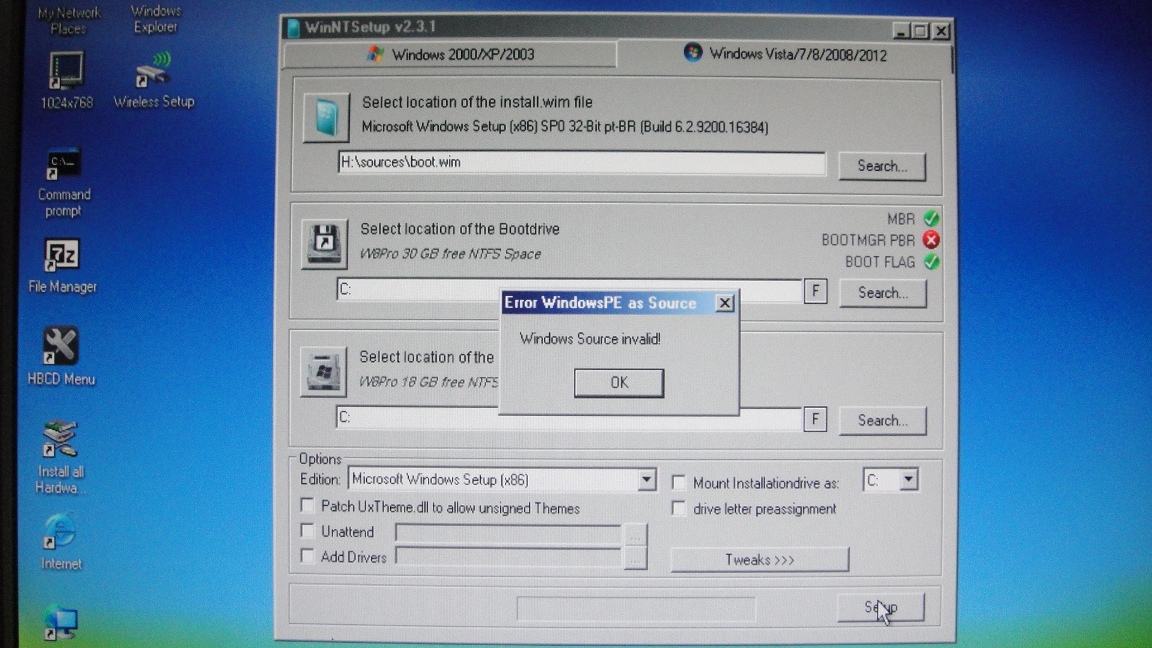
  1. Please picture now attached show my instalation setup. Please look at. I do not use WinPE. I only need WinNTSetup install W8Pro from DVD/ USB pen drive boot.win 162.059 Kb install.esd 1.586.791 Kb If install.wim do not exit I choose the only wim file inside directory and receive an error message.
  2. My MiniXP desktop picture atached running WinNTSetup. Include WinNTSetup error message "Error WindowsPE as Source and Windows Source invalid"
  3. Hello JFX! My W8 Pro DVD do not have install.wim. Only boot.wim. March 2013. I start WinNtSetup boot.wim but system show me error message and not continue. Is it possible help me?
Account

Navigation

Configure browser push notifications

Chrome (Android)
  1. Tap the lock icon next to the address bar.
  2. Tap Permissions → Notifications.
  3. Adjust your preference.
Chrome (Desktop)
  1. Click the padlock icon in the address bar.
  2. Select Site settings.
  3. Find Notifications and adjust your preference.