



Skip to content
View in the app

A better way to browse. Learn more.

MSFN

A full-screen app on your home screen with push notifications, badges and more.

To install this app on iOS and iPadOS
  1. Tap the Share icon in Safari
  2. Scroll the menu and tap Add to Home Screen.
  3. Tap Add in the top-right corner.
To install this app on Android
  1. Tap the 3-dot menu (⋮) in the top-right corner of the browser.
  2. Tap Add to Home screen or Install app.
  3. Confirm by tapping Install.

Ryrynz

Member
  • Joined

  • Last visited

  • Country

    New Zealand
  1. No kidding. Everyone here knows how defintions work, maybe except for you.
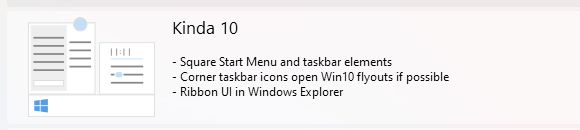
  2. There is a "Kinda 10" option as a theme you can select.
  3. You got that the wrong way around son. Submit it a report to ESET, this is Antivirus/Anti-Malware 101.
  4. Changelog for 3.3.3?
  5. Would be nice if there was an automatic check for updates feature. If not configurable, every 7 days would be nice.
  6. What's the difference between these icons that show twice plz? I've clicked on each of them and see zero difference. Also Tihiy could you add an option to allow configuring of HKEY_CURRENT_USER\Software\Microsoft\Windows\CurrentVersion\Explorer\Advanced\MMTaskbarGlomLevel ? Since MS has has removed the GUI option in Windows 11 to configure it at least for now.. is a nice quality of life option for many. Is there any chance of unlocking some extra transparency for the startmenu and taskbar? I want to see some of my background bleed through but even on the lowest setting I only see a little and on the taskbar it's almost imperceptible. Also any chance of not having the icons having their colors factor into the transparency? I think it makes more sense to only have the wallpaper/background colors come through.
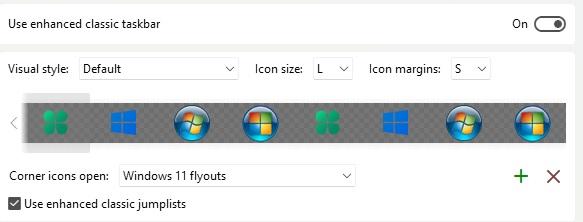
  7. Wihat's the difference between both sets of three icons for the start menu icon that look identical? From the clover rightwards.
  8. Would love to see some icon options for the notifications icon in the taskbar.
  9. Clicking on the Start Menu makes the Segments disappear into a normal taskar. 3.09c
  10. Ryrynz replied to Tihiy's topic in StartIsBack+
    Before upgrading to 11 should I uninstall Startisback 2.9.15 first or just install 11 and update to preview 2 afterwards? Cheers Also will the new version require re-licensing?
  11. Ryrynz replied to Tihiy's topic in StartIsBack+
    Same issue here as above.
  12. Ryrynz replied to Tihiy's topic in StartIsBack+
    Thanks Tihiy, I think for once 'Check updates' actually worked for me this time, seamless! Just wondering, is it a possibility to allow us to lock the quick launch icons so they don't move around? I think most people prefer them to remain in certain positions and would like to avoid them accidentally moving when being clicked on.
  13. Ryrynz replied to Tihiy's topic in StartIsBack+
    Could you add the ability to lock taskbar icons please like 7+ Taskbar Tweaker can do with disable_items_drag? Thanks.
  14. Ryrynz replied to Tihiy's topic in StartIsBack+
    If you change the start menu icon the right click power user menu launches up the top of the screen. This happened before 2.0 as well, nobody mentioned this? Pretty obvious bug.
  15. Ryrynz replied to Tihiy's topic in StartIsBack+
    Cheers. The color is still off a little though. If I use custom coloring for taskbar and start menu the start menu is a little bit darker. As a result I have to use 72% visibility for start menu vs 75% for taskbar. They should match percentages.

Account

Navigation

Configure browser push notifications

Chrome (Android)
  1. Tap the lock icon next to the address bar.
  2. Tap Permissions → Notifications.
  3. Adjust your preference.
Chrome (Desktop)
  1. Click the padlock icon in the address bar.
  2. Select Site settings.
  3. Find Notifications and adjust your preference.