




-
Yeah, that's a bug Fixed, re-download RC via same link. OK,u r so fast
-
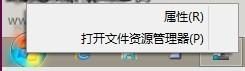
1.3rc1 bug the right-click menu shows diffient the line has turned to the characters right now like
-
what's this meaning?
-
对我个人而言,每次运行cfg.exe时检查有无新版本已经足够了 实在没有必要弄一个让人讨厌的大的提醒,而且这样也需要额外的进程和服务,实在是没必要 最好的就是维持现状 For me personally, the check for a new version of each run cfg.exe enough It is not necessary to get a big reminder annoying, and so also require additional processes and services, it is not necessary The best is to maintain the status quo
-
Use a scheduled task? no matter how to notify,I do not like any more extra services and processes running Maybe ,the now notification is enough , Updating is not a usual feature
-
Only when you run configurator. I may introduce checking in explorer as well, but i don't like obtrusive notifications (nobody does). Do you have an idea how to notify about new version if configurator is not running? no matter how to notify,I do not like any more extra services and processes running
-
It *IS* given at first installation and as well in FAQ. I may add a control panel item or start menu shortcut as well, but i hope it's not necessary. Not necessary at all
-
Nice work, 1.1RC , the right-click menu suits my system language now http://p13.freep.cn/p.aspx?u=v20_p13_photo_1211160922067112_0.png
-
Less is more! I think the best is totally like native win7 Start menu,enough the more features, the more complex
-
A feature missing
-
I don‘t think it's necessary
-
A feature missing
-
Good work! I will buy a key
-
yeh,this had mentioned many times before
-
It's same way in Windows 7 start menu, the color in the search box is not black. That's not true, only the "Search programs and files" is in gray, but typed text is black. That‘s true
