




Everything posted by Win9xFreak
-
So I have a Dell Optiplex GX110 and it runs Windows 98. I have tried to download ethernet drivers from Dell, but none seem to work. It is connected by an ethernet cable to a wireless repeater. I tried everything I could find on Dell's website, and it detected some 3Com thing and said the device was working properly. But when I opened K-Meleon or IE 6, none of them were able to connect to the internet. So is it a problem with the driver or the repeater?
-
Thanks to everyone for all their help. I knew that I made the right choice by coming here. So thank you all. :thumbup :thumbup
-
Thanks, I was getting annoyed that I couldn't find a driver. Also, is there a Sound Blaster Audigy 2 driver for ME? I don't have sound on ME either.
-
No unknown device shown in device manager. Just Dial-Up Adapter and 2 NDIS 1394 Net Adapters. Not sure what motherboard or video card I have, but I have an Intel Pentium D and 512 mb of RAM.
-
Anyone know where I could get a nvidia nforce ethernet driver? I would like to connect to the internet with windows ME if possible.
-
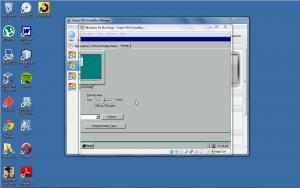
My real resolution is 1280 by 800. The resolution in the VM is 640 by 480. If I drag the window in the VM it keeps going and going and there is no end. I want to fix that so I am able to save my changed settings.
-
So I installed Windows 95 on Virtualbox. I wanted to fix the colors from 16 to 32 colors and have the highest screen resolution possible. I installed Scitech Display Doctor in order to combat this problem. After installing all the drivers and setting my monitor, I wanted to change my screen resolution and colors. I wen t to display properties but ended up with I never ending window and no way for me to press apply. Is there any way to fix this abnormal problem?
-
One detail I forgot to mention: I dual-booted ME and XP and on Windows XP I installed a nVidia ethernet controller (or something like that) so I guess that would be the brand. (I think...)
-
Does anyone here know where I could find an Ethernet driver for Windows ME??? I searched the internet for many but I could not find one that would allow me to connect to the internet. Can someone help me???
