Nomen
Content Type
Profiles
Forums
Events
Everything posted by Nomen
-
Is MSFN.org now practically unusable for win-98/Opera 12?
Nomen replied to Nomen's topic in Windows 9x/ME
Yes, I can't navigate between discussion groups any more, and my username/password login info is not being remembered. The "remember my login" check-box, when clicked on, does not put anything in the box but a bit of a shadow does seem to surround the box. So the functionality of the "remembering" part is not working, but I don't know where that is supposed to happen (on msfn or in opera?). As far as discussing this website issue here in this win-98/me group, or on the board devoted to website issues -> isin't it clear that this is an issue SPECIFIC ONLY TO WIN-9x/ME USERS? Isin't the continued functionality and any remedies or improvements that we can discover about how to continue to use msfn.org under win-98 best discussed IN THIS GROUP ?!?!?! Because it does not affect the wider internet community (using win-xp or 7, 8, 10, etc) ? -
Was there a change to the msfn site software about a week ago? I don't think any of the site navigation buttons/links are working any more under win-98 / Opera 12.02.
-
The test page is here: https://www.ssllabs.com/ssltest/viewMyClient.html I'mtrying to figure out if there's a problem with my FF2 configs - or if getting "www.ssllabs.com has sent an incorrect or unexpected message. Error code -12243" is normal/expected for FF2. The page says (after dismissing the error message) "Failed, probably due to firewall restrictions " and is showing that no TLS or SSL protocals are working (some say NO, some say Firewall). I'm not running any firewall. Opera 12.02 is saying TLS 1.3 (no), 1.2 (yes), 1.1 (yes), 1.0 (yes), SSL3 (yes), SSl2 (no).
-
Opera.exe (v 12.02 and v 12.18) work fine with Opera.dll (v 12.02). Both versions of Opera.exe give the Autoupdate error when used with Opera.dll v 12.18. (at least that's where I am right now). On the Opera discussion forum, regarding the autoupdate error: See if it thinks it has downloaded an update - if it has, delete it. On Windows 10 machine Opera 12.18 starts fine, but when asked to check for updates it said "Update check failed". Another post said to open up operaprefs.ini (in the profile folder) and look for "Level Of Update Automation=" and "Auto Update State=" and set them both to =0 if they're not already. If that doesn't solve the problem then try removing / renaming operaprefs.old and try restarting. I have operaprefs.ini in c:\windows\application data\opera and both of the above settings are indeed set to 0.
-
I'm at the point where opera.dll 12.18 - IP.41 says no patches needed, even if I select Walk Dependencies. But Opera throws the message "Autoupdate failed init: -2" and waits for me to hit OK, then it goes away. Which I guess has been seen before: This is with RASAPI32.dll from win-98. About the only thing left to try is the win-me version. My previous attempt with the win-2k version (5.00.2195.6920) of rasapi32 gave issues (IP.41) with rasman.dll, which I have in windows/system (again, win-2k version). I believe the issues with rasman.dll are because of ntdll.dll: [ntdll.dll] RtlStringFromGUID= NtSetValueKey= NtOpenKey= NtDeleteValueKey= RtlAppendUnicodeStringToString= RtlOpenCurrentUser= NtQueryValueKey= RtlGUIDFromString= RtlUlongByteSwap= RtlConvertSidToUnicodeString= Then again, I have no idea if fixing those, and using win-2k versions of rasapi32 and rasman.dll will get opera 12.18 working. What is this "Autoupdate" thing that Opera is trying to do? Any way to stop it?
-
I seem to have several psapi.dll files that don't give version information (files-properties): 4,608 bytes, created june 1/2015 5,120 bytes, created dec 14/2008 (this is in \windows) 12,288 bytes, created may 27/2015 (this is in \windows\kernelex) The psapi.dll contained in psapi3b.7z is 4096 bytes (and also has no version info) so I'm not sure where the above 3 that I have came from. I take it that this is the file I should have in \windows\kernelex ? I have a few other psapi.dll files, with version info, scattered around the system: 18,192 bytes (version 4.00) Windows NT 28,944 bytes (version 5.00.2134.1) Windows 2000 45,136 bytes (version 4.00) Windows NT (this is in \windows\system) Strange to see 2 different 4.00/NT versions. The 18kb one seems to be associated with InstallAware 8\plug-ins\MDAC. Here is what's in my k452stub.log file. The file was over 1500 lines - I sorted it and removed the duplicates: [K452stub] = Advapi32.dll:CryptAcquireContextW=z5 ;? = = Kernel32.dll:HeapSetInformation=z4 ;? = = Kernel32.dll:IsValidLanguageGroup=z2 ;? = = Kernel32.dll:SetDllDirectoryA=z1 ;? = I don't seem to have a Kstub822.log file.
-
Regarding Opera.dll 12.18, I'm at the point now where IP.41 is telling me: [Patches needed] opera.dll=Functions [IPHLPAPI.DLL] CancelIPChangeNotify= GetAdaptersAddresses= I get the same output regardless the setting for Process Delay imports. This is in my kex core.ini: [DCFG1] contents=Kstub822,std,kexbases,kexbasen,K452stub desc=Default mode I can see GetAdaptersAddresses is mentioned in kstub822.ini: [Iphlpapi.dll] GetAdaptersAddresses=>iphlpapi4: GetPerAdapterInfo=>iphlpapi4: iphlpapi4.dll is located in \windows\kernelex folder. I can see CancelIPChangeNotify is mentioned in Kexbases.dll and iphlpapi4.dll. I see *\IPHLPAPI.DLL in this registry key: HKEY_LOCAL_MACHINE\Software\KernelEx\AppSettings\Flags I see iphlpapi.dll in these registry keys: HKEY_LOCAL_MACHINE\System\CurrentControlSet\Control\InstalledFiles HKEY_LOCAL_MACHINE\System\CurrentControlSet\Control\SessionManager\KnownDLLs The data value for IPHLPAPI for the KnownDLLs key is IPHLPAPI.JMP. I'm not sure if I'm supposed to keep that reference to IPHLPAPI.JMP or delete the key. I have the file IPHLPAPI.JMP located in \windows\system folder (should it be in kernelex folder?).
-
I don't know if this is just new to me, or anyone else, but replacing Secur32.dll and IPhlpAPI.dll with XP-SP3 version does actually result in a workable win-98 system. I found one problem with an OCX file used by Trendnet IPviewSE program (web-cam software) is caused by IPhlpAPI, but Opera 12 and FF2 seem to work just fine. Swapping those files doesn't quite fix the issues with Opera.dll version 12.18 - I get a missing library error instead of "a device attached to the system is not functioning". So now I'm going to look into what file (looks like a DLL file) is missing. Also - note this: Win-98 version of secur32.dll is about 59 kb, and XP-SP3 is actually 3kb smaller, yet the XP version impliments more than double the number of functions. Almost all the extra functions are unicode (W) versions that the 98 dll doesn't (naturally) impliment. Has anyone thought of adding an ascii <-> unicode translator into Kex so that when a (W) function is called, Kex translates the call to Ascii and performs the function call using a native module (if present) ? Maybe there's a way to use unicows to do this? Edit: Ok, so ImportPatcher is saying "no problems found" with the 12.18 opera.dll, but if I walk dependencies I get: [Patches needed] PSAPI.DLL=Functions IPHLPAPI.DLL=Functions [ntdll.dll] NtStopProfile= NtSetIntervalProfile= NtStartProfile= NtWriteFile= NtQueryVirtualMemory= RtlGetNtProductType= RtlCreateUnicodeString= RtlxAnsiStringToUnicodeSize= NtDuplicateObject= NlsMbCodePageTag= RtlxUnicodeStringToAnsiSize= RtlAcquireResourceShared= RtlAcquireResourceExclusive= RtlReleaseResource= NtFreeVirtualMemory= NtSetInformationThread= NtQueryEvent= RtlCreateUnicodeStringFromAsciiz= ZwReplyWaitReplyPort= RtlCopyUnicodeString= ZwRequestWaitReplyPort= NtOpenEvent= ZwFreeVirtualMemory= RtlGUIDFromString= I have 2 different versions of psapi.dll. One in \windows (5kb, no version info) and one in windows\system (45kb, v 4.00). No idea if I should be using something else, or where it goes. Running IP against the 45kb version of psapi.dll gives these problems: [ntdll.dll] NtStopProfile= NtSetIntervalProfile= NtStartProfile= NtWriteFile= NtQueryVirtualMemory= Running IP against the XP version of IPhlpapi.dll gives these problems: [ntdll.dll] RtlReleaseResource= RtlAcquireResourceShared= RtlAcquireResourceExclusive= RtlGUIDFromString=
-
Verify.exe is 4.05.2016.17 and when run it says "Kernelex has been successfully installed and is now ..." Don't know if this is a factor, but my "c:\windows\" folder is really "c:\win98\" (ie, %windir% = c:\win98). kernelex.dll is version 4.05.2016.17. > At this time, the ImportPatcher executable must be named "ImportPatcher.exe" or ... Ah, that must be it. Mine was named "ImportPatcher.41.exe". I renamed it to ImportPatcher.exe. It is located in c:\win98\sendto. Running IP again against opera.dll v12.18, I get this: [Patches needed] opera.dll=Functions [Secur32.dll] InitSecurityInterfaceW= [IPHLPAPI.DLL] CancelIPChangeNotify= Running IP with Walk Dependencies + Link to patched copies gives the above, plus this: PSAPI.DLL=Functions [ntdll.dll] NtStopProfile= NtSetIntervalProfile= NtStartProfile= NtWriteFile= NtQueryVirtualMemory=
-
I've set Kex compatibility mode for IP.41 to be Vista. Kex compatibility mode for opera.dll (12.18) is set to default (should it be forced to something else?). This is what I get now. I put (in brackets) any functions that exist in kex stub files: [Patches needed] opera.dll=Functions [Secur32.dll] LsaGetLogonSessionData= (kstub822, kstub730) LsaEnumerateLogonSessions= (kstub822, kstub730) InitSecurityInterfaceW= (kstub822, kstub730) LsaFreeReturnBuffer= (kstub822, kstub730) [KERNEL32.dll] GetUserGeoID= (kstub822, kstub730, stubs.ini) GetGeoInfoW= (kstub822, kstub730, stubs.ini) [USER32.dll] SetLayeredWindowAttributes= (not present in any .ini file) [IPHLPAPI.DLL] CancelIPChangeNotify= (not present in any .ini file) Why are the above functions in Secur32 and Kernel32 being flagged by IP? They are not being picked up, even though they exist in the stub files. What about SetLayeredWindowAttributes and CancelIPChangeNotify? (edit): If I select Walk Dependencies in IP, it looks like PSAPI.DLL has an issue, and I see 9 functions that show up under ntdll.dll that I didn't see before. I still see the same 8 functions that are listed above.
-
I downloaded Kexbeta.17 and copied the 7 files it contained over into my c:\windows\kernelex folder (over-writing the existing files). Restarted, and ran IP.41 on the opera.dll (12.18). I get this: [Secur32.dll] LsaGetLogonSessionData= LsaEnumerateLogonSessions= InitSecurityInterfaceW= LsaFreeReturnBuffer= [KERNEL32.dll] GetUserGeoID= GetGeoInfoW= [USER32.dll] SetLayeredWindowAttributes= [IPHLPAPI.DLL] CancelIPChangeNotify= My stubs.ini (and kstub730.ini) contains GetGeoInfoW=z5e GetUserGeoID=t1 My kstub730.ini contains InitSecurityInterfaceW=z0 LsaEnumerateLogonSessions=t2 LsaFreeReturnBuffer=t1 So I shouldn't be seeing those in Import Patcher - right? But I am. > For now, use Kexstubs.dll with the definition: SetProcessDEPPolicy=f1e50 Where do I put that?
-
This is what Import Patcher is telling me: [Secur32.dll] LsaGetLogonSessionData= LsaEnumerateLogonSessions= InitSecurityInterfaceW= LsaFreeReturnBuffer= [KERNEL32.dll] GetUserGeoID= GetGeoInfoW= [USER32.dll] SetLayeredWindowAttributes= [IPHLPAPI.DLL] CancelIPChangeNotify= Which you will note is a little bit different than what abcdefg posted above. This is for the 12.18 dll file. I am using import patcher with Start dependency search in local, Test by loading (Kex), and Process delay imports checked. I get *No Problems Found* when running the same analysis on the 12.02 opera.dll. Why so few issues (or no issues in the case of 12.02) when Dependency Walker shows many issues (missing functions) ??
-
No youtube for Win9x/ME users without KernelEX anymore now?
Nomen replied to schwups's topic in Windows 9x/ME
If you take your standard youtube link, which looks like this: "www.youtube.com/watch?v=(video-id)" I find that I can typically always play it in either FF2 or Opera 12.02 if I change the link to this: "www.youtube.com/v/(video-id)". Now that said, I've got 2 win-98 systems, and one of them I can seem to play youtube video's in the first format on opera 12.02 and I don't get the "your browser does not currently recognize any of the video formats available" message. If I right-click on the video and select "get debug info" I see a lot of garble-dee-gook and nothing obvious telling me what version of flash that my Opera is using (I'm assuming that flash is used somehow). So if anyone knows how to find out what Opera is using to play these video's, I can then figure out how exactly my one system is still able to play them in "native" (window'd) format. -
I'm looking into the differences between the version 02 and 18 of opera.dll and was wondering if the Watson thing will tell you (in detail) why a dll fails to load. There are about 130 functions being called in the version 12.18 that are not being called by the 12.02 file that are flagged by DW, and another 100 that are also flagged but are called by both versions (so I'm thinking they're not the problem). If Watson is of no use in this case - is there anything else?
-
We are not talking about your patches. We are talking about differences "under the hood" between 98 and ME. User GDI resources / heaps - how does ME differ vs 98? Yes, I recall ME's usable RAM was almost 2 gb- that should be included in the Wiki ME page. That is a useful advantage ME has over 98. Also would like to know if ME is better able to handle (defrag, fix, compress or optimize) large registry files compared to 98. And my tangent question still stands - was anything done to see if ME's TCP/IP stack could be transplanted into 98? (drive-size limitation is moot. Give either a 9x or ME system a PCI SI-based SATA card and use SI drivers and you're fine with large drives. Macro$haft should have fixed ESDI_506.pdr for 9x/me since they were both under mainline support in 2001/2002 when XP's 137 gb drive limitation was fixed, but we know why MS never did that don't we?)
-
https://en.wikipedia.org/wiki/Windows_me That will tell you a lot about how ME differs from 98se. Seems that a lot of emphasis was put on minimizing boot time. Some of the more relavent items: ________ The registry is loaded only once; for efficient loading, the registry is split into three files instead of two (SYSTEM.DAT and USER.DAT), with the new file CLASSES.DAT containing the contents of the hive HKEY_CLASSES_ROOT required for boot loaded initially. Windows ME is the only operating system in the Windows 9x series that includes generic drivers for USB mass storage devices and USB printers. The waveOut, DirectSound, and DirectShow APIs support non-PCM formats such as AC-3 or WMA over S/PDIF Net Crawler: Windows ME introduced a net crawling feature which automatically searches out and creates shortcuts to network shares and printers in My Network Places. New TCP/IP Stack: Windows ME includes the Windows 2000 networking stack and architecture which was known to be more reliable, full-featured, stable and offered better performance. System Configuration Utility allows users to manually extract and restore individual system files from the Windows ME setup files. It has also been updated with three new tabs called "Static VxDs", "Environment" and "International". The Static VxDs tab allows users to enable or disable static virtual device drivers to be loaded at startup, the Environment tab allows users to enable or disable environment variables, and the International tab allows users to set international language keyboard layout settings that were formerly set via the real mode MS-DOS configuration files. A Cleanup button on the Startup tab allows cleaning up invalid or deleted startup entries. Windows ME restricted support for real mode MS-DOS. As a result, IO.SYS in Windows ME disregards CONFIG.SYS, COMMAND.COM and WIN.COM and directly executes VMM32.VXD. In its default configuration the system would neither boot into an MS-DOS command prompt nor exit to DOS from Windows; real mode drivers such as ANSI.SYS could not be loaded and older applications that require real mode could not be run. Microsoft argued that the change improved the speed and reliability of the boot process. ________________ What could have really significant relavence is if ME has increased User and GDI resources compared to 98se, or has increased the amount of accessible / usable system RAM, or could better deal with registry files that over time get really large. While the fact that ME's TCP/IP stack is taken from Win2k (which I assume is a moderate advantage), and I believe that NUSB gives 98 equivalence with ME in terms of using generic USB mass storage, (and note the downside for ME to be able to boot into DOS is the user so chooses, except probably by way of a boot floppy), -> ME would be killer compared to 98se if it increased User / GDI resources and raised the bar on installable ram. It would be super-killer if it supported multi-core (or at least 2-core) CPU's. I guess it's also noteworthy that ME, neither out-of-the-box or by way of MS updates (as was done with XP-SP0), was ever given a fix for the 137 gb drive-size limitation. So the ME vs 98se question has no clear-cut answer, unless I'm wrong about some of the items above. Side question: Was anything ever done to see if ME's TCP/IP stack could be transplanted into 98se?
-
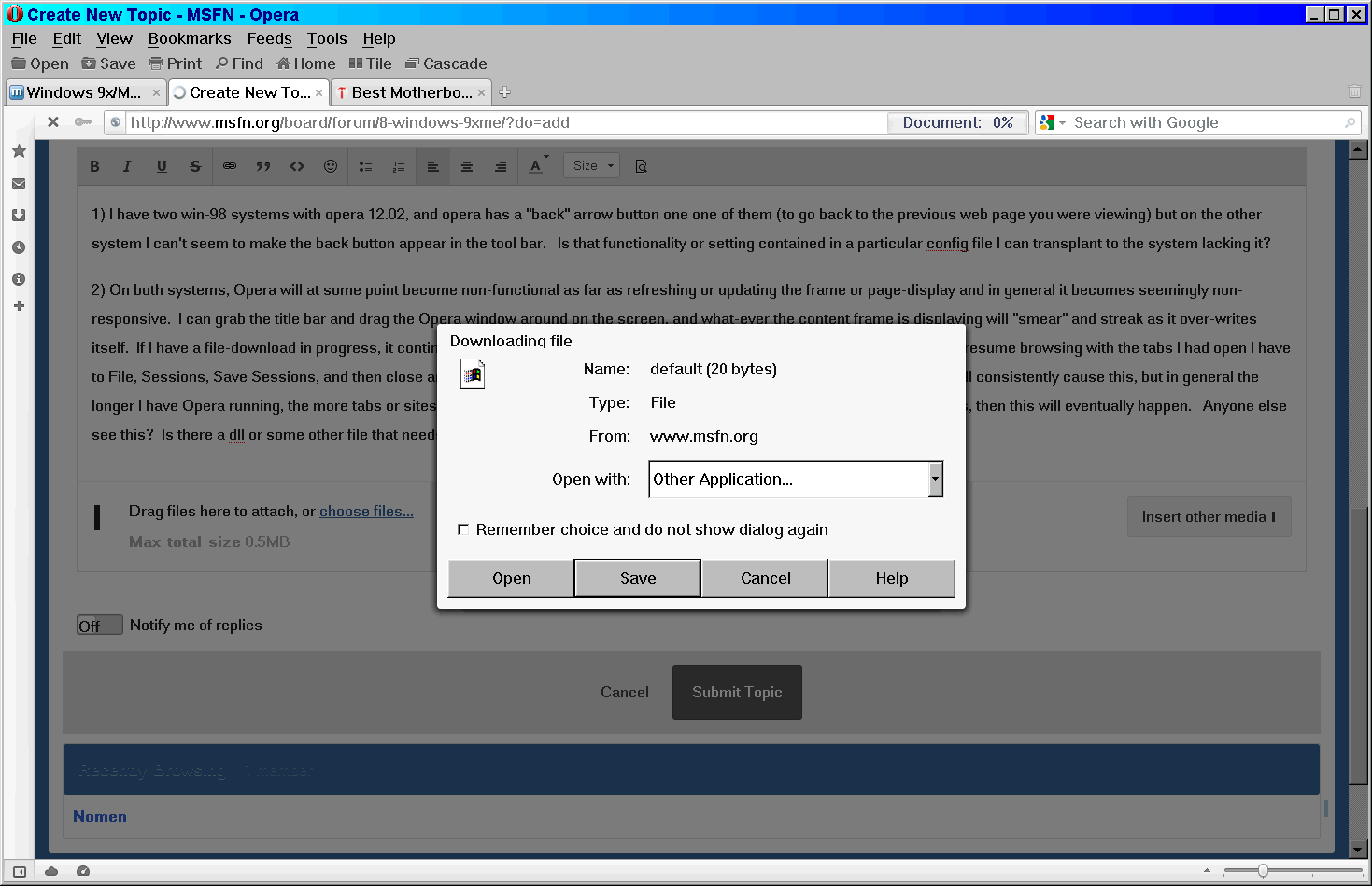
Every time I submit a post to msfn, after hitting the "submit reply" button, this is what I see:

-
1) I have two win-98 systems with opera 12.02, and opera has a "back" arrow button one one of them (to go back to the previous web page you were viewing) but on the other system I can't seem to make the back button appear in the tool bar. Is that functionality or setting contained in a particular config file I can transplant to the system lacking it? 2) On both systems, Opera will at some point become non-functional as far as refreshing or updating the frame or page-display and in general it becomes seemingly non-responsive. I can grab the title bar and drag the Opera window around on the screen, and what-ever the content frame is displaying will "smear" and streak as it over-writes itself. If I have a file-download in progress, it continues with no issues. The options on the title bar remain active, and if I want to resume browsing with the tabs I had open I have to File, Sessions, Save Sessions, and then close and re-start Opera. There is no specific set of operations I can perform that will consistently cause this, but in general the longer I have Opera running, the more tabs or sites or pages I view, the more I switch between Opera and other running programs, then this will eventually happen. Anyone else see this? Is there a dll or some other file that needs updating?
-
Yea, I was trying that a few times yesterday, but each time it said no adapter found. But today for some reason it found it, so I had the same adapter listed twice, as (1) and (2). There isin't much in the properties for them, but the one difference was that one of them said "Slot 0/3" and the other said "Slot 1/8" or something like that. I had the card plugged into the fourth PCI slot (counting from the AGP slot) same as it was in the original motherboard, but I guess the numbering ended up different - I'm assuming that slot means PCI socket number. After a while I removed the first adapter entry. In win-98, if you have no hard-drive controller driver, then it will use DOS "compatibility" mode to access the drive, which is a lot slower. Does NT4 do the same? How do I know if NT4 is using a "32-bit" driver to access the IDE drive in the most optimal way that the hardware is capable of? Seems that the drive controller is showing up as a "SCSI" device if I'm seeing this correctly. (remember, I did run the IAA file and I think it did install) Also - I take it that I am now able to clone this NT4 install (currently on an 80 gb drive) to larger IDE drive if I so desire - or am I limited (is NT4-SP6 limited) to 137 gb total drive size? Beyond having working video and network adapter, and NT seeing all the 2 gb ram in this system (it had 1 gb in the previous system that died) I'm satisfied that this system can continue to do it's server job on this motherboard. Certainly way more horsepower now vs before (P3-800 mhz vs P4-2.5 ghz). I don't need USB or sound, but I am curious if USB could work in this new setup. Also - how to I get Explorer detailed folder-view to be the default? Doesn't seem to be anywhere to set that. Is there a registry entry for this?
-
I must need something for NT to see the PCI bus - no? Like I said, NT was using a D-link PCI ethernet card on the BX440 motherboard, and I moved that card to the i845 board and NT did not see the card, even when I try to "add" the card again it says there is no such card on the system. How does NT show me what hardware it has loaded drivers for? It seems quite primitive compared to all other windows versions.
-
An inductor on an old Epoc BX440 motherboard had the bad taste to fry itself today, possibly because of two nearby capacitors that might have failed. I cloned the 80 gb drive (running NT4) and tried to get it running on any spare working board I can find. I have some old 661V31 boards, but can't get a bios on them that recognizes a drive that large. So I put the drive on a Soyo 845GV/PE board, and NT booted up but in VGA mode. I found an NT4 driver for the integrated Extreme-2 graphics adapter, but that's all I can find. When NT was running on the Epoc board, it had a D-link 530 giga-bit network pci card, so I threw that on the Soyo (disabled the Soyo on-board lan) and tried re-installing the D-link driver (have-disk method) but it can't find the card. I find scant evidence that there are / were NT4 drivers for some 845-based motherboards, but can't locate any corresponding driver files. I did find an Intel Application Accelerator that claimed to be for 845 and NT, and ran the file but got no real confirmation or indication that it did anything after it finished doing stuff and wanted to re-boot. Anyone know if there are 845 chipset drivers for NT4? Sitting on some obscure server out there, somewhere? Or is there a way to hack the win-2k INF files?
-
I'm posting this here in win-7 because in the end, the article is more relevant for that OS in a funny, yet sad way. And also because I like to poke win-7 in the eye every once in a while... ============ Blue screen of death saved Windows XP from WannaCry ransomware, say security researchers Researchers suggest WannaCry attacks against most Windows XP systems failed to install the ransomware payload -- but crashed systems while trying. May 31, 2017 When WannaCry hit the world in mid-May, much focus was put on how the widespread use of the out-of-date Windows XP operating system helped it spread so fast. The UK's National Health service was one of the highest-profile victims of the cyberattack -- and many of its bespoke systems still rely on Windows XP -- while Microsoft were quick to release a security patch for the long unsupported operating system. And while Windows XP systems were among those affected by WannaCry, later analysis suggests that 98% (it had to be 98% eh?) of victims were running Windows 7. But that's not to say WannaCry wasn't problematic for targets using Windows XP, with a new report by cybersecurity researchers at Kryptos suggesting that while the operating system was mostly immune from falling victim to the ransomware, many failed attacks resulted in computers crashing and displaying the 'blue-screen of death' and requiring a hard reset (oh, the horror - a hard reset) Researchers tested WannaCry ransomware against a number of operating systems running in a test environment: Windows XP with Service Pack 2, Windows XP with Service Pack 3, Windows 7 64 bit with Service Pack 1, and Windows Server 2008 with Service Pack 1. While attacks against Windows 7 successfully installed WannaCry, after a number of attempts the supposedly vulnerable Windows XP was much more resilient to the ransomware than expected, with the OS running Service Pack 2 not becoming infected at all. However, Windows XP running SP 2 was affected, but rather than becoming infected with WannaCry and requesting a ransom in return for locked files, the system kept blue-screening and rebooting itself. "The worst-case scenario, and likely scenario, is that WannaCry caused many unexplained blue-screen-of-death crashes," say researchers. While this phenomenon will have no doubt been frustrating for organisations which found their machines repeatedly crashing, at least they hadn't been infected by ransomware. http://www.zdnet.com/article/blue-screen-of-death-saved-windows-xp-from-wannacry-ransomware-say-security-researchers/
-
Oops - I mean Opera 12.02.
-
> KB2670838 is only required when installing either IE10 or IE11, not IE9. > plus there's KB2834140, which provides a fix for KB2670838. My Win-7 SP1 install image (created with RT7) I believe currently contains both 2670838 and 2834140. Because my install image also includes IE 11, you're saying I can remove 2670838 and keep 2834140 - yes? > KB2670838 is no longer "evil" - it was only evil when installed on laptops > with hybrid or switchable amd/intel or nvidia/intel graphics adapters using > outdated graphics drivers. The Dell laptop that I use for my test platform does indeed have both Intel and Nvidia graphics adapters, and I'm pretty sure that my win-7 install image has the most recent Nvidia / Dell drivers. > to answer pointertovoid's question about servicing stack updates, > install either KB3020369 or KB3177467 servicing stack update first > before any other update. I see that my install image does have 3020369, and not 3177467. I find that windows-update queries seem to complete just fine, taking maybe a few minutes.
-
Opera 2.12 and the 20-byte phantom "default" file Sometimes while browsing sites with Opera 12.02, and often on msfn, I click on a link and Opera asks me what I want to do with file "default" (20 bytes). I can either open it, or save it, or just cancel. When I save it, I end up with a zero-byte file. A recent example: I had a notification that someone replied to one of my posts. The URL for the reply was this: www .msfn .org/board/topic/176709-win7-post-sp1-patches/?do=findComment&comment=1139680 When I click on the URL, or if I right-click and copy the URL and try to open it in a new tab, Opera does the same thing - tells me that I've got to choose what to do with file "default - 20 bytes". The same thing happens immediately after I post something. The post obviously goes through regardless if I download this phantom default file or if I tell Opera to cancel. Any ideas what's causing this? I can open the URL with FF 2.0.0.20 for what that's worth, without FF seeing or asking me about this "default" file, and in it's own fractured way will display the page.