



Skip to content
View in the app

A better way to browse. Learn more.

MSFN

A full-screen app on your home screen with push notifications, badges and more.

To install this app on iOS and iPadOS
  1. Tap the Share icon in Safari
  2. Scroll the menu and tap Add to Home Screen.
  3. Tap Add in the top-right corner.
To install this app on Android
  1. Tap the 3-dot menu (⋮) in the top-right corner of the browser.
  2. Tap Add to Home screen or Install app.
  3. Confirm by tapping Install.

cindy914

Member
  • Joined

  • Last visited

  • Country

    Canada
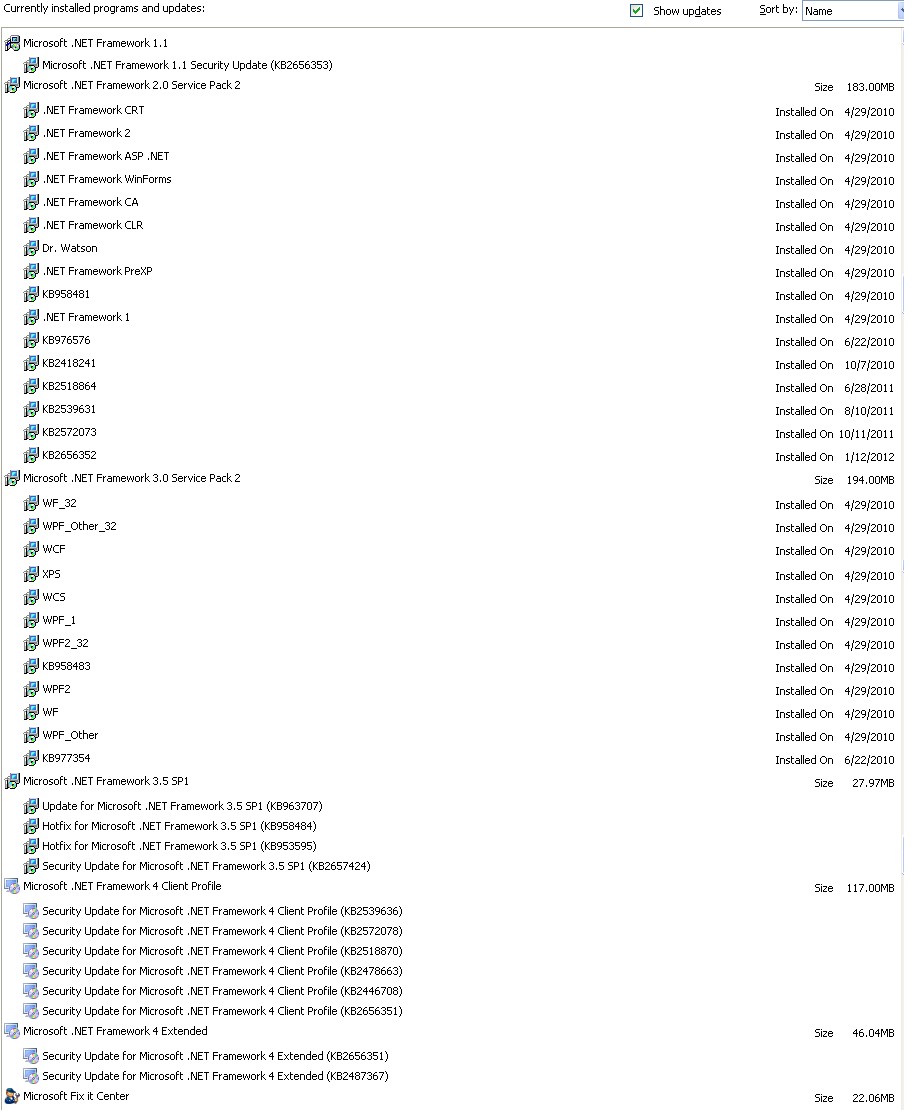
  1. Hello ~ Hoping to find some help here. I have a problem with KB2657424 constantly updating. I get the automatic Windows Update almost immediately after having run it. I went into Windows Update online and tried it from there thinking perhaps that would make a difference. It didn't. Even Windows Update, although it shows this update being SUCCESSFULLY updated numerous times over the last month, it will still ask me to install it again. I have tried Microsoft Fix It to no avail. I have made sure that everything else having to do with .NET Framework is up-to-date. I am attaching a photo of all of the .NET Framework items which are currently installed on my XP SP# system. Any suggestions as to how to get this update actually successfully installed would be appreciated. Thank you! ~ Cindy
Account

Navigation

Configure browser push notifications

Chrome (Android)
  1. Tap the lock icon next to the address bar.
  2. Tap Permissions → Notifications.
  3. Adjust your preference.
Chrome (Desktop)
  1. Click the padlock icon in the address bar.
  2. Select Site settings.
  3. Find Notifications and adjust your preference.