




Everything posted by opakedragon
-
im working with an sp0 vista image. I just did some more research and apparently you cannot slipstream sp1 into vista safely. I vaguely remember seeing a way to download some .exe's from microsoft and make your own iso's. I may have to look into this.
-
I need to modify windows vista and 7 images. I currently have waik for windows 7 installed. dism doesnt like vista so how do I fix this. I understand that I cannot use windows 7 waik to modify a vista image but I dont want to lose the ability to modify 7 images. How do I do this? Thanks for your help!
-
Hi. I am having some difficulty unattending my windows 7 dvd. I want to put a few application installers on the dvd and run them from there without copying the installers to the hdd. I cannot seem to find the right path variable (if thats what I need). Help would be greatly appreciated!
-
would I be able to remove the images I dont want from the dvd to save space? or does that not work?
-
I was wondering if anyone knew what the differences were between vista home premium disc and an ultimate disc? I know that I can install home premium with the ultimate disc, so can I change the ultimate disc to install home premium only? would it be the same procedure for x86 as x64?
-
For Vista does the sp2.ulz from http://www.windowsupdatesdownloader.com/ include the sp1 updates? Does Service Pack 2 include all the updates since Service Pack 1? or are there updates in between (a friend seems to think so)? help is greatly appreciated! EDIT: Ok so I am a little confused are the critical updates in each of the ulz from before or after the service packs in the ulz?
-
Ok I really dont like to use other peoples programs for installing updates because I never know exactly what liberties they took to create the final product. I was wondering if anyone knew how to apply updates to the 3.5 sp1, without the use of a user made program? Im looking for something similar to this: For me this tutorial worked great for installing and integrating .NET Framework 1.1 + updates. I have done countless searches to find the answer to my question but I keep getting links to how to use some persons premade program instead of a tutorial on how to do the work yourself. Thanks for any help!
-
For my purposes I need to have all .net framework versions + their updates installed. Im still trying to figure out exactly how to do that though. From what I have read I gather that i need to do all of the updates and versions in order or things get fudged up. I also need to make them all unattended but that is a different thread. Thanks guys.
-
Thank you!
-
I cant find what switches there are for either of these "AVG 2011 Internet Security" or "Emsisoft Anti-Malware 5.1" so that I can silent install them. I intend to create a switchless installer and create a cab file to be slip streamed for each of them.
-
I appreciate the help. I meant the addon, could I do something to get rid of WGA and still have a valid copy of xp?
-
Hi so I am getting a little confused about the .NET Framework situation. Do I have to install all of the versions and updates individually? or will installing the latest version install everything at once? This is important because I don't want to install an earlier version that will be installed again anyway and I need to know what to do. Thanks!
-
So i just create a cab file with folder structure: $OEM$\$$\SoftwareDistribution\DataStor.edb and treat it as a regular add on? Or can I just replace the DataStor.ed_ in the Microsoft Update cab (that I am already integrating into the slipstream) with the renamed from DataStor.edb from that link?
-
So i just create a cab file with folder structure: $OEM$\$$\SoftwareDistribution\DataStor.edb and treat it as a regular add on?
-
Do you mean from inside Windows Update/Microsoft Update just click the plus sign to expand the update info then check the box don't show this update again. That's it. Quicken2k I did mean from within Microsoft Update but i also meant from slipstream (i realize now that I only mentioned slipstreaming in the title sorry) so that its hidden before xp is installed.
-
how does one hide an update from microsoft/windows update? I dont like a few updates and i dont want them showing up next time i do updates.
-
Last Session.ini Do you know if I use the add-on: WGA Validation Add-on - v1.9.42.0 from http://win-x.co.cc/updates.html will I have problems with it "contain[ing] code to suppress the appearance of WGA Notifications (KB905474) from Windows Update." Is there a way to get rid of it and still update without a problem?
-
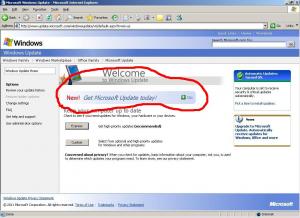
First off Thanks for responding. Also I have read a few of your posts specifically and they have been very helpful in understanding how to slipstream. Ok so I am trying to slipstream all current updates for windows xp pro, but I am a stickler for details and dont want to just ignore the Windows Genuine Advantage Notification update like the site suggested. So I need to figure out that issue but its not terribly important. I also ran into another problem and I was wondering if anyone knew the answer to it: Microsoft Windows Update is still out of date and I am not sure how to resolve it. I hope this explains it well enough
-
Hi guys i was wondering (since the search keywords for this bring up far too many results) if anyone knows how to update the updating software within xp? I followed this site http://win-x.co.cc/updates.html to slipstream with nlite. i excluded the WGA Notification suppressing update I dont know if that makes a difference. Any help would be appreciated.
