Everything posted by mainpage
-
This and nLite
-
That is what I was thinking of. But it looks a little to complicated for me
-
Alright will do, Thanks.
-
Can SFXMaker create switchless/silent installers for .NET Framework ?
-
Can I download the offline installer from MS and then instruct the installer to use the passive switch or silent ones? I've read that there is some tool that makes them silent if you have the install packages. But I can't seem to find out what its called
-
mainpage, open a Run dialog, enter msiexec and it will tell you all the switches. Enjoy, John. Is there a way to tell the installer what command to use?
-
mainpage, I know nothing about SFXMaker 1.2, but assume if it can create silent installers, it can handle .NET. You need to asked a forum on the installer for an answer. The switches I use for installing .NET are here: dotnetfx35.exe /Passive /NoRestartI think if you change the Passive to Silent it will be completely quiet, but I prefer to see something is happening. Enjoy, John. Is there any way to use switches with the regular MS installer? I like to see the dialogs as well
-
And if it can... what are the commands/switches?
-
"a-i-o" All in one? So I would have to... integrate all of them into one package
-
Which one of these would I need to have a up to date .NET Framework? I've read that all the framworks are cumulative, so that would mean that 3.5 SP1 should only be needed then. But theres some conflicting things I've read saying that 1.1 and 4.0 are totally different and programs needing 1.1 wont work with 2 and 3 and ones needing 3+ have problems with 4. Are there any nLite addons? 'cause I'd prefer using nLite addons instead of RyanVM packs.
-
I'm having some trouble integrating this How exactly am I supposed to integrate it? just the installer file? or the .INI along with the installer? When I include the .INI, nLite reports it as being roughly 7GB's.
-
Thanks. Yeah I totally forgot to use the search *facepalm*.
-
Could anyone make a addon of uTorrent Alpha 2.1 uTorrent Project Falcon ================ I have most of these as RyanVM Integrator switchless installers, but after I'm done using nLite they seem to break and aren't installed. So if anyone could make them as nLite addons that would be awesome. 7-Zip - filled Auslogics Disk Defrag Auslogics Disk Defrag Screensaver CCleaner - filled FCleaner Game Booster ImgBurn - filled Revo Uninstaller - filled Firefox - filled VLC - filled Skype Opera 10.53 - filled Sumatra PDF - filled Speccy Tweak UI - filled OpenOffice 3.2.0 WinDirStat System Explorer VirtualBox
-
I'd would appreciate that a lot. It will take awhile though... my upload sucks. Do you need the shell.dll's and the .msstyles or just the styles?
-
I'll do that. Thanks for all your help anyways on everything else. It's just that I've spent the last 2 weeks on this and its frustrating that the only thing holding me back now is the cosmetics
-
Hmm, could that be the problem? I had all the themes on a previous install and I just bulk transferred anything with the .msstyles name and none of the shell.dll's. EDIT: I re-downloaded all the themes and moved them into separate folders. Most of them integrated, but for some reason only about half of the ones that did show up in the desktop properties theme dropdown menu. Any ideas how to make others be included in it?
-
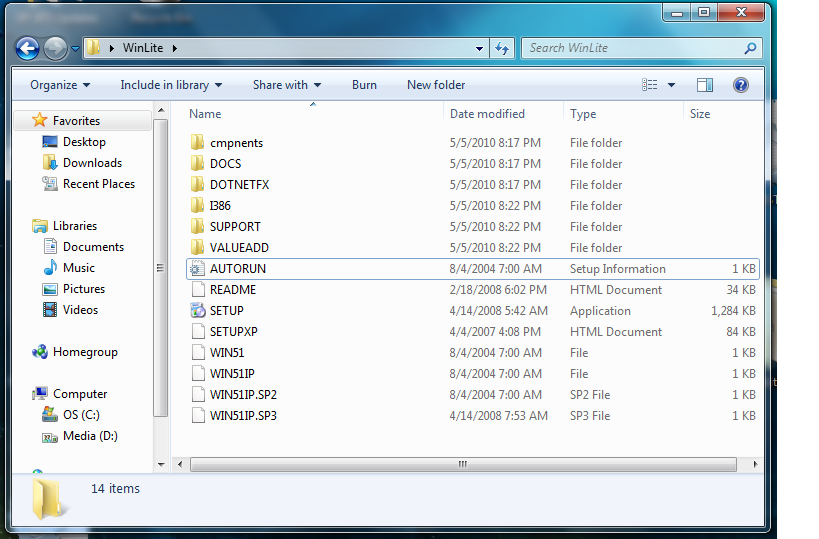
There isn't a "NLITE.IN" file in the source. though there is in the copy's that I modified with nLite. The theme files I'm using are .msstyles, is there a way to include cursors and a wallpaper in the unattended options anywhere? Thanks for all the help so far
-
Oops.. if this is really the case, I would ask for my money back. AFAIK, computer stores aren't allowed to release their own builds into retail sale, let alone that store is not allowed to use nLite for any purpose like this. How will you know that something else, e.g. a theme isn't also integrated (and is now causing you problems)? AFAIK its only the SP that was integrated (judging from tutorials on the net the files and folders are the same) They only sold it to me after I could prove that I had a valid XP license. I tried integrating the themes last night and 1 theme will integrate successfully, but more than 1 and I get the same error (going to be a real PITA to move em all to separate folders ) Also is there any way to make registry tweaks to the image? I use this and this and doing it manually takes away from the glory of a unattended install.
-
I'm not integrating a SP, but I think the image has SP3 slipstreamed using nLite since the name of the CD (which the computer store said was a retail SP3 disc) was the same as nLite's default ISO name (WinLite). Should I move the themes into different folders instead of having them in 1? and try to make the ISO under XP? UPDATE: I made a ISO in XP and 1 theme integrated successfully, I'll post later if all of them work.
-
Haven't been able to find a IE8 install pack/ switchless installer I use WMP11 Integrator
-
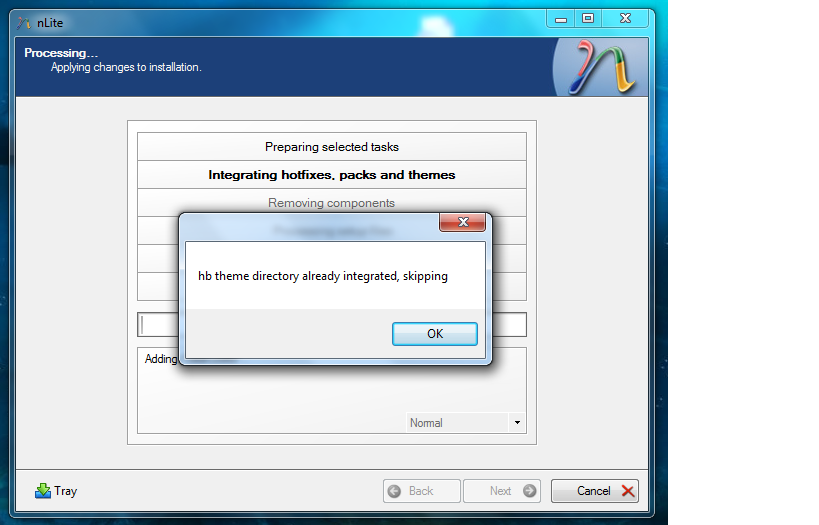
Here's a screenshot of the message and the preset. new.ini
-
I have the source image copied and I make copy's from it... Whenever I need to tweak it a little more, I delete it and make another copy (recycle bin is filled with old images )
-
He wanted to know if there was something that you could boot from to erase the HDD
-
Whenever my install hangs I use Darik's Boot and Nuke (DBAN) Just boot from the CD and set it to auto and wait til its done. Always works for me
-
I moved the theme files off the desktop and into a separate folder. But now I have a box that says: theme file already integrated, skipping. I have to OK the box whenever a new theme is being added.