-
Windows Registry Editor Version 5.00 [HKEY_CURRENT_USER\Software\Microsoft\Internet Explorer\Main] "SearchMigrated"=dword:00000001 "RunOnceHasShown"=dword:00000001 "RunOnceComplete"=dword:00000001
-
So if I get this right reverse method doesn't change a thing unless you want to remove components from Vista original? In either case, you have the SP1 uninstall backup files? But can use Vsp1cln.exe cmd before you recreate iso?. I'm asking this because i had the issue were I could not use the Fax scan folder because for some reason it had been moved (I think this is an issue if you change languages). The fix was to delete the fax folder and Vista recreates it, but after that move (I repro'd it) it takes 1:40 to get to desktop with a a quad core 64 bits (a BIT unusual if you pardon my pun ). The savings is most likely with the (dll hell) files Winsxs folder, yes?? Thanks Nuhi or other vLite brains here
-
yes .... u shouldnt remove windows media player...... Hi, Fixed. Don't touch it, add your Win updates (including Media Player) and it works
-
Hey all, been a while. well, here with the latest version, Movie maker missing files. wmidx.dll wmasf.dll gotta clue???
-
Hi all, will this version work with net framework 3.0?? Thanks,
-
this is what i do open nlite select service pack hotfixes options slip sp2 choose ryanvm pack, powercalc and tweakui, select advanced, and tick all options go to patches screen in options, disable sfc (so cat files are removed -touch nothing else for now) do nite process.. close nlite open nlite, remove, add drivers, unattended, options, tweaks and iso Man it seems more complicated to make sure all thingnys work. Must be a simpler way??
-
Ou lala un vrai Québecois!!! Salut mec!!
-
Afaik FullUnattend and ProvideDefault work the same way as long as all needed infos are correctly provided. Do you have a password for your "Administrateur" session ? If you want a blank one, there's now an option in nlite. I had default hide and it asked for the computer name. As soon as I retried and used full unattented I did not get the the computer name window. B) No I never use a password. It's a waste of time in my opinion. I use PGP instead to protect my files. What is NoWaitAfterTextMode = 1 NoWaitAfterGUIMode = 1 for???
-
Man I must of made dozens of nLite cds, and I made a simple error like and it got me all screwed up. Just goes to show that a simple mistake in computing can lead to all sorts of mishaps!! Thanks lennierv. Also thanks to camarade_ Tux for your time and patience.
-
I think you have it!! I forgot to choose full unattended and got that error I will try again and try to remmber to use full unattended.
-
There you go!! WINNT_1.SIF
-
Here it is. Thanks. The other .ini is in the first post. Last_Session_u.ini
-
-
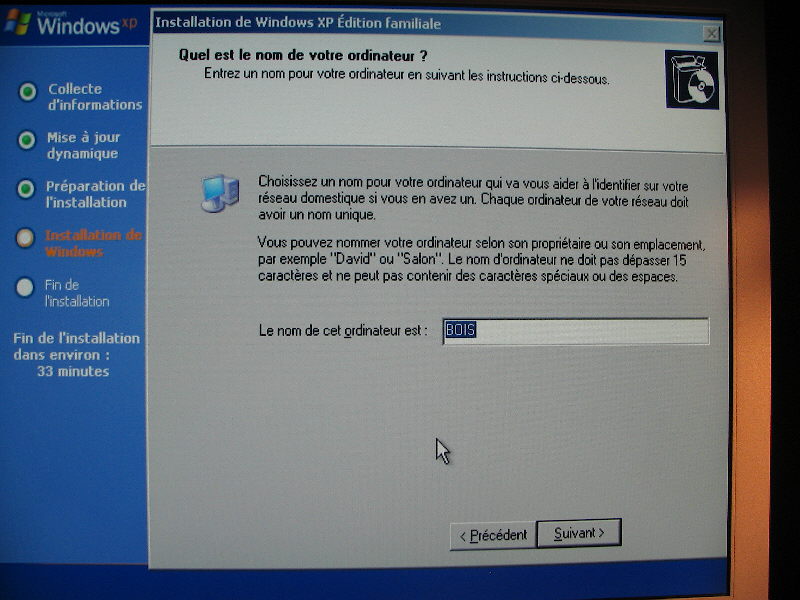
Hey ho all!!!! Nuhi we love you!!! (no I'm not gay) OK here we go, Windows XP home French version. I created an nLited version with very little changes. On cd creation I gave the computer name bois (wood in French). I also tried maison (Home in French) On each install I was asked the name of the computer, but the window showed the created name. All I had to do was press enter and instalation continued. Can anyone tell me why install stops on that window, I don't change a thing,click enter and install continues??? Go figure!! Last_Session.ini
-
Yo all, anyone know what is causing Acrobat reader to show text in weird shapes like Chinese or what?? Someone notice what is removed to cause this?? Thanks, B)