Skip to content
View in the app

A better way to browse. Learn more.

MSFN

A full-screen app on your home screen with push notifications, badges and more.

To install this app on iOS and iPadOS
  1. Tap the Share icon in Safari
  2. Scroll the menu and tap Add to Home Screen.
  3. Tap Add in the top-right corner.
To install this app on Android
  1. Tap the 3-dot menu (⋮) in the top-right corner of the browser.
  2. Tap Add to Home screen or Install app.
  3. Confirm by tapping Install.

BaByDraGon

Member
  • Joined

  • Last visited

  • Country

    United Kingdom

Everything posted by BaByDraGon

  1. Ok sorted thanks ppl !
  2. Sorry about the thread title.. BTW i've done wot u've said but still get same error?
  3. Wheres the opition for starcraft? I was made just a little before warcraft (1997) and its a very gud game !
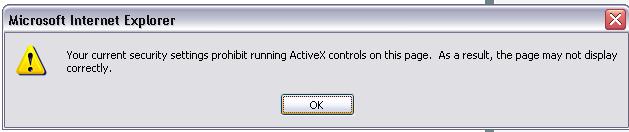
  4. Help please i keep getting this..
  5. Ok i've just got windows server 2003 but i don't understand why i can't log onto my hotmail? I've tryied hotmail.com and clicking the mail icon on msn but nothing works. Its just a blank screen and it says page done at the bottom. Also how come after about 30 secs my games turn off?
Account

Navigation

Search

Search

Configure browser push notifications

Chrome (Android)
  1. Tap the lock icon next to the address bar.
  2. Tap Permissions → Notifications.
  3. Adjust your preference.
Chrome (Desktop)
  1. Click the padlock icon in the address bar.
  2. Select Site settings.
  3. Find Notifications and adjust your preference.