



Skip to content
View in the app

A better way to browse. Learn more.

MSFN

A full-screen app on your home screen with push notifications, badges and more.

To install this app on iOS and iPadOS
  1. Tap the Share icon in Safari
  2. Scroll the menu and tap Add to Home Screen.
  3. Tap Add in the top-right corner.
To install this app on Android
  1. Tap the 3-dot menu (⋮) in the top-right corner of the browser.
  2. Tap Add to Home screen or Install app.
  3. Confirm by tapping Install.

infrin

Member
  • Joined

  • Last visited

  • Country

    United States
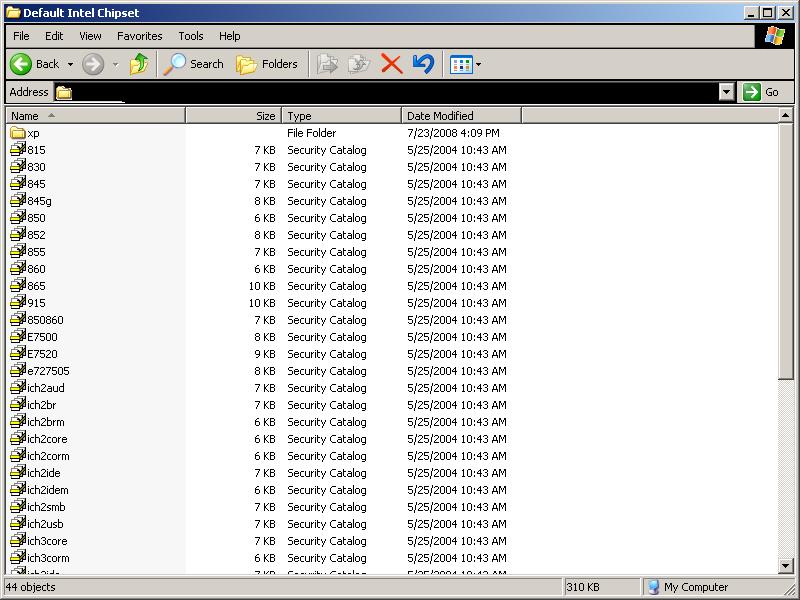
  1. I thank you for the link but, I had already read it and it doesn't seem to apply to my situation with the DELL drivers since most of them do not have .inf files. Thats the whole problem.....After extracting the drivers, there are NO .inf files to be found. -- hapecat® ---- I think that I know what he is talking about. I am trying to work with Dell Optiplex GX280 drivers for reimaging a harddrive and *not* installing the drivers until AFTER the setup. Anyways, the GX280's chipset drivers are ALL cab files, no inf files. I have attached a screenshot of the folder containing the files.
Account

Navigation

Configure browser push notifications

Chrome (Android)
  1. Tap the lock icon next to the address bar.
  2. Tap Permissions → Notifications.
  3. Adjust your preference.
Chrome (Desktop)
  1. Click the padlock icon in the address bar.
  2. Select Site settings.
  3. Find Notifications and adjust your preference.