Skip to content
View in the app

A better way to browse. Learn more.

MSFN

A full-screen app on your home screen with push notifications, badges and more.

To install this app on iOS and iPadOS
  1. Tap the Share icon in Safari
  2. Scroll the menu and tap Add to Home Screen.
  3. Tap Add in the top-right corner.
To install this app on Android
  1. Tap the 3-dot menu (⋮) in the top-right corner of the browser.
  2. Tap Add to Home screen or Install app.
  3. Confirm by tapping Install.

forever_ends

Member
  • Joined

  • Last visited

  • Country

    United States
  1. forever_ends replied to Madhav's topic in nLite
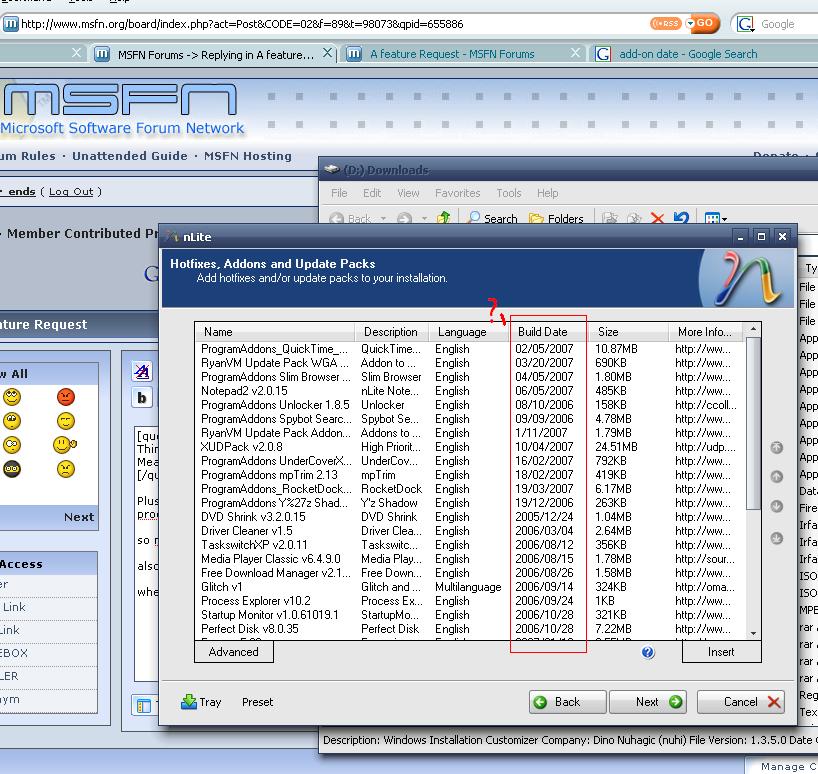
    Plus, i sorta think the 'back' button would be good, since i like to reuse presets, but alter little things on them for my other computers (ie progs/themes/Product keys hehe) so madhav, i agree, it would be a convenience for the user side, nuhi is it difficult for your end? also, sorry to put this here, but: when sorting add-ons/hotfixes by date, some hf's dates are in different formats, which throws off the sorting (see attatched). does this hurt anything?
  2. Thanks you rock my face!

Account

Navigation

Configure browser push notifications

Chrome (Android)
  1. Tap the lock icon next to the address bar.
  2. Tap Permissions → Notifications.
  3. Adjust your preference.
Chrome (Desktop)
  1. Click the padlock icon in the address bar.
  2. Select Site settings.
  3. Find Notifications and adjust your preference.