-
thx sp00f, the VISTA SP1 Reverse Integration works fine !!!
-
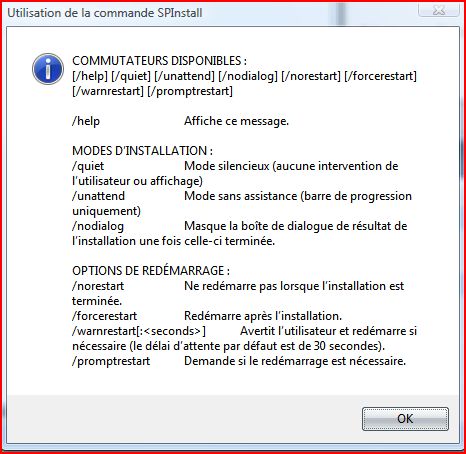
Hello, Who know how to integrate the Service Pack 1 VISTA as in XP /integrate ? There is only quiet install
-
Hello, I have created a French Windows Vista Ultimate Unattended. To integrate Dreamscene (not available in french version), i had to integrate the English LP. All works good (Unattended, Dreamscene, etc..) but on certain computers, in Administrator (or User Name), I have the folders 'downloads' instead of 'téléchargement', 'favorites' instead of 'Favoris', 'Music' instead of Musique etc.. Start Menu, control pannel etc.. all is in french. It's just in Administrateur (or User Name) that the folder's names are in english ??? Someone has a Solution ?? Thx.
-
Whith the new NERO 7.9.6.0 Final, The Silent switch that works with the 7.8.5.0 doesn't work with the new one ?? nero.msi /QB /NORESTART STARTPARAM="CallFromExe" DONOTRUNSETUPX="1" SERIALNUM_USERVAL="xxxx-xxxx-xxxx-xxxx-xxxx-xxxx-xxxx" AGREETOLICENSE="TRUE" Someone has a solution ?
-
Hello, To integrate Hotfixes very easy, I use "Vista Update Integrator" and go to this site to take them : http://www1.webng.com/xpsp3/
-
Ok it works. I didn't understand. It's because I put 1 instead of 2 with the imagex mount command. imagex /mountrw e:\vista\sources\boot.wim 2 g:\vista2 And then in the sources folder there is the spwizimg.dll that I have modified and it works whith a bootable DVD. Thx to all.
-
The file "spwizimg.dll" is in the \sources directory on the DVD but if you change the 517 bitmap it just works with upgradading vista not by booting dvd. And this file is not in boot.wim so there must be an another file ! ?
-
; TO use new Bootscreen ( noGUI) winload.exe.mui [HKEY_LOCAL_MACHINE\SYSTEM\ControlSet001\Control] "SystemStartOptions"="/NOEXECUTE=OPTIN /NOGUIBOOT /BOOTLOGO" [HKEY_LOCAL_MACHINE\SYSTEM\ControlSet002\Control] "SystemStartOptions"="/NOEXECUTE=OPTIN /NOGUIBOOT /BOOTLOGO" [HKEY_LOCAL_MACHINE\SYSTEM\CurrentControlSet\Control] "SystemStartOptions"="/NOEXECUTE=OPTIN /NOGUIBOOT /BOOTLOGO" This does not work for me. After install, the registry has this values, but on reboot the registry's values are back to normal ??
-
which is the file to modify to change the setup screens ? thx
-
Hello, When i install JAVA 6 automated, it's present in program files & you can remove it whith add/remove programs but it's not present in IE ? In 'tools' 'options internet' 'advanced' there is no java ? If I install it manualy it works normaly why ? SynchronousCommand wcm:action="add"> <Order>3</Order> <CommandLine>%AppsRoot%install\java6.exe /s /v/qn</CommandLine> <Description>Installation JAVA 6</Description> </SynchronousCommand>
-
Hello, Now that the Autounattend.xml works great, i can install all my tweaks & programs automated. To personalize my Vista, how to change the winload.exe.mui whith mine & enable "No GUI Boot" automated ? Thx.
-
Hello, Thx for your help. I finaly found the solution. Here are my codes that install a vista ultimate full automated (just the choice & options for hard disk) and install softwares silently. You will have to create a empty ''AppsRoot.txt'' file in the DVD root and create a ''install'' folder. In the ''install'' folder create a file : ''run.cmd'' sample of my ''run.cmd'' : start /wait %AppsRoot%install\reader8\AcroRead.msi /qb start /wait %AppsRoot%install\java6.exe /s /v/qn start /wait %AppsRoot%install\winrar.exe /s start /wait %AppsRoot%install\msn81\MsnMsgs.msi /quiet /norestart Sorry for my poor english, i'm french. Autounattend.xml
-
No APPSROOT entry Stellarzork.
-
Hello, I just want to install applications when installing Vista. i have seen the tuto : Installing Applications from media (http://www.msfn.org/board/index.php?showtopic=95462) Why this doesn't work ? no errors but install nohting. Thx. -------------------------- <?xml version="1.0" encoding="utf-8"?> <unattend xmlns="urn:schemas-microsoft-com:unattend"> <settings pass="specialize"> <component name="Microsoft-Windows-Deployment" processorArchitecture="x86" publicKeyToken="31bf3856ad364e35" language="neutral" versionScope="nonSxS" xmlns:wcm="http://schemas.microsoft.com/WMIConfig/2002/State" xmlns:xsi="http://www.w3.org/2001/XMLSchema-instance"> <RunSynchronous> <RunSynchronousCommand wcm:action="add"> <Order>1</Order> <Path>cmd /c "FOR %i IN (C D E F G H I J K L N M O P Q R S T U V W X Y Z) DO IF EXIST %i:\AppsRoot.txt SETX AppsRoot %i:\ -m"</Path> </RunSynchronousCommand> </RunSynchronous> </component> </settings> <settings pass="oobeSystem"> <component name="Microsoft-Windows-Shell-Setup" processorArchitecture="x86" publicKeyToken="31bf3856ad364e35" language="neutral" versionScope="nonSxS" xmlns:wcm="http://schemas.microsoft.com/WMIConfig/2002/State" xmlns:xsi="http://www.w3.org/2001/XMLSchema-instance"> <FirstLogonCommands> <SynchronousCommand wcm:action="add"> <Order>1</Order> <CommandLine>REGEDIT /S %AppsRoot%\install\aero.reg</CommandLine> </SynchronousCommand> <SynchronousCommand wcm:action="add"> <Order>2</Order> <CommandLine>%AppsRoot%install\reader8\AcroRead.msi /qb</CommandLine> </SynchronousCommand> <SynchronousCommand wcm:action="add"> <Order>3</Order> <CommandLine>%AppsRoot%install\java6.exe /s /v/qn</CommandLine> </SynchronousCommand> <SynchronousCommand wcm:action="add"> <Order>4</Order> <CommandLine>%AppsRoot%install\winrar.exe /s</CommandLine> </SynchronousCommand> <SynchronousCommand wcm:action="add"> <Order>5</Order> <CommandLine>%AppsRoot%install\msn8\MsnMsgs.msi /quiet /norestart</CommandLine> </SynchronousCommand> </FirstLogonCommands> </component> </settings> <cpi:offlineImage cpi:source="wim:e:/vista/ultimat3/sources/install.wim#Windows Vista (vLite) ULTIMATE" xmlns:cpi="urn:schemas-microsoft-com:cpi" /> </unattend>