Everything posted by Alpheratz13
-
Morning, @drthawhizkid I have complis the script of Easy CD-DA Extractor 7.1.3 in Easy_CD_DA_Extractor_7.1.3_au3.exe, so when it's installed in unattend install, it's show the installation window, so my question is: is possible know the switch to hiden the install window of Easy CD-DA Extractor 7.1.3, i hope you understand beter. Thanks for your help. Irving PS...Sorry for my bad english.
-
Thanks for your help. It's works, i compli in .exe But how i do silent install? Thanks again
-
Morning, So nobody still found out how i registre this prog? If someone know, please let us know.. Thanks Irving
-
Morning I have doing like this : $OEM$\$Docs\Default User\Application Data\Microsoft\Internet Explorer\Quick Launch It's works fine for me Irving
-
Morning, It's works right now Thanks for your help Irving
-
Evening, @MHz Ooooops, I don't see this error, since fews days don't works and don't seeing the error "Install" & "Instal"...aaawww , i need take a pause for fews days, my mind start beeing tired. I look if works now. Thanks MHz for showing the error Irving
-
Morning, I have me too the same probleme, the folder "Install" don't delete at all, but the folder "Drivers" are delete. Before it's works fine and now (i don't know wich reason) don't delete "Install" Here is my cleanup.cmd cmdow @ /HID shutdown.exe -r -f -t 10 -c "Windows XP aller redémarrer dans 10 secondes..." net user aspnet /delete RD /S /Q "%AllUsersProfile%\Start Menu\Programs\PrintMe Internet Printing" RD /S /Q "%AllUsersProfile%\Start Menu\Programs\Java Web Start" DEL "%systemroot%\*.bmp" DEL "%systemroot%\Web\Wallpaper\*.jpg" DEL "%systemroot%\system32\dllcache\*.scr" DEL "%systemroot%\system32\*.scr" DEL "%AllUsersProfile%\Start Menu\Windows Update.lnk" DEL "%AllUsersProfile%\Start Menu\Set Program Access and Defaults.lnk" DEL "%AllUsersProfile%\Start Menu\Windows Catalog.lnk" DEL "%UserProfile%\Start Menu\Programs\Windows Media Player.lnk" DEL "%AllUsersProfile%\Start Menu\Programs\Windows Movie Maker.lnk" DEL "%AllUsersProfile%\Start Menu\Programs\Adobe Reader 6.0.lnk" DEL "%UserProfile%\Desktop\Flashget.lnk" DEL "%AllUsersProfile%\Desktop\Java Web Start.lnk" DEL "%AllUsersProfile%\Desktop\Adobe Reader 6.0.lnk" DEL "%AllUsersProfile%\Desktop\Alcohol 120%.lnk" Del /y "%AppData%\Microsoft\Internet Explorer\Quick Launch\Tag&Rename.lnk" RD /S /Q "%systemroot%\Cache\Adobe Reader 6\" RD /S /Q %systemdrive%\drivers\ RD /S /Q %systemdrive%\instal\ EXIT What can be wrong? Thanks Irving EDIT. its don't work since i put the Hotfix (RyanVM's Windows XP SP2 Update Pack 1.01), is possible is came from there error of deleter "Install"?? @a06lp : Did you also put the hotfix? I do a test without the hotfix looks if will works or is the same. I let you know.
-
It's works Great job smc1979 Thank you Irving
-
Thanks smc1979 I will look at it and let you know if it's works. It's ok about english I let you know more later. Thanks again Irving
-
Morning, Noboby knows how make a Reg file with this probleme what i asked above? Thank you for your help Irving
-
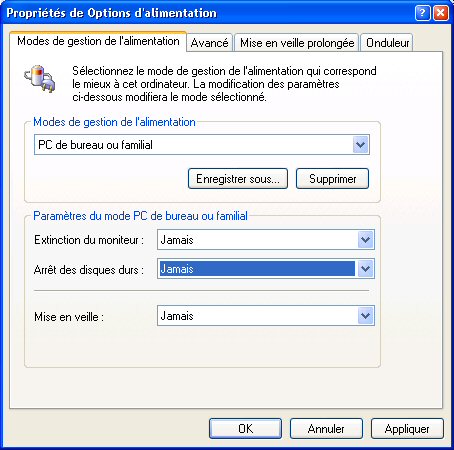
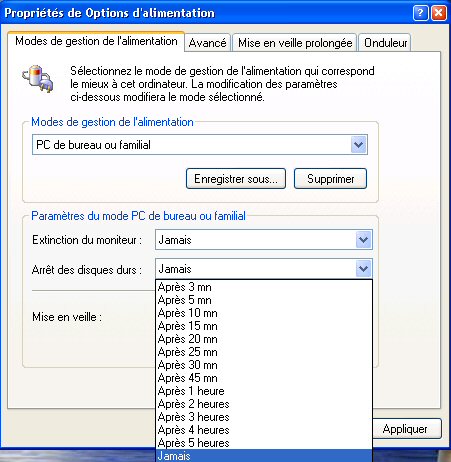
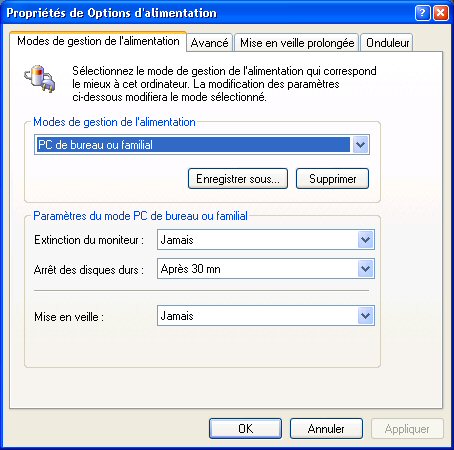
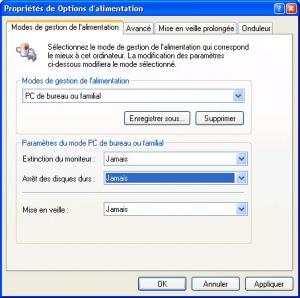
If you see, i want stop the HD from 30 Minutes to Never. Someone knows how or exist make an reg file to disable (Never) my HD??? Thanks for your help Irving
-
Last one
-
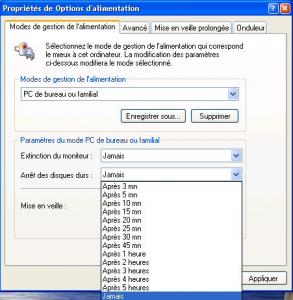
3eme
-
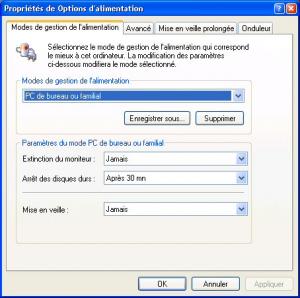
2eme
-
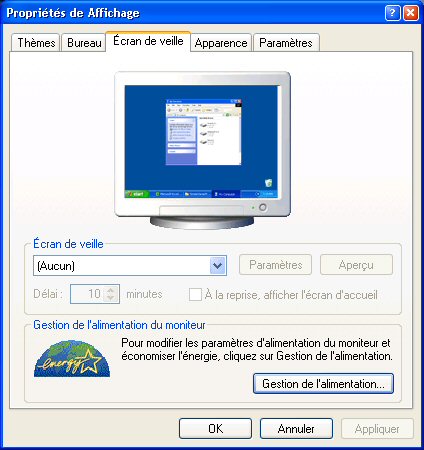
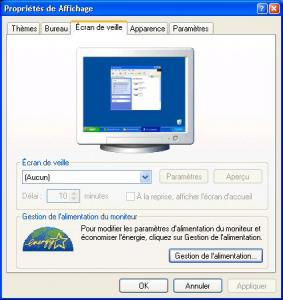
Evening, I like to ask how i disable my power HD, by default is enable. It's better i show by images, it's in french, but i am sure you will understand. Images are in order from enable to disable (30 Minutes to Never) :
-
It's works, cool Thanks you guys, great work Irving
-
@buletov Is possible you can give different code, because i don't much about wating and sleep (i hope you know what i mean) Thanks Irving
-
Thanks kyuuzo I have this : RunOnceEx.cmd cmdow @ /HID @echo off SET KEY=HKLM\SOFTWARE\Microsoft\Windows\CurrentVersion\RunOnceEx REG ADD %KEY% /V TITLE /D "Configuration des logiciels" /f REG ADD %KEY%\045 /VE /D "MSN Messenger 6.2" /f REG ADD %KEY%\045 /V 1 /D "%systemdrive%\Install\Messenger62\MsnMsgs.msi /qb" /f REG ADD %KEY%\046 /VE /D "MSN Messenger Plus! 3.20" /f REG ADD %KEY%\046 /V 1 /D "%systemdrive%\Install\MsgPlus320\MsgPlus-320.exe /SilentInstallNoSponsor" /f REG ADD %KEY%\046 /V 2 /D "pskill.exe MsgPlus.exe" /f REG ADD %KEY%\046 /V 3 /D "pskill.exe msnmsgr.exe" /f REG ADD %KEY%\046 /V 4 /D "REGEDIT /S %systemdrive%\Install\MsgPlus320\MsgPlusoff.reg" REG ADD %KEY%\046 /V 5 /D "REGEDIT /S %systemdrive%\Install\MsgPlus320\msgplusfr.reg" REG ADD %KEY%\048 /VE /D "WinRAR 3.40 Fr" /f REG ADD %KEY%\048 /V 1 /D "%systemdrive%\Install\Winrar\Winrarfr.exe /s /W" /f REG ADD %KEY%\049 /VE /D "Tag&Rename 3.1.5" /f REG ADD %KEY%\049 /V 1 /D "%systemdrive%\Install\Tag&Rename315\TagRename315.exe /VERYSILENT /SP- /NORESTART" /f REG ADD %KEY%\049 /V 2 /D "TASKKILL.exe /F /IM TagRename.exe" /f REG ADD %KEY%\060 /VE /D "Windows Media Player 10" /f REG ADD %KEY%\060 /V 1 /D "%systemdrive%\Install\WMP10\MP10Setup.exe /q:A /c:\"setup_wm.exe /Q /R:N /DisallowSystemRestore\"" /f REG ADD %KEY%\076 /VE /D "Redemarrer L'Ordinateur" /f REG ADD %KEY%\076 /V 1 /D "%systemdrive%\Install\cleanup.cmd" /f REG ADD %KEY%\076 /V 2 /D "%systemdrive%\install\extracleanup.cmd" /f EXIT cleanup.cmd cmdow @ /HID shutdown.exe -r -f -t 0 -c "Windows XP aller redémarrer dans 10 secondes..." net user aspnet /delete RD /S /Q "%AllUsersProfile%\Start Menu\Programs\PrintMe Internet Printing" RD /S /Q "%AllUsersProfile%\Start Menu\Programs\Java Web Start" DEL "%systemroot%\*.bmp" DEL "%systemroot%\Web\Wallpaper\*.jpg" DEL "%systemroot%\system32\dllcache\*.scr" DEL "%systemroot%\system32\*.scr" DEL "%AllUsersProfile%\Start Menu\Windows Update.lnk" DEL "%AllUsersProfile%\Start Menu\Set Program Access and Defaults.lnk" DEL "%AllUsersProfile%\Start Menu\Windows Catalog.lnk" DEL "%UserProfile%\Start Menu\Programs\Windows Media Player.lnk" DEL "%AllUsersProfile%\Start Menu\Programs\Windows Movie Maker.lnk" DEL "%AllUsersProfile%\Start Menu\Programs\Adobe Reader 6.0.lnk" DEL "%UserProfile%\Desktop\Flashget.lnk" DEL "%AllUsersProfile%\Desktop\Java Web Start.lnk" DEL "%AllUsersProfile%\Desktop\Adobe Reader 6.0.lnk" DEL "%AllUsersProfile%\Desktop\Alcohol 120%.lnk" RD /S /Q "%systemroot%\Cache\Adobe Reader 6\" RD /S /Q %systemdrive%\drivers\ RD /S /Q %systemdrive%\instal\ EXIT extracleanup.cmd cmdow @ /HID shutdown.exe -r -f -t 10 -c "Windows XP aller redémarrer dans 10 secondes..." SET KEY=HKLM\SOFTWARE\Microsoft\Windows\CurrentVersion\RunOnceEx REG ADD %KEY%\002 /VE /D "Cleaning Up and Rebooting" /f DEL /Q "%appdata%\Microsoft\Internet Explorer\Quick Launch\Launch Internet Explorer Browser.lnk" EXIT It's ok like this or is something wrong? Thanks Irving
-
Hi, I have the same probleme How do you make an RunOnceEx to call second RunOnceEx after first reboot? I hope that you understand what i mean? Thanks Irving
-
Ok, thanks
-
Hi tguy, Thanks for your help but how it's works or where put i those commande? It's in RunOnceEx.cmd, in a reg file or something, is possible you explain how i do? Thanks again Irving
-
@RyanVM Here i am back for to saying, that your pack is great and it's works fine with Messenger 6.2. That's all Irving
-
@yoz7120 Thank you very much, it's works fine Thanks again Irving
-
Morning, @crahak Thanks for your help but it's dont works You think is right commande as %AppData% ?? It's work on your Unattend install? In the mean time i use this : DEL /a "C:\Documents and Settings\Irving\Application Data\Microsoft\Internet Explorer\Quick Launch\Tag&Rename.lnk" That's works fine Anyway, i am gladfull for yours help and thanks Jito463. You two Irving
-
Evening, Thanks guys, @jaclaz : Thank you for your links, i have look at it, but i have try already what they said. @prathapml : Yes, i know is better without caracters special, but i am someone like to be perfect (or nearly) @mazin : I have done what you said, but it's don't works, it's look as "D?marrer" But nevermind, it's better what prathapml wrote, use no caracters special. Thank you for yours help Irving