-
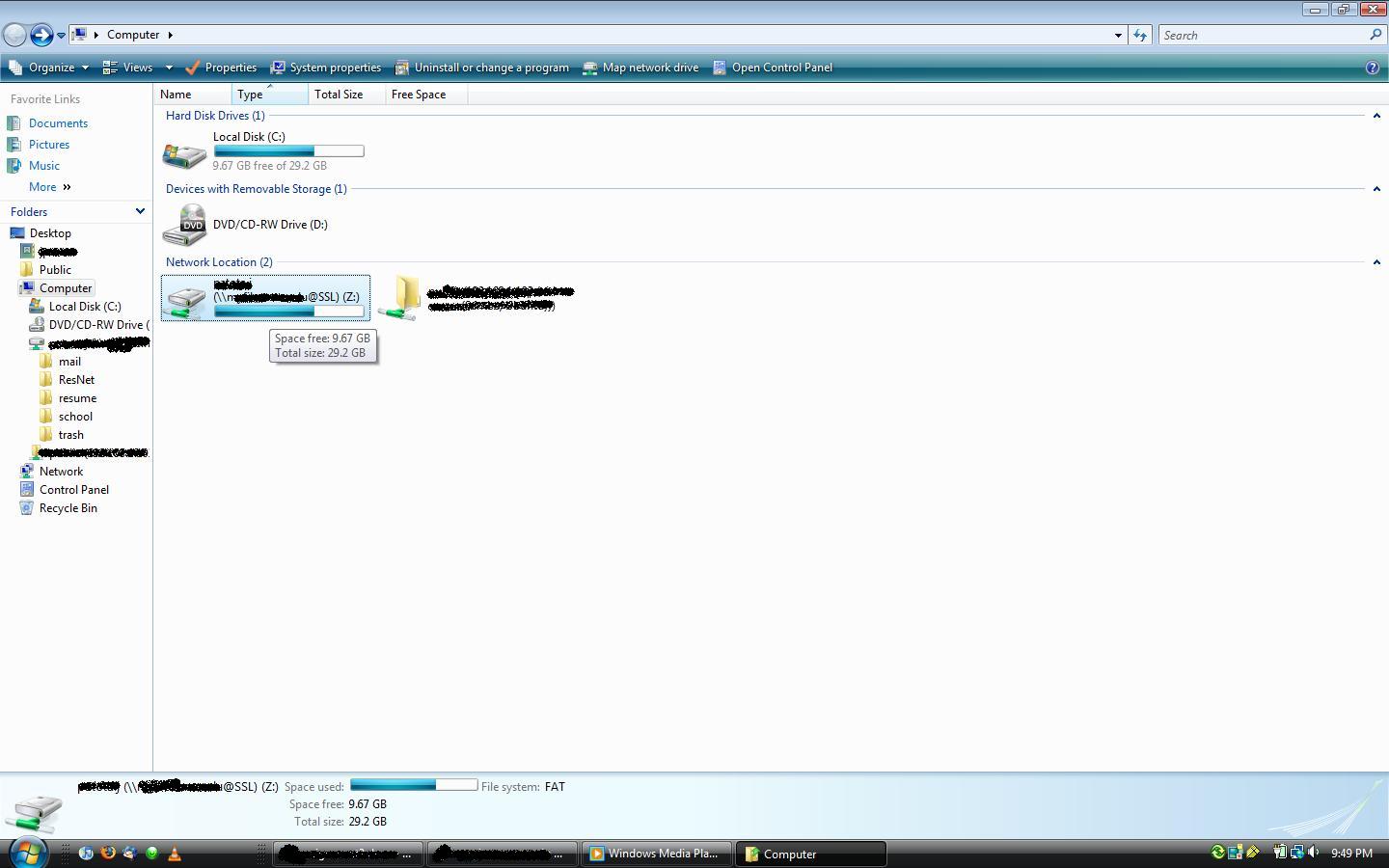
As you can see in the attached image, I have mounted a network drive location to an https address. Oddly enough windows claims the free space on that drive happens to be the exact parameters of my local disk. odd???? I think so. Ideas on how to fix? Is the problem based on a particular type of connection or to all mapped drives in general? Is it limited to vista business or does it stretch to all platforms. Is it just the server I'm connecting to?
-
good point the application I was looking for was http://ophcrack.sourceforge.net/
-
Is there a way to change the default internet browser in vista from IE to firefox? or any other browser for that matter?
-
knoppix live cd?
-
http://gparted.sourceforge.net/ may also help
-
Previous versions of vista have allowed a shutdown command to be issued in n seconds where n can be any number. Vista business (at least) now requires a maximum of 600 seconds ot 10 minutes. In a hypothetical situation, say I wanted to download a file which was to take about an hour. I needed to leave my workstation but still shut it down before I left the office for the weekend. I would normally set the shutdown timer for 2 hours, or 3 just to be sure the file had finished downloading. Now with the 10 limit, this cannot be achieved. My question is this: What is the motivation behind such a change in policy, can it be reversed, and is the same across all platforms? John
-
I have gone to the Control Panel -> System -> remote settings -> remote tab and allowed connections from computers running any version of rdesktop. I restarted and noted the changes are persistent. I have checked the firewall settings and ensured remote desktop connections are allowed to pass through on my private (as opposed to public) network When using the application tsclient in ubuntu, or Terminal Server Client for short and I enter the IP address of the computer. I select the Protocol RDP (as opposed to RDPv5, and VNC), try connecting, and my connection is refused. Normally I would take steps to diagnose the problem by logging into localhost on the vista machine to test the service is actually running but vista in its security measures does not allow this. Is there a way to eliminate some variables in determining the root of the issue. I know vista uses RDPv6 but by specifying that computers can connect using any type of connection is supposed to head that compability issue off correct? Thanks for the help John
-
Awesome utility. Have you thought about making this tool available under knoppix? Its nice to be able to boot into windows and run driverbackup but what if its so far gone you cant? John