Nerwin Posted November 26, 2006 Posted November 26, 2006 I believe its in the Shell32.dll use this program to extract it: http://www.softpedia.com/get/Desktop-Enhan...nsExtract.shtmlI hope this helps
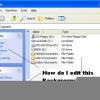
Silvereyes Posted May 27, 2007 Posted May 27, 2007 Most of the 'standard' icons are in shell32.dll. You can see these by using the'Change Icon' feature.Right click any desktop icon and select 'properties' then 'Change Icon'.Select 'Browse' then navigate to '\winnt\system32\shell32.dll' and click 'OK'.This works for any file containing embedded icons. If the file doesn't containany icons you'll get an error msg.Just be careful when doing this or you might find yourself changing icons whenyou don't want to

Recommended Posts
Create an account or sign in to comment
You need to be a member in order to leave a comment
Create an account
Sign up for a new account in our community. It's easy!
Register a new accountSign in
Already have an account? Sign in here.
Sign In Now