Doggie52
Content Type
Profiles
Forums
Events
Everything posted by Doggie52
-
Hello! In the manual for my ASUS P7P55D-E LX, in the Memory Configurations section, the following note appends the instructions on how to install the memory: What does this mean? Does this mean that I only can use one stick of RAM per channel, meaning that I can't run two sticks in Dual-Channel mode? If I buy two 2GB sticks of RAM with the X.M.P. feature, can I turn this on/off inside the BIOS and thus use them in Dual-Channel mode anyway? How is the performance of X.M.P. RAM versus Dual-Channel RAM? Thanks in advance, Doggie52
-
I've tried pretty much everything related to BIOS-RAM settings, I've actually "overclocked" (quoted as they are vendor marked at what the BIOS thinks is an overclock) them to DDR3-1600 to no avail. I've also run MemTest for several passes without any errors when running each stick separately, yet I keep getting errors when running both together. I've mailed both ASUS and OCZ and I will see what they say.
-
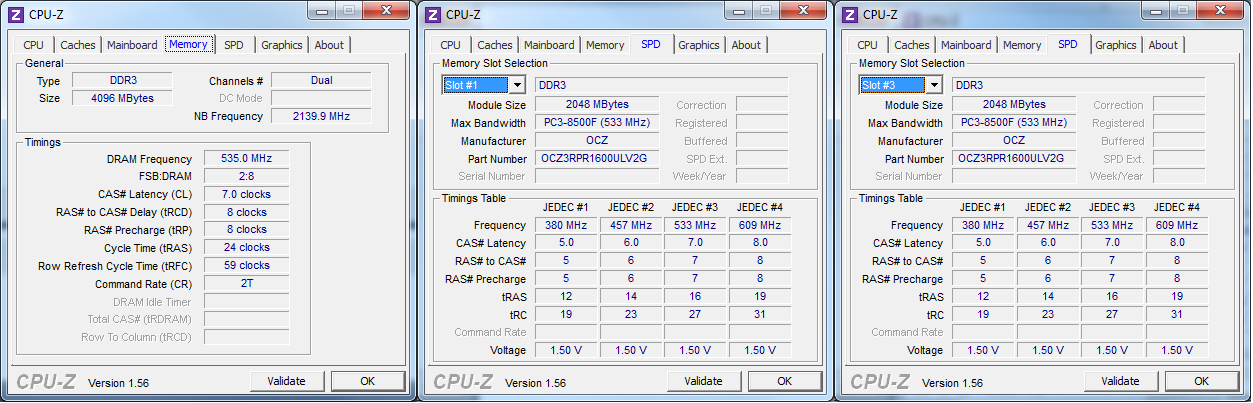
Where I am at right now: I have run both sticks of RAM separately for ~20 standard MemTest passes each (more than enough, I hope) and they come out with no errors. This means using two sticks fails, whilst using one stick at a time works well. Now, of course, I wonder what can be the cause of this weird behavior. Perhaps my RAM isn't meant to work with my mobo? The DRAM-frequency you saw in the picture was the default, set by the BIOS. In fact, I can only push that to DDR3-1333 (667MHz) , which is less than the optimal (DDR3-1600 @ 800MHz) for my RAM. Possible culprits? faulty PSUfaulty mobofaulty RAM That the RAM is faulty seems unlikely, given that they work independently - or am I wrong here? A faulty PSU seems more and more like a likely culprit - given that my computer sometimes (rarely, but still, 2 times over two weeks) spontaneously powers down and reboots the PSU might be damaged. It might be providing too little power for two sticks of RAM to work simultaneously, or might be overloaded as an earlier poster suggested. But, it could also be the motherboard that is broken. What do you think? Is there any way (apart from getting a replacement PSU) I can with relatively high certainty determine whether my PSU is healthy or not?
-
CPU-Z images and report are below. The timings they show are the custom timings I am running at right now. The BIOS defaults, again, were 1T and 7-7-7-20. Thank you for your help! CPU-zREPORT.txt

-
I had a quick look into what timings my RAM is supposed to run at vs. what BIOS sets them to run at: BIOS default settings: 7-7-7-20 proposed settings for OCZ3RPR1600ULV4 from OCZ: 7-8-8-24 Why is there a difference here? Which one of the settings is most likely to cause problems? I switched the CR to T2 and the timings to what OCZ proposed, and I get errors on test #6 and #7 on the first pass. My RAM has passive heating and after feeling them, I can conclude that the temperature is not a problem. I am running a 630W PSU which I bought no more than 1 year ago. Is there a way I can determine whether it is faulty without having to replace it? What I will do now: test each stick separately for 12 hourstry to find a temporary replacement for my PSU in order to rule that out
-
Hello! After having built together the following rig I am experiencing several problems within Windows. MB: ASUS P7P55D-E LX CPU: Intel i5 760 @ 2.8GHz stock HDD: OCZ Agility II SSD (60GB, the OS-drive) and a Samsung 500GB (secondary drive) GPU: nVidia GTX260 chipset, ASUS make RAM: OCZ Reaper 2x2GB CL7 All of the above, except the Samsung HDD and the ASUS GPU, are brand new. OS: Windows 7 Ultimate x64 retail Issues MEMORY_MANAGEMENT and PFN_LIST_CORRUPT BSODs at random times random computer shutdowns (complete death, as if power cable had been pulled out), then, 5s later, reboot by itself GPU driver crashes and then recovers corruption problems when downloading certain files and extracting them large amounts of apps crash at irregular intervals motherboard refuses to boot from USB devices, it only loads a black screen with blinking cursor (neither W7 nor MemTest boot, finally had to burn them both to DVD) All of the above issues have been occurring during a period of two weeks or less. Attempted diagnosing MemTest86+, attempts listed below in descending order:(both sticks of RAM installed): multiple errors on tests #6 and #7 in the 4GB-range somewhere (one stick of RAM installed): no errors after 3-4 passes (other stick of RAM installed): no errors after 3-4 passes (both sticks of RAM installed but in opposite order compared to #1): no errors after 3-4 passes (the next day, same configuration as #4): errors on test #6 [*]S.M.A.R.T status on both HDDs no errors, status OK on everything SSD: 100% life-time [*]Windows Memory Diagnostics no errors after two passes Attempted solutions re-format (new system has only been running for a day or two)no errors appearing yet [*]BIOS update seems to have caused the BIOS to no longer boot from USB devices, however I am unsure of when that problem started appearing Questions is faulty RAM the cause of all my issues? can a faulty mobo be the cause of all my issues? why does MemTest appear to give inconsistent results? is there any way I can diagnose motherboard issues? is there any way I can go beyond S.M.A.R.T when diagnosing my SSD? is there any way I can diagnose CPU issues? Do you people recommend any further diagnosing? Is there anything you would like me to add to my post? My sincere thanks in advance, I hope my post was not too lengthy! // Douglas