orionuk
Content Type
Profiles
Forums
Events
Everything posted by orionuk
-
I have it working fine in RunOnceEx method. I download the Internet Explorer Admin Kit (IEAK) for IE7. You will need IE7 installed before you run this. http://www.microsoft.com/technet/prodtechn...k7/default.mspx You can use this to create an IE7Setup.exe which you can personalise. It is mainly aimed at easy deployment in corporate environments but no reason why you cannot use it on a home PC. I include IE7 at the end of my RunOnceEx.cmd which appears to work fine on my virtual PC (MS Virtual PC 2004). The /Q installs in quiet mode, no progress bar is displayed. Note that the install does take a while ie. more than 5 mins. Hope this helps. Here is my RunOnceEx.cmd: @echo off SetLocal enableextensions SET CDROM=%~d0 SET KEY=HKLM\SOFTWARE\Microsoft\Windows\CurrentVersion\RunOnceEx REG ADD %KEY% /V TITLE /D "Installing Applications" /f REG ADD %KEY%\001 /VE /D "Acrobat Reader 7.07" /f REG ADD %KEY%\001 /V 1 /D "%CDROM%\Applications\AdobeReader\Adobereader707.msi TRANSFORMS=Adobereader707.mst /qb" /f REG ADD %KEY%\005 /VE /D "Lavasoft Ad-Aware 1.0.6.0" /f REG ADD %KEY%\005 /V 1 /D "%CDROM%\Applications\Adaware\aawsepersonal.exe /S" /f REG ADD %KEY%\010 /VE /D "Java Runtime 5.0 Update 10.0" /f REG ADD %KEY%\010 /V 1 /D "%CDROM%\Applications\Java\java.exe /qb IEXPLORER=1 JAVAUPDATE=0 SYSTRAY=0" /f REG ADD %KEY%\015 /VE /D "Microsoft Office 2003 Professional" /f REG ADD %KEY%\015 /V 1 /D "%CDROM%\Applications\Office2003\setup.exe TRANSFORMS=Unattended.mst /qb" /f REG ADD %KEY%\020 /VE /D "Microsoft Frontpage 2003" /f REG ADD %KEY%\020 /V 1 /D "%CDROM%\Applications\Frontpage2003\setup.exe TRANSFORMS=Unattended.mst /qb" /f REG ADD %KEY%\021 /VE /D "Microsoft .NET Framework 1.1 SP1" /f REG ADD %KEY%\021 /V 1 /D "%CDROM%\Applications\DotNet11sp1\dotnet11sp1.exe" /f REG ADD %KEY%\025 /VE /D "Microsoft .NET Framework 2.0" /f REG ADD %KEY%\025 /V 1 /D "%CDROM%\Applications\DotNet2\dotnet2.exe" /f REG ADD %KEY%\030 /VE /D "Real Alternative 1.51" /f REG ADD %KEY%\030 /V 1 /D "%CDROM%\Applications\RealAlternative\realalt151.exe /VERYSILENT /SP-" /f REG ADD %KEY%\040 /VE /D "Apple Software Update 1.0.2.1" /f REG ADD %KEY%\040 /V 1 /D "%CDROM%\Applications\AppleSoftwareUpdate\AppleSoftwareUpdate.msi TRANSFORMS=applesoftwareupdate.mst /qb" /f REG ADD %KEY%\045 /VE /D "QuickTime 7.13.170" /f REG ADD %KEY%\045 /V 1 /D "%CDROM%\Applications\Quicktime\QuickTime.msi TRANSFORMS=quicktime.mst /qb" /f REG ADD %KEY%\050 /VE /D "iTunes 7.0.2.16" /f REG ADD %KEY%\050 /V 1 /D "%CDROM%\Applications\itunes\iTunes.msi TRANSFORMS=itunes.mst /qb" /f REG ADD %KEY%\055 /VE /D "Windows Defender 1.1.1593.0" /f REG ADD %KEY%\055 /V 1 /D "%CDROM%\Applications\Windowsdefender\WindowsDefender.msi TRANSFORMS=WindowsDefender.mst /qb" /f REG ADD %KEY%\060 /VE /D "Orca" /f REG ADD %KEY%\060 /V 1 /D "%CDROM%\Applications\Orca\orca.msi /qb" /f REG ADD %KEY%\065 /VE /D "ISSCript9 (for Sony PC suite)" /f REG ADD %KEY%\065 /V 1 /D "%CDROM%\Applications\SonyPCSuite\ISScript9.msi /qb" /f REG ADD %KEY%\070 /VE /D "Sony PC suite 1.30.53" /f REG ADD %KEY%\070 /V 1 /D "%CDROM%\Applications\SonyPCSuite\SonyPCSuite.msi TRANSFORMS=sonypcsuite.mst /qb" /f REG ADD %KEY%\075 /VE /D "Spy Bot 1.4" /f" REG ADD %KEY%\075 /V 1 /D "%CDROM%\Applications\Spybot\spybotsd14.exe /silent" /f REG ADD %KEY%\097 /VE /D "Importing Registry Tweaks" /f REG ADD %KEY%\097 /V 1 /D "REGEDIT /S %CDROM%\Applications\regtweaks.reg" /f REG ADD %KEY%\098 /VE /D "Cleaning Up default shortcuts" /f REG ADD %KEY%\098 /V 1 /D "%CDROM%\Applications\cleanup.cmd" /f REG ADD %KEY%\099 /VE /D "Internet Explorer 7" /f REG ADD %KEY%\099 /V 1 /D "%CDROM%\Applications\IE7\IE7Setup.exe /Q" /f EndLocal EXIT
-
I have downloaded the Internet Explorer Administration Kit (IEAK) from the Microsoft site and configured it using that. It also allows Favorites and RSS Feeds to be added aswell as turning off the startup HTML page which goes through the first run wizard. http://www.microsoft.com/technet/prodtechn...k7/default.mspx The IEAK will output a file called IE7setup.exe. If you run this in RunOnceEx with the switch /Q it will install with no user interface. I have tried this on my Virtual PC and it works fine, although it does take a while. Gareth
-
I have found that the following installation command line appears to work quite well although you will still need to go through the initial setup routine. I am using Wise package Studio 6 (at work :-) so I might get round to authoring a complete MSI to encompass the whole installation. ITUNES V7.0.1.8 C:\WINDOWS\SYSTEM32\msiexec.exe /i <path location>\Tunes.msi REGSRCH_DESKTOP_SHORTCUTS=0 REGSRCH_INSTALL_ASU=0 REGSRCH_MEDIA_DEFAULTS=0 /qb QUICKTIME V7.1.3.130 C:\WINDOWS\SYSTEM32\msiexec.exe /i <path location>\QuickTime.msi DESKTOP_SHORTCUTS=0 REGSRCH_INSTALL_ASU=0 /qb APPLE SOFTWARE UPDATE V1.0.1.1 C:\WINDOWS\SYSTEM32\msiexec.exe /i <path location>\AppleSoftwareUpdate.msi /qb REGSRCH_DESKTOP_SHORTCUTS=0 - This prevent any shortcuts appearing in Desktop and QuickLaunch folders REGSRCH_INSTALL_ASU=0 - Prior to the install there is a check box for installing "Apple Software Update", I believe this removes the check box REGSRCH_MEDIA_DEFAULTS=0 - This stops iTunes/Quicktime being the default media player I think that covers it. All I can say is well done to Apple for finally getting rid of all Install Shield rubbish! Gareth
-
Hi there Do I need to install .NET 1.1 and 2.0? Or does 2.0 include 1.1 aswell? I noticed in one of the example .reg files in the unattended guide there is a entry to remove ASPNET user. I believe this is added when .NET is installed. What is the impact in removing this account? I am assuming that if it is in the unattended guide .reg example that it is safe to delete. Thanks Orionuk
-
Hi there I am using the following lines in my runonceex file to install the current version of Adobe Acrobat Reader 7.07 however although it highlights the name of the file during the install nothing gets installed. No errors are reported that it cannot find the install folder or the .exe file. The entry is: REG ADD %KEY%\002 /VE /D "Acrobat Reader 7.07" /f REG ADD %KEY%\002 /V 1 /D "%systemdrive%\install\Applications\AcrobatReader\AdbeRdr707_en_US.exe -p"-s /v\"/qn\""" /f I am pretty sure that I am using the correct switches copied from previous posts but I do not know why this is not installing. Thank you in advance. Orion
-
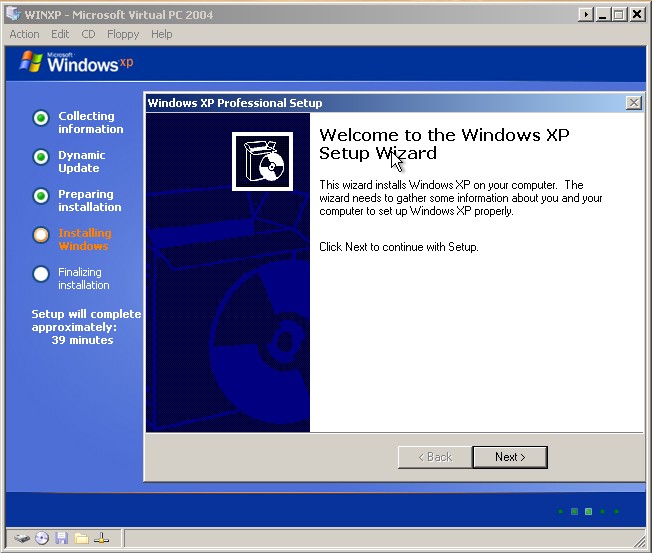
Hi there I have created my winnt.sif which is 99.9% complete, however after copying the setup files it will display the progress of the installation I keep having to click Next on the screen "Welcome to Windows XP setup Wizard", after point it runs smoothly unattended. I have attached the screenshot. I cannot tell which entry needs to be amended. I have tried searching the forum but nothing related to my issue came up. Also I would like my computer to appear in capitals eg "PISCES" however it always names in lower case. Can anyone help me? Thanks in advance. My winnt.sif: ;SetupMgrTag [Data] AutoPartition=0 MsDosInitiated="0" UnattendedInstall="Yes" AutomaticUpdates=yes [unattended] UnattendMode=FullUnattended OemSkipEula=Yes OemPreinstall=Yes TargetPath=\WINDOWS FileSystem=* UnattendSwitch="Yes" WaitForReboot="No" KeyboardLayout="United Kingdom" [GuiUnattended] AdminPassword=xxxxxxxxxxxxx EncryptedAdminPassword=NO OEMSkipRegional=1 TimeZone=85 OemSkipWelcome=0 [userData] ProductKey=xxxxxxxxxx FullName="xxxxx" OrgName="None" ComputerName="PISCES" [Display] BitsPerPel=16 Xresolution=800 YResolution=600 Vrefresh=60 [RegionalSettings] LanguageGroup=1 SystemLocale=00000809 UserLocale=00000809 InputLocale=0809:00000809 [branding] BrandIEUsingUnattended=Yes Home_Page=http:\\www.bbc.co.uk [Proxy] Proxy_Enable=0 Use_Same_Proxy=1 [identification] JoinWorkgroup=HOME [Networking] InstallDefaultComponents=Yes [Components] msmsgs=off msnexplr=off zonegames=off