-
I had to change my power supply but now I tried to do the updated unpicking what you said and it worked fine. Thx Guys
-
Nope, those are new updates that I got from Windows Update, the image I used was had all the updates integrated until July, and those on the SS are new ones.
-
never mind I did on the wrong DVD, but I'm using a 64bit right now, and thats the one I'm having the problems, and I removed the same things. I have a clean install DVD, I just thought would be easier to do on a image already updated.
-
I removed a lot stuff, including the things on the main page news, pretty much everything i thought it was useless, and after that i didn't disable anything else. I attached my presets so maybe you guys can have a good idea of whats the problem, and one thing I noticed is when I used vLite on a Vista with August updates it wouldn't install, I had to use it on a July image. Rafael.ini
-
I did reboot and still wont work
-
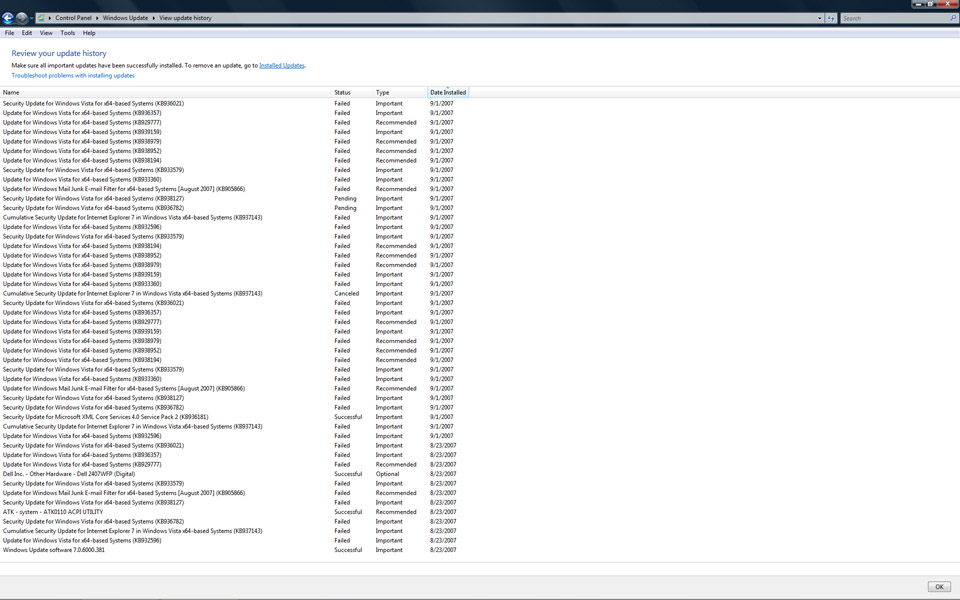
I used vlite 1.1 beta to remove all I wanted and now i cant get a single update installed, they all fail. Also used the reg patch release to see if it would help and had no luck. PS: Vista Ultimate 64 with patches till august. Any solution?
-
Ops I really never check that, I was doing the opposite, checking everything I wanted and leaving unselected what i didn't want. Now I did a new image and worked on my virtual machine. Thanks for coming here after such long time.
-
There it is... Rafael2.ini Rafael2_u.ini
-
Don't feel stupid, there should be more visible warning for that. Btw what wasn't removed? I never experienced such thing. BitLocker, Defender, Backup... plus other things. Also the setup for Home network, my name...
-
hahahah I feel so stupid, worked Sorry for the dumb question Thanks It worked but I few things didn't get removed
-
hahahah I feel so stupid, worked Sorry for the dumb question Thanks
-
I used vLite in 2 different vista images and I didn't change or remove anything I selected. I used a virtual machine to try it and it gave me a regular installation with all the regular options to choose. Anyone has any ideas?
-
hahaha now i have to laught of my own ignorance.
-
i'm suppose to get more options and more tabs when i do a ctrl+alt+del, thats the only thing i get.
-
On the image you can see what happend to my ctrl+alt+del screen, its getting really pain in the a**, if something crashes i cant end the service. There's any way to fix it?